|
VOOZH | about |
|
VOOZH | about |
Snake Game using ReactJS project implements functional components and manages the state accordingly. The developed Game allows users to control a snake using the arrow keys or touch the buttons displayed on the screen to collect food and grow in length. The goal of the game is to eat as much food as possible without colliding with the walls or the snake's own body.
Let's have a quick look at what the final application will look like:
Step 1: Set up the React project using the below command in VSCode IDE.
npm create vite@latest Snake_GameStep 2: Navigate to the newly created project folder by executing the below command.
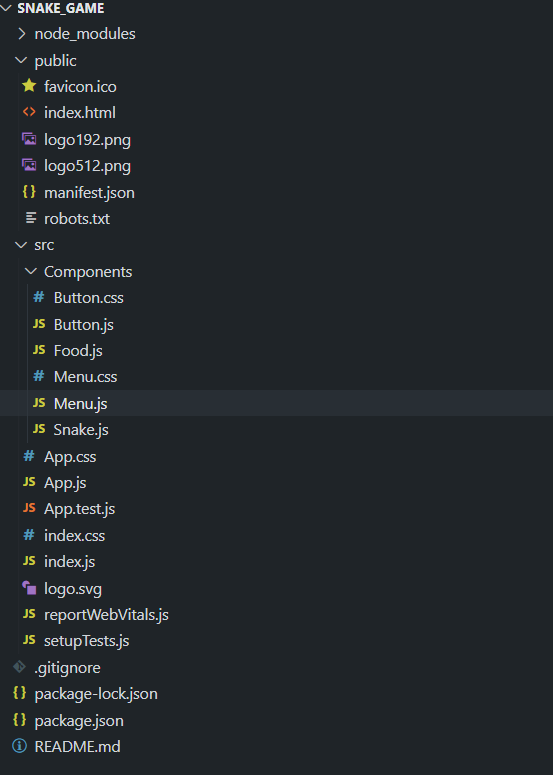
cd Snake_GameStep 3: Create a folder named Components. We will create various components and their styling files in this components folder such as Button.js, Food.js, Menu.js, Snake.js, Menu.css, and Button.css.
The updated dependencies in package.json will look like:
"dependencies": {
 "react": "^19.1.0",
 "react-dom": "^19.1.0",
 },
 "devDependencies": {
 "@vitejs/plugin-react": "^4.6.0",
 "vite": "^7.0.4"
 }
Example: Insert the below code in the App.js ad index.css files mentioned in the above directory structure.
Write the following mentioned code in different files(The name of the files is mentioned in the first line of each code block).
npm run devhttp://localhost:5173/
.png)