In this article, we’ll walk through the process of creating a visually engaging background effect using a moving stars animation and overlaying it with a centred image. This effect combines the power of React, Three.js, and Framer Motion to create a stunning UI component.
Prerequisites Approach Set up a new React project with create-react-app. Install and configure Tailwind CSS for styling. Install @react-three/fiber, @react-three/drei, and framer-motion packages. Implement the MovingStars component using @react-three/fiber and @react-three/drei for the star field effect. Create the App component with a Canvas for rendering the stars and a centered image overlay. Steps To Create Dynamic Background Effect Step 1 : Create a new React project by running the following command in your terminal npx create-react-app my-project Step 2: To incorporate Tailwind CSS into your React project, follow these steps Install Tailwind CSS: Run the following command in your terminal npm install tailwindcss postcss autoprefixer Initialize Tailwind CSS: Generate the configuration files by running npx tailwindcss init -p Configure Tailwind: Add the following lines to your tailwind.config.js file to enable Tailwind CSS module.exports = { content: [ "./src/**/*.{js,jsx,ts,tsx}", ], theme: { extend: {}, }, plugins: [], } Import Tailwind in Your CSS: Add the following imports to your src/index.css file: @tailwind base; @tailwind components; @tailwind utilities; Step 3 : install the required packages for integrating Three.js and Framer Motion with the following command
npm install @react-three/fiber @react-three/drei framer-motion Package Descriptions
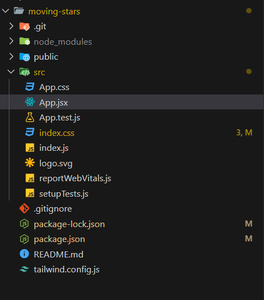
@react-three/fiber : A React renderer for Three.js, allowing you to create and manage 3D scenes with React. @react-three/drei: A library of useful helpers and abstractions for @react-three/fiber. framer-motion: A library for animations and transitions in React. Project Structure 👁 Screenshot-2024-08-02-171203 Project Structure Updated Dependencies "dependencies": { "@react-three/drei": "^9.109.5", "@react-three/fiber": "^8.16.8", "@testing-library/jest-dom": "^5.17.0", "@testing-library/react": "^13.4.0", "@testing-library/user-event": "^13.5.0", "framer-motion": "^11.3.24", "react": "^18.3.1", "react-dom": "^18.3.1", "react-scripts": "5.0.1", "web-vitals": "^2.1.4" } Step 4 : Navigate to the src folder in your React project and replace the contents of App.jsx with the following code Step 5: Run the Code
npm start This command will launch your application, allowing you to view the dynamic background effect with moving stars and a centered image.
Output: