VOOZH about

URL: https://www.geeksforgeeks.org/reactjs/daily-activity-planner-app-with-next-js/

⇱ Daily Activity Planner App with Next.js - GeeksforGeeks


  • Courses
  • Tutorials
  • Interview Prep

Daily Activity Planner App with Next.js

Last Updated : 23 Jul, 2025

Managing your tasks is one of the most important things in a hectic routine. In this article, we will see step-by-step procedure of creating a task manager app from scratch.

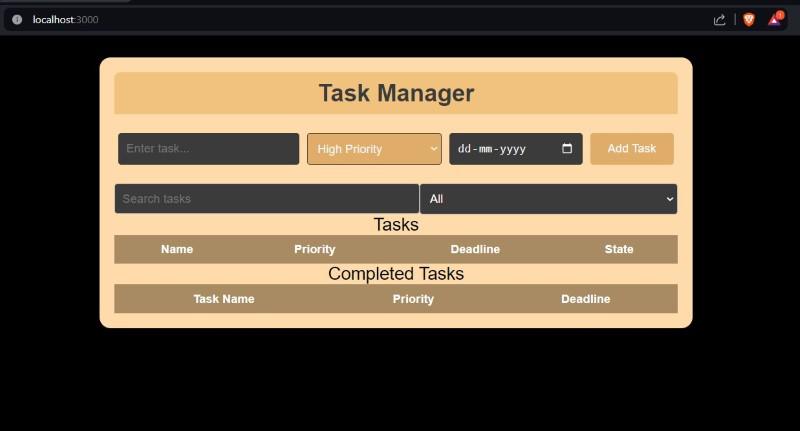
Output Preview: Let us have a look at how the final output will look like.

👁 d
Final look

Prerequisites :

Approach to create Daily Activity Planner:

  • State Management: For efficient task and input field handling, use useState.
  • Input Handling: Put in place handlers for the name, priority, and deadline of each task.
  • Task Functions: Task operations are managed by functions such as addTask, EditTask, DeleteTask, and markDone.
  • Improve user experience (UX) by using filtered tasks to effortlessly filter tasks according to user-specified requirements.

Steps to create the Next JS Application:

Step 1: Create a new Next.js project using the following command

npx create-next-app task-manager-app

Step 2: Change to the project directory:

cd task-manager-app

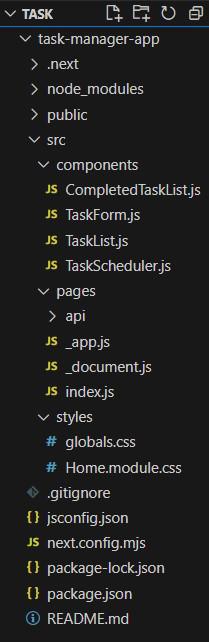
Project Structure:

👁 a
Project Structure

The updated Dependencies in package.json file will look like:

"dependencies": {
"react": "^18",
"react-dom": "^18",
"next": "14.1.0"
}

Example: Create the required files as seen on folder structure and paste the code components as per the structure.

Steps to run the application:

Step 1: Run this command to start the application:

npm run dev

Step 2: Visit the URL:

http://localhost:3000

Output:

👁 Daily Activity Planner App
Daily Activity Planner App
Comment