|
VOOZH | about |
|
VOOZH | about |
ReactJS is the powerful JavaScript library used for building user interfaces especially single-page applications(SPAs). Two of the most commonly used hooks in React are useState and useEffect. These hooks make functional components more powerful by allowing them to manage the state and handle side effects.
These are the following topics that we are going to cover:
useState is the hook that allows you to add state to functional components in React. State refers to data that can change over time and trigger re-renders of components. Before the introduction of useState only class components could manage state.
When we call useState, it returns an array with two values:
This allows you to manage dynamic data in your component. Every time the state changes, React re-renders the component to reflect updated values.
Example: count is the state variable and setCount is a function used to update count. When the button is clicked setCount(count + 1) increases the value of the count by 1.
// App.js
import React, { useState } from 'react';

function Counter() {
 const [count, setCount] = useState(0);

 return (
 <div>
 <p>Count: {count}</p>
 <button onClick={() => setCount(count + 1)}>Increase</button>
 </div>
 );
}

export default Counter;
Output:
useEffect is the hook that allows you to perform side effects in functional components. The side effect is any operation that affects something outside a component such as data fetching, interacting with the browser DOM or setting up timers.
useEffect takes two arguments:
useEffect is also used for cleanup like removing event listeners by returning function inside it. The function containing side effect logic (e.g., fetching data or updating document title). An optional array of dependencies that tells React when to re-run effect. If array is empty then effect runs only once when component mounts.
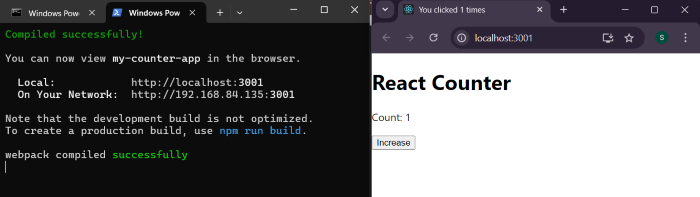
Example: In this example every time count changes useEffect runs and updates document title with new count.
// App.js
import React, { useState, useEffect } from 'react';

function Counter() {
 const [count, setCount] = useState(0);

 useEffect(() => {
 document.title = `You clicked ${count} times`;
 }, [count]); // This effect runs only when 'count' changes

 return (
 <div>
 <p>Count: {count}</p>
 <button onClick={() => setCount(count + 1)}>Increase</button>
 </div>
 );
}

export default Counter;
Output:
Feature | useState | useEffect |
|---|---|---|
Purpose | To manage state in the functional components | To handle the side effects in functional components |
Returns | The state variable and function to update it | Nothing (but can return cleanup function) |
Triggered By | State updates (when update function is called) | Renders, state changes or prop changes (depends on the dependencies) |
Common Uses | Managing the UI data like form inputs, toggles and counters | Fetching the data, subscriptions, timers or updating DOM |
Both useState and useEffect are essential tools for building modern, functional components in React. useState lets you manage and update the component state while useEffect allows you to handle side effects like the data fetching, DOM manipulation and cleanup. Together they make React components more dynamic, an interactive and efficient.