|
VOOZH | about |
|
VOOZH | about |
In this article, we will learn how to add a CSS class conditionally in React JS. If we want to update/add a CSS class when the component is updated or the state/props of components change then we have to conditionally apply the CSS based on the state/props value.
Syntax of adding CSS classes conditionally:
<div className={`box ${flag === false ? "" : "hidden"}`}>The class hidden will be applied when the value of the flag is true otherwise only the box CSS class will be applied.
handleUpdate, flipping the flag between true and false.Step 1: Create a React application using the following command:
npx create-react-app foldernameStep 2: After creating your project folder i.e. foldername, move to it using the following command:
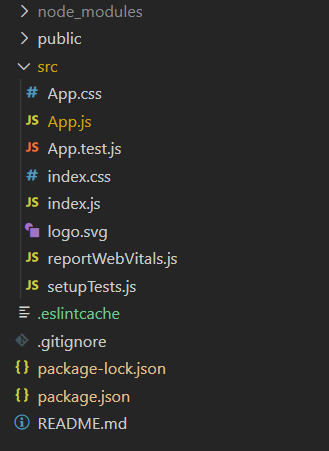
cd foldernameProject Structure:
👁 ImageThe updated dependencies in package.json file will look like:
"dependencies": {
 "react": "^18.2.0",
 "react-dom": "^18.2.0",
 "react-scripts": "5.0.1",
 "web-vitals": "^2.1.4",
}
Example: As we can see from the below output the box will disappear when the CSS class hidden will be added to the HTML element based on the updated value of the state.
Step to Run Application: Run the application using the following command from the root directory of the project:
npm startOutput: Now open your browser and go to http://localhost:3000
👁 Image