|
VOOZH | about |
|
VOOZH | about |
To connect Node with React, we use React for the frontend (what users see) and Node.js for the backend (where the server logic lives). The frontend sends requests to the backend, and the backend responds with data or actions.
There are many ways to connect React with Node.js, like using Axios or Fetch or setting up a proxy. In this article, we'll keep things simple and use the proxy method to make them work together smoothly.
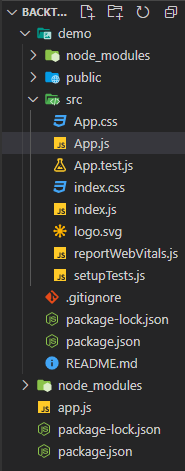
Follow these basic steps to create the backend of your Node.js application:
mkdir demoapp
cd demoapp
npm init -yEnsure that the entry point is set to either app.js or index.js
npm i express nodemonThe updated dependencies in package.json file will look like:
"dependencies": {
 "express": "^5.1.0",
 "nodemon": "^3.1.9",
}
Follow these steps to set up the React frontend:
npx create-react-app democd demoThe updated dependencies in package.json file will look like:
"dependencies": {
 "@testing-library/jest-dom": "^5.17.0",
 "@testing-library/react": "^13.4.0",
 "@testing-library/user-event": "^13.5.0",
 "react": "^18.2.0",
 "react-dom": "^18.2.0",
 "react-scripts": "5.0.1",
 "web-vitals": "^2.1.4"
}
Example: This example shows basic program for backend server.
Run the application using the following command:
npm run devOutput: Now go to http://localhost:8080/ in your browser, you will see the following output.
👁 ImageTo connect React with Node using a proxy, add this line in your React app’s package.json file right after the "name" and "version" fields at the top:
"proxy": "http://localhost:8080"This tells React to automatically forward any unknown requests (like /post) to your Node.js backend running on port 8080 during development.
Example: This example includes the frontend implementation of proxy and react web page with button to connect to the backend.
Steps to run React app: Run this command in terminal
npm startOutput: This output will be visible on http://localhost:3000/ on browser window.
Apart from the proxy method, there are several ways to connect a React frontend with a Node.js backend. These methods help manage communication and data flow between the client and server more efficiently.