|
VOOZH | about |
|
VOOZH | about |
In this article, we will be building a very simple Dictionary app with the help of an API. This is a perfect project for beginners as it will teach you how to fetch information from an API and display it and some basics of how React actually works. Also, we will learn about how to use React icons. Let's begin.
Approach: Our app contains two sections, one for taking the user input and the other is for displaying the data. Whenever a user searches for a word, we store that input in a state and trigger an API call based on the searched keyword parameter. After that when the API call is made, we simply store that API response in another state variable, and then we finally display the information accordingly.
The pre-requisites for this project are:
Step 1: Create a react application by typing the following command in the terminal:
npm create vite@latest dictionary-app --template reactStep 2: Now, go to the project folder i.e dictionary-app by running the following command:
cd dictionary-appStep 3: Let's install some npm packages required for this project:
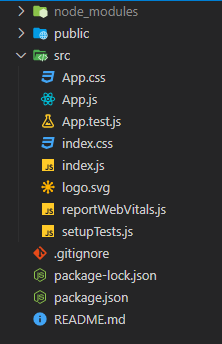
npm install axiosnpm install react-iconsProject Structure: It should look like this:
👁 ImageExample: It is the only component of our app that contains all the logic. We will be using a free opensource API (no auth required) called 'Free Dictionary API' to fetch all the required data. Our app contains two sections i.e a section for taking the user input and a search button, the other is for displaying the data. Apart from displaying the information that we received, we will also have a speaker button that lets users listen to the phonetics.
Now write down the following code in the App.js file. Here, the App is our default component where we have written our code. Here, the filename is App.js and App.css
Step to Run Application: Run the application using the following command from the root directory of the project:
npm run devOutput: Now open your browser and go to http://localhost:5173/, you will see the following output: