|
VOOZH | about |
|
VOOZH | about |
When working on a React app using Vite, we often come across situations where we have a complex folder structure which also makes our component import URLs complex. To resolve this issue we can use Absolute imports in Vite React App. absolute imports help us to import files directly from the root folder of the project which makes the code look cleaner and readable.
we’ll learn how to set up absolute imports in a Vite React app step by step. The easiest and most simple way to create Absolute imports in the Vite React app is by using Vite Alias in vite.config.js.
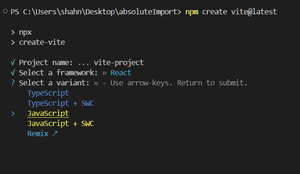
Step 1: Install Vite using the following command and select the options as shown in the images.
npm create vite@latestStep 2: Choose React for the framework
Step 3: Choose JavaScript for the variant
Step 4: Navigate to the project directory then install dependencies using the below commands.
cd vite-projectnpm install"dependencies": {
"react": "^18.3.1",
"react-dom": "^18.3.1"
},
"devDependencies": {
"@eslint/js": "^9.9.0",
"@types/react": "^18.3.3",
"@types/react-dom": "^18.3.0",
"@vitejs/plugin-react": "^4.3.1",
"eslint": "^9.9.0",
"eslint-plugin-react": "^7.35.0",
"eslint-plugin-react-hooks": "^5.1.0-rc.0",
"eslint-plugin-react-refresh": "^0.4.9",
"globals": "^15.9.0",
"vite": "^5.4.1"
}
In VIte React App, we can create absolute imports by confugring the path aliases. A path alias informs the app how to interpret a specific import paths. For example, we can use '@' sybmol to denote 'src/' directory. Now we can import components from any location in the project without using relative paths.
// vite.config.js
import { defineConfig } from "vite";
import react from "@vitejs/plugin-react";
import { resolve } from "path";

export default defineConfig({
 plugins: [react()],
 resolve: {
 alias: {
 "@": resolve(__dirname, "src"),
 },
 },
});
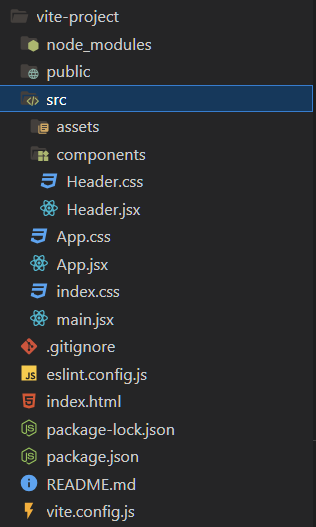
import Header from '@/components/Header';import Header from '../../components/Header';Example: We need to make a component folder in src folder then create two files named 'Header.jsx' and 'Header.css'. We will import 'Header' component in 'App.jsx' and 'Header.css' in 'Header.jsx' file. The implementation is shown below.
npm run devOutput:
By setting up the Absolute imports in a Vite React app the structure of the code is simplified and it becomes cleaner and easy to read. By avoiding long relative paths and adding simplified urls in our imports can help achieve better code quality. Even if the project grows larger, we don't need to worry about the complex structure of the project because it will be handled by Absolute imports.