|
VOOZH | about |
|
VOOZH | about |
Memoization optimizes costly function calls by caching results for future identical inputs. Reselect, a library for Redux applications, provides the creation of memoized selectors. In this article, we will learn how to create memoized selectors using the Reselect library.
Reselect is a simple selector library for Redux that allows you to create memoized selectors. A selector is a function that takes the state as an argument and returns a derived piece of state. By memoizing these selectors, Reselect ensures that they are only recalculated when their input arguments change, preventing unnecessary re-renders.
Reselect offers a few different ways to create selectors. The most common approach involves using the createSelector function.
A basic selector directly extracts a portion of the state from the Redux store
Example: This function takes the state as an argument and returns the userList array.
const getUsers = (state) => state.users.userList;A memoized selector uses the createSelector function to cache the results of a computation. This function takes an array of input selectors and a transform function:
Example: This Illustrates getUserNames is a memoized selector that maps over the userList and extracts user names.
import { createSelector } from 'reselect';

const getUserNames = createSelector(
 [getUsers],
 (userList) => userList.map(user => ({ id: user.id, name: user.name, isActive: user.isActive }))
);
More complex memoized selectors can combine multiple input selectors.
Example: This selector counts the number of active users by filtering the userList.
const getActiveUsersCount = createSelector(
 [getUsers],
 (userList) => userList.filter(user => user.isActive).length
);
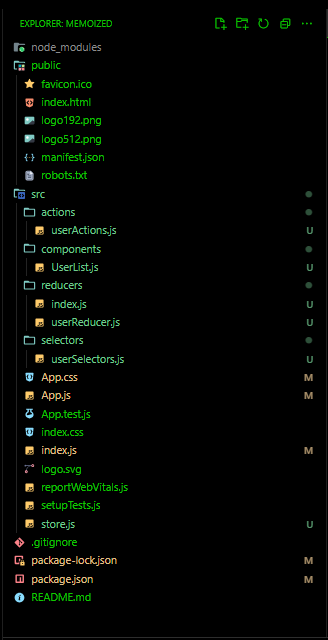
To create a React application that uses Reselect, follow these steps:
Step 1: Create a React Application named ‘memoized’ and navigate to it using this command.
npx create-react-app memoized
cd memoized
Step 2: Install required packages and dependencies.
npm install redux react-redux reselect
"dependencies": {
 "@testing-library/jest-dom": "^5.17.0",
 "@testing-library/react": "^13.4.0",
 "@testing-library/user-event": "^13.5.0",
 "react": "^18.2.0",
 "react-dom": "^18.2.0",
 "react-redux": "^8.1.3",
 "react-scripts": "5.0.1",
 "redux": "^4.2.1",
 "reselect": "^4.1.5",
 "web-vitals": "^2.1.4"
 }
Example: This example shows the implementation of the above-explained approach
Here's a demonstrating the output of the above application: