|
VOOZH | about |
|
VOOZH | about |
In Next.js 13 and above versions you can use the 'use client' directive to disable the server side rendering and enable the client side rendering for some specific pages or components. This directive indicates that the code should be executed on clint side only.
Step 1: Use the following command and set a Next.Js project:
npx create-next-app demodisablessr
cd demodisablessr
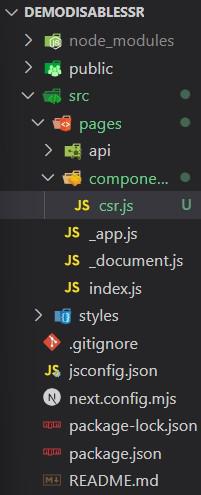
Step 2: Create a components folder in pages directory add a csr.js file and make sure the structure is as follows.
The updated dependencies in package.json file:
"dependencies": {
 "react": "^18",
 "react-dom": "^18",
 "next": "14.2.4"
}
Ensure your Next.js project is updated to version 13 or later, as the use client directive is introduced in this version.
npm install next@latestTo disable SSR for an entire page, add the use client directive at the top of the page component file.
Add the use client directive at the top of the file:
By adding 'use client'; at the top of the file, you ensure that this page will only be rendered on the client side.
To disable SSR for a specific component, you can also use the use client directive at the top of the component file.
1. Run Next.js application with following command.
npm run dev2. Inspect the Page Source: Right-click on the page and select "View Page Source". You should see the minimal HTML content for the ClientOnlyComponent, indicating that it is not pre-rendered on the server and is rendered on the client side.
3. Check the Functionality: Click the "Increment Counter" button and observe the counter incrementing, confirming that the component is functioning as expected with client-side rendering.
By using the use client directive at the top of your component or page files in Next.js 13 and later, you can easily disable server-side rendering for specific parts of your application. or if you want to disable at application level or root level of pages one can use directive in pages index.js file as shown in this article.