|
VOOZH | about |
|
VOOZH | about |
To implement webhooks in React JS, you first need to set up a backend server to handle incoming webhook requests. This server should have endpoints to receive and process webhook data. Then, in your React application, you can use libraries like Axios or the native fetch API to send HTTP POST requests to these webhook endpoints.
A webhook is an HTTP-based callback function that allows lightweight, event-driven communication between two Application Programming Interfaces (APIs). React webhooks, sometimes referred to as custom hooks, allow you to reuse logic in a component. They were introduced in React 16.8 as part of the Hooks API, offering a new way to work with stateful logic in functional components. While React webhooks are not part of the official React library, they are a popular and widely adopted pattern within the React community.
In React JS, implement webhooks by setting up a backend server to handle incoming webhook requests and using libraries like Axios or fetch API to send HTTP POST requests to the server's webhook endpoints.
Table of Content
The Fetch API provides a simple and powerful interface for fetching resources (such as JSON data) across the network. It is built into modern web browsers, making it readily available for use in ReactJS applications without additional libraries. With the Fetch API, you can easily send HTTP requests, including POST requests, to webhooks endpoints.
fetch(url, {
 method: 'POST',
 headers: {
 'Content-Type': 'application/json',
 },
 body: JSON.stringify(data),
})
 .then(response => {
 if (!response.ok) {
 throw new Error('Network response was not ok');
 }
 return response.json();
 })
 .then(data => {
 // Handle the response data here
 })
 .catch(error => {
 console.error('There was a problem with your fetch operation:', error);
 });
Axios is a widely-used HTTP client for JavaScript that simplifies making HTTP requests in both browser and Node.js environments. It offers a more intuitive interface than the Fetch API, with features like automatic JSON parsing, request cancellation, and error handling. Other libraries like Fetch or Superagent also provide similar functionalities and are preferred by developers for their additional features and flexibility compared to the native Fetch API.
import axios from 'axios';

axios.post(url, data, {
 headers: {
 'Content-Type': 'application/json',
 },
})
 .then(response => {
 // Handle successful response
 })
 .catch(error => {
 // Handle error
 });
Dedicated webhook libraries like 'react-use-webhook' are designed to make implementing webhooks in ReactJS easier. These libraries offer custom hooks or components that handle sending HTTP requests to webhook endpoints. They also provide features like retry options, error handling, and automatic data formatting, simplifying webhook integration and reducing code repetition.
import { useWebhook } from 'react-use-webhook';

const { sendRequest } = useWebhook();

sendRequest('your-webhook-url', { /* your data object */ });
Step 1: Create a React Application using the following command.
npx create-react-app react-webhooksStep 2: Install the required dependencies:
npm install axiosThe updated dependencies in package.json file will look like:
"dependencies": {
 "@testing-library/jest-dom": "^5.17.0",
 "@testing-library/react": "^13.4.0",
 "@testing-library/user-event": "^13.5.0",
 "axios": "^1.6.7",
 "react": "^18.2.0",
 "react-dom": "^18.2.0",
 "react-scripts": "5.0.1",
 "web-vitals": "^2.1.4"
 }
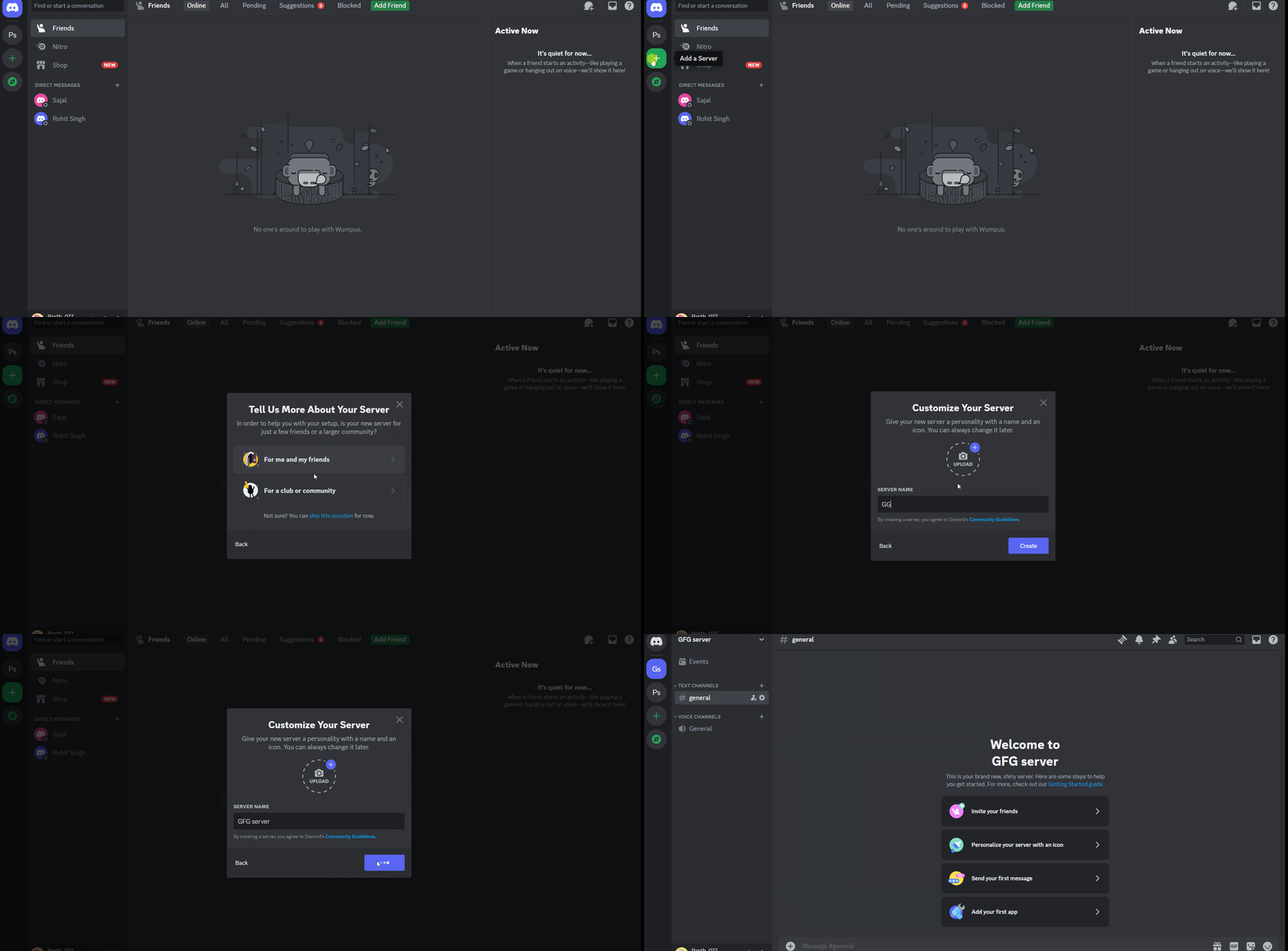
Step 1: Download Discord. You can visit this link To download Discord "https://discord.com/"
Step 2: Create your own server:
Step 3: Create your webhook.
👁 Createwebhook
Step 4: You can copy your webhook URL and use it in the code.
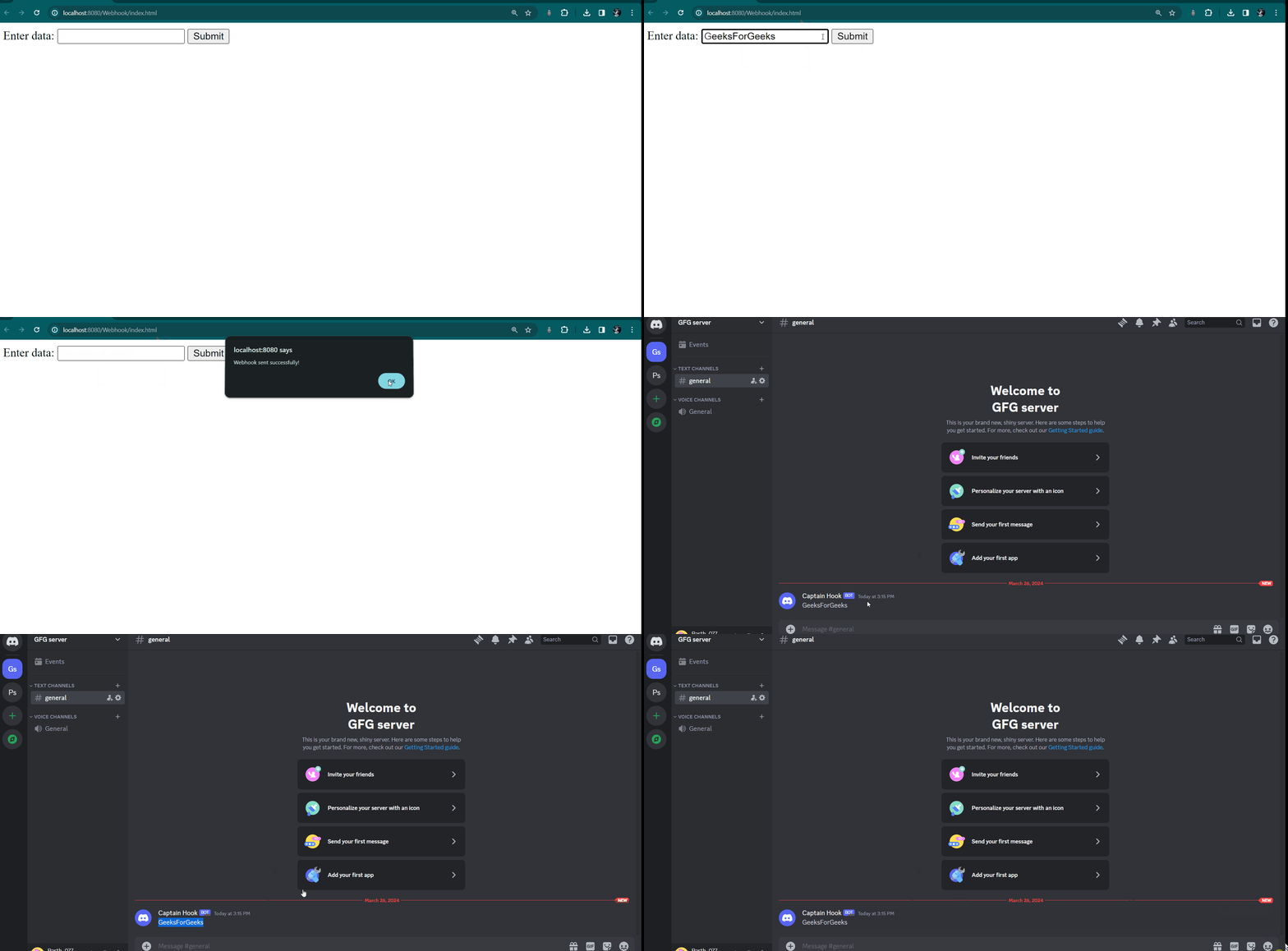
Example: Implement a webhook that sends a POST request to a server when a user submits a form.
Output: