 |
VOOZH | about |
|
VOOZH | about |
Optimizing the performance of React-Redux applications involves several strategies to improve loading speed, reduce unnecessary re-renders, and enhance user experience. In this article, we implement some optimization techniques, that can significantly improve the performance of applications.
We will discuss the different approaches to optimize the performance of React-Redux applications:
Table of Content
Step 1: Create a React application using the following command.
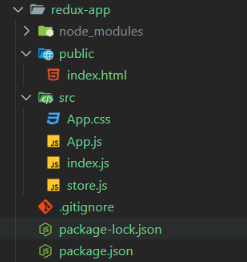
npx create-react-app redux-appStep 2: After creating your project folder i.e. redux-app, move to it using the following command.
cd redux-appStep 3: Install required dependencies like redux, and reselect.
npm i react react-dom redux react-redux reselectThe Updated dependencies in your package.json file is:
 "dependencies": {
 "react": "^18.3.1",
 "react-dom": "^18.3.1",
 "react-redux": "^9.1.2",
 "redux": "^5.0.1",
 "reselect": "^5.1.0"
 }
The useSelector hook can cause unnecessary re-renders if not used properly. Make sure you are selecting only the necessary part of the state.
Example: Below is an example to optimize the performance of React-Redux applications using Reselect Library.
Output :
Ensure your Redux state shape is normalized. This reduces the complexity of your state and helps in efficiently updating and accessing it.
Example: Below is an example to optimize the performance of React-Redux applications using Reselect Library.
Output:
Break down your reducers to handle smaller slices of state. This can make state management more efficient and avoid re-rendering.
Example: Below is an example to optimize the performance of React-Redux applications using Reselect Library.
Output:
The reselect library in React-Redux creates memoized selectors to efficiently compute state data, ensuring components re-render only when relevant state changes.
Example: Below is an example to optimize the performance of React-Redux applications using Reselect Library.
Output:




.gif)