|
VOOZH | about |
|
VOOZH | about |
Debouncing in react is used to limit the frequent executions. It is implemented using the lodash debounce method.
Debouncing in React is a technique used to limit the execution rate. It prevents excessive function calls for frequent events, like changing the input, and helps improve the performance.
To perform debouncing in react we will be using lodash debouncemethod. we will pass a function to it on which we want to apply debouncing.
// import the method
import debounce from "lodash";

// call the funtion
debounce(function, timeInMilliseconds,[options]);
Step 1: Create a React application using the following command:
npx create-react-app react-debouncing Step 2: After creating your project folder i.e. react-debouncing, move to it using the following command:
cd react-debouncingStep 3: After creating the ReactJS application, Install the required module using the following command:
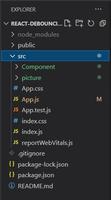
npm install lodashProject Structure: It will look like the following.
The updated dependencies in the package.json file are:
"dependencies": {
 "@testing-library/jest-dom": "^5.17.0",
 "@testing-library/react": "^13.4.0",
 "@testing-library/user-event": "^13.5.0",
 "lodash": "^4.17.21",
 "react": "^18.3.1",
 "react-dom": "^18.3.1",
 "react-scripts": "5.0.1",
 "web-vitals": "^2.1.4"
},
Example: This example uses Lodash Debounce method to perform debouncing for input change in react.
Explanation:
Step to Run Application: Run the application using the following command from the root directory of the project:
npm startOutput: Now open your browser and go to http://localhost:3000/, you will see the following output:
To implement debouncing in react we have used lodash debounce method to handle the frequent input change.