|
VOOZH | about |
|
VOOZH | about |
React is a frontend open-source JavaScript library, used to build interactive User Interfaces. React is focused on Single Page applications and is more popularly known as a SPA.
Testing is an important aspect of development. It examines whether the application is behaving as intended, and protects it when any unwanted changes are made to the application. There are various test libraries such as chai, mocha etc. In this tutorial, we'll be using the jest library along with reacting testing library to test out the React Components.
Prerequisites:
Modules required:
Creating React App and Setting Up:
Step 1: You will start a new project using create-react-app so open your terminal and type.
npx create-react-app jest-testingStep 2: Switch to the jest-testing folder using the following command.
cd jest-testingStep 3: Change to the src folder and remove the unnecessary stuff using the following command
cd src
rm*
Step 4: Create a components folder in the src folder
mkdir componentsStep 5: Create a components folder in the src folder
cd componentsStep 6: Create a Button folder and a Text folder
mkdir Button,TextStep 7: Create a Button.js file and Button.test.js file inside the Button folder.
touch Button.js Button.test.jsNote: The name of the test file should be the same as the component and should be followed with a .test.js extension as when the tests are run using the npm test command, React automatically checks for all the file names with a .test extension and runs the tests.
Step 8: Create a Text.js file and Text.test.js file inside the Text folder.
touch Text.js Text.test.jsStep 9: In the src folder, create App.js, index.js, and App.test.js files.
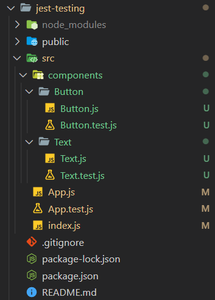
touch App.js index.js App.test.jsProject Structure: The file structure in the project will look like this.
Example: Setup all the files with basic code to toggle the text GeeksForGeeks when a button is clicked.
index.js
Button.js
Text.js
App.js
Output: Run the following command to start up the application:
npm startA simple app is created which toggles the text GeeksForGeeks when the button is pressed.
Now that the basic application is set up, we can begin testing it. Before testing the application let's learn about a few important testing methods.
Testing the Button Component: We are going to perform two tests on the Button Component.
Button.test.js
Output:
Run the tests using the following command:
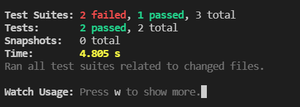
npm testWe can see that two test suites have failed and one has passed. The reason for this is that no tests have been designed for the Text Component and the App Component. So the only test suite passing is the Button Component.
Testing the Text Component: We are going to perform three tests on the Text Component.
Text.test.js
Output:
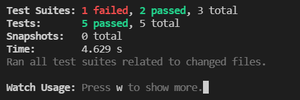
Run the tests using the following command:
npm testTesting the App Component: Testing the App Component is also known as integration testing as we the testing the application when we have integrated our button and text components. We are going to perform three tests on the App Component.
App.js
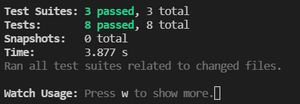
Output: Run the tests using the following command:
npm test