|
VOOZH | about |
|
VOOZH | about |
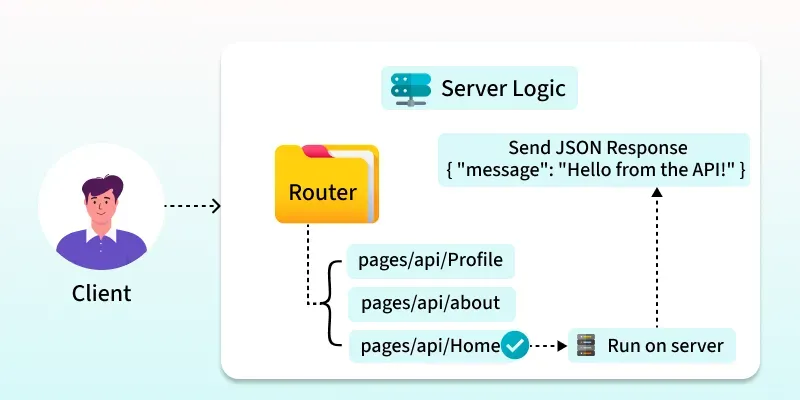
Next.js API Routes are a feature of Next.js that allows you to create server-side logic and APIs within your Next.js application. These API routes are implemented using files in the `pages/api` directory of your Next.js project. When you deploy your Next.js application, these API routes are automatically served as serverless functions.
pages/api folder.pages/api/Home.js :- /api/Home).In this example, visiting `/api/home` in your Next.js application will trigger this API route, and it will respond with a JSON object containing the message "Hello from the API!".
In Next.js API Routes, you can manage multiple HTTP methods (GET, POST, PUT, DELETE, etc.) inside a single route by checking req.method. This allows one endpoint to handle different types of operations efficiently.
Dynamic API routes in Next.js allow you to create flexible endpoints that handle dynamic parameters in the URL. This is useful for building APIs that require variable data, such as fetching specific resources based on IDs or filtering data based on query parameters. Here's how you can create dynamic API routes in Next.js:
Here's an example of a dynamic API route in Next.js that handles a user ID parameter:
In this example, visiting `/api/users/123` in your Next.js application will trigger this API route, and it will respond with a JSON object containing the user data for ID 123.
In this example, visiting `/api/users/123` in your Next.js application will trigger this API route, and it will respond with a JSON object containing the user data for ID 123.
By default, API routes in Next.js follow a file-based routing convention (`pages/api/`). However, you can customize the route paths using the `basePath` option in your `next.config.js` file. For example:
With this configuration, your API routes will be accessible under the `/api` path, such as `/api/users` instead of `/api/users.js`.
You can add middleware functions to your API routes to handle common tasks like authentication, request validation, error handling, etc. Middleware can be applied globally or selectively to specific API routes. Here's an example of adding middleware using the `next-connect` package:
You can use environment variables to configure your API routes dynamically based on different environments (development, production, testing, etc.). Next.js provides built-in support for environment variables using `.env` files. For example:
# .env.local
API_KEY=your_api_key
Then, access the environment variable in your API route like this:
You can implement caching strategies in your API routes to improve performance and reduce server load. Use caching libraries like `node-cache` or `redis` to store and retrieve cached data within your API logic.
Implement robust error handling mechanisms in your API routes to gracefully handle errors, log them for debugging, and send appropriate error responses to clients. You can use try-catch blocks, error middleware, or custom error classes for this purpose.
Validate incoming requests to your API routes to ensure they meet the required format, data types, and constraints. Use validation libraries like `joi`, `express-validator`, or write custom validation logic as per your application's needs.
When typing API Routes with TypeScript in Next.js, you can ensure type safety by defining types for request and response objects as well as for response data. Here's how you can do it:
In your API route files (`pages/api/...`), import the appropriate types from `next` to type the request and response objects.
For example, to type a GET request and response:
In this example, `NextApiRequest` and `NextApiResponse<Data>` are imported from `next` and used to type the request and response objects, respectively. The `Data` type represents the structure of the response data.
Define types for the data you expect to send in the response. This can be done using TypeScript interfaces or types.
For example, defining an interface for user data:
// types/User.ts [typescript]

export interface User {
 id: number;
 name: string;
 email: string;
}
Then, use this interface in your API route to type the response data:
Here, `User` is imported from the `User.ts` file in the `types` directory to type the response data.
You can access an API route from your frontend code (React components) using techniques like fetch or libraries like Axios. Here'san example using fetch:
Output