|
VOOZH | about |
|
VOOZH | about |
Animation plays a vital role in modern web development, enhancing user experience and adding a layer of interactivity to web interfaces. React Motion is a popular animation library specifically designed for React applications.
This article will explore React Motion in detail, covering its key features, benefits, usage, and examples.
Table of Content
React Motion is a JavaScript library that enables developers to create smooth and fluid animations in React applications. Unlike traditional CSS animations or transitions, React Motion utilizes physics-based animations using springs, resulting in more natural and realistic motion effects. It abstracts complex animation logic and provides a declarative API for defining animations within React components.
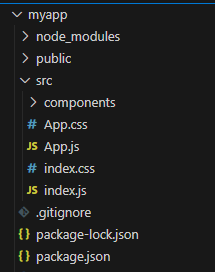
Step 1: Create a new React project by running the below command line:
npx create-react-app my-react-motionStep 2: After creating your project folder i.e. foldername, move to it using the following command:
cd foldernameStep 3: Install required Dependencies
npm i react-motion👁 Screenshot-2024-03-22-121818
The updated dependencies in package.json file after installing required modules.
"dependencies": {
 "@testing-library/jest-dom": "^5.17.0",
 "@testing-library/react": "^13.4.0",
 "@testing-library/user-event": "^13.5.0",
 "react": "^18.2.0",
 "react-motion": "^0.5.2",
 "react-dom": "^18.2.0",
 "react-scripts": "5.0.1",
 "web-vitals": "^2.1.4"
}
The <motion/> component takes in two advantage: defaultStyle and style.The defaultStyle advantage definnes the initail of the style object while style props is an object that defines the style values at any given point.style determined using the spring() helper function.
useState hook to manage the hover state of the card. This state will track whether the card is being hovered over or not.onMouseEnter and onMouseLeave events on the card container to toggle the hover state based on user interaction.Motion and spring from 'react-motion' to create smooth animations. Define animation logic using spring for transitioning the card's rotation based on the hover state.transform property to the card based on the animated rotateY value provided by React Motion.Eample: This example shows the use of motion component.
Step to Run Application: Run the application using the following command from the root directory of the project:
npm startOutput: Now open your browser and go to http://localhost:3000/, you will see the following output: