|
VOOZH | about |
|
VOOZH | about |
Next JS is a React framework that provides a number of features to help you build fast and scalable web applications. One of these features is loading.js which allows you to create a loading UI for your application.
Loading UI is important because it helps to improve the user experience as without a loading UI users will think that the application is frozen or unresponsive.
To create loading states, you can create a file named "loading.js" inside the route that you want to handle and can render a react component from it which will act as the loader.
// inside loading.js
export default function Loader() {
 return <> Your code </>
}
Step 1: To create your app, run the following npx command in your terminal to start the creation process:
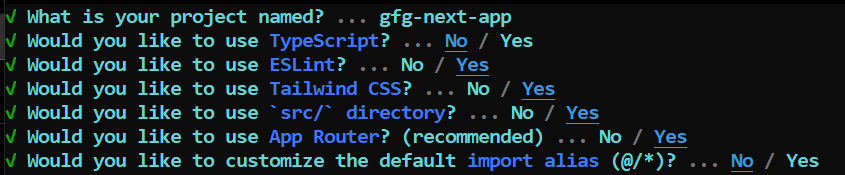
npx create-next-app@latestStep 2: Provide the necessary details to create your app as shown in the image below.
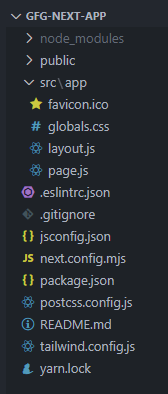
Step 3: Your project would be created by now. Go inside your project directory and start the development server through the following command:
npm run devThe updated dependencies in package.json file will look like:
"dependencies": {
 "react": "^18",
 "react-dom": "^18",
 "next": "14.1.0"
 },
"devDependencies": {
 "autoprefixer": "^10.0.1",
 "postcss": "^8",
 "tailwindcss": "^3.3.0",
 "eslint": "^8",
 "eslint-config-next": "14.1.0"
}
Example 1: In this example, let's create the "loading.js" file inside our app directory and return simple loading text from it inside a component. Then inside our home page ("src/app/page.js"), let's make it an async function and simulate that it's consuming time through a Promise which resolve after certain seconds. For that amount of time, we will be displayed the loading text returned by the loading component.
Output:
Example 2: In this example, let's create a dynamic page inside "src/app/[user]/page.js". Now, let's make a request to the github api inside this page through the fetch api and then show that to the user.
Output: