VOOZH about

URL: https://www.geeksforgeeks.org/reactjs/news-app-using-react/

⇱ News App using React - GeeksforGeeks


  • Courses
  • Tutorials
  • Interview Prep

News App using React

Last Updated : 24 Jul, 2025

News App using React JS uses React's basic principles to fetch the latest news from a News API and show them to users based on their interests. It's a simple project to create an interactive and personalized news-viewing experience.

Preview of final output: Let us have a look at how the final output will look like.

👁 Screenshot-2023-12-02-235708
Preview Image

Prerequisites:

Approach:

  • Integrate a free third-party news API (e.g., NewsAPI) into the News App to access up-to-date news content. Obtain an API key for authentication.
  • Fetch news data from the API using fetch or a similar method. Log the data to the console to ensure successful retrieval.
  • Create React components (e.g., NewsList, NewsItem) to organize the display of news content within the app.
  • Implment rendering logic in the components to display relevant information from the API response, such as headlines, descriptions, and publication details.
  • Enable a filter functionality to allow users to customize their news feed based on interests. Query the API with user preferences to fetch filtered news.
  • Implement an infinite scroll feature to enhance user experience. Load additional news content as the user scrolls down, providing a seamless and continuous browsing experience.

Steps to Create the News App:

Step 1: Set up React Project using the Command:

npm create vite@latest <name-of-project> --template react

Step 2: Navigate to the Project folder using:

cd <name of project>

Step 3: Install dependencies:

npm install

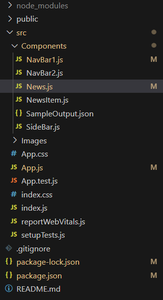
Project Structure:

👁 Screenshot-2023-12-03-001608
Project Structure

The updated dependencies in package.json file will look like:

"dependencies": {
"react": "^18.2.0",
"react-dom": "^18.2.0",
"vite": "^4.0.0",
"axios": "^0.27.2"
}

Example: Create folders "Components" and paste the given code in respective files

Steps to Run the Application:

Step 1: Type the following Command in terminal:

npm run dev

Output

Comment