|
VOOZH | about |
|
VOOZH | about |
Next.js data-fetching methods define when data is loaded to balance performance and SEO.
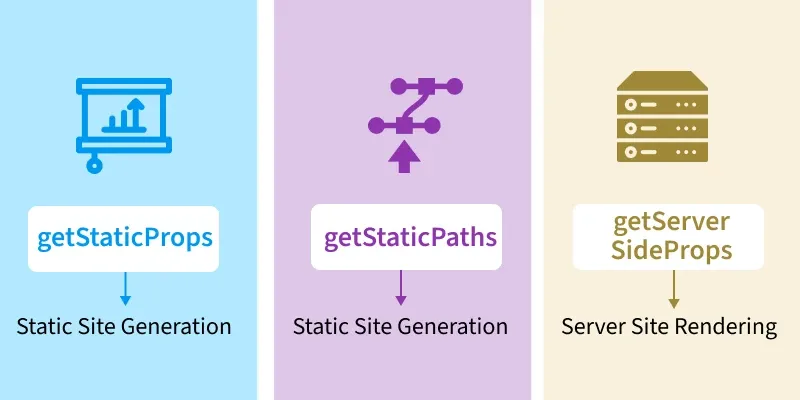
Given below are some data fetching methods used in Next.js to handle data at build time, request time, or on the client side:
It fetches and pre-renders all required data at build time, caching the content for fast delivery and improved SEO. This method is the default in Next.js and is used for Static Site Generation (SSG) and Incremental Static Regeneration (ISR).
Properties of getStaticProps:
If a page uses getStaticProps and has dynamic routes, it must declare a list of paths that will be statically generated. Next.js will statically pre-render all the paths defined by getStaticPaths when we export a function named getStaticPaths from a page.
Properties of getStaticPaths:
getServerSideProps is a Next.js data-fetching method used for Server-Side Rendering, where data is fetched and the page is rendered on every request to ensure fresh and dynamic content.
Properties of getServerSideProps:
Example: A Next.js application featuring albums, posts, and dynamically routed users pages, each demonstrating different data-fetching strategies using the JSONPlaceholder API.
Run the following command to create a new Next.js application (Make sure you have NPM and node installed)
npx create-next-app@latest myprojectProject Structure
/pages/index.js - Clean up the homepage (index) by removing boilerplate code and adding navigation links to all implemented pages.
/pages/albums.jsx - Albums page will implement static site generation using getStaticProps, we will export the data fetching method along with the page component. We can send fetched data to the page component using props. Next Js will fetch all the albums at build time before the user's request.
/pages/posts.jsx - The Posts page uses Server-Side Rendering with getServerSideProps, fetching data on every user request and passing it to the page component via props.
/pages/users/[id].jsx - For this dynamic page, user IDs are pre-defined using getStaticPaths so Next.js can generate pages at build time.
Run the application: Open the terminal and enter the following command.
npm run dev