|
VOOZH | about |
|
VOOZH | about |
Next.js dynamic API routes allow you to create flexible endpoints that can handle various parameters, enabling powerful and versatile server-side functionalities within your application.
Dynamic API routes in Next.js enable the creation of endpoints that can capture and process URL parameters dynamically. These routes allow your application to handle various resource requests identified by unique parameters, making it easier to build APIs that interact with multiple resources. This feature is particularly useful for developing complex applications requiring adaptable and scalable server-side logic.
Dynamic API Routes in Next.js follows a pre-defined syntax to declare Dynamic API routes. To declare a Dynamic API routes in Next.js you need to write the file name or folder name in square brackets "[]". then, write the code of the application in the function.
Syntax:
[folder_name] or [file_name].jsx Step 1: Create a NextJs app using the following command.
npx create-next-app my-appStep 2 : Got to the project directory and create a main Folder students in "src/app" directory
cd my-app
src -> app -> new_folder_name = students
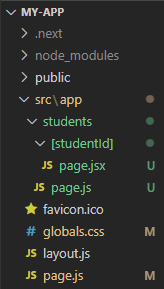
Step 3 : Create a new Folder with [studentId] inside students folder.
mkdir [studentId]Step 4 : Create a new file inside [studentId]
example:/src/app/students/[studentId]/page.jsxProject Structure:
👁 fileNameThe updated dependencies in package.json file will look like:
"dependencies": {
 "react": "^18",
 "react-dom": "^18",
 "next": "14.0.4"
},
"devDependencies": {
 "typescript": "^5",
 "@types/node": "^20",
 "@types/react": "^18",
 "@types/react-dom": "^18",
 "autoprefixer": "^10.0.1",
 "postcss": "^8",
 "tailwindcss": "^3.3.0",
 "eslint": "^8",
 "eslint-config-next": "14.0.4"
}
Example: Write the following code in page.jsx file.
Step To run the application:
Step 1: Run the following command in the terminal
npm run dev Test your dynamically created API routes by visiting "http://localhost:3000/students/1, http://localhost:3000/students/2, .... http://localhost:3000/students/1000, etc. " in your browser
http://localhost:3000/students/1
http://localhost:3000/students/2
http://localhost:3000/students/3
..........
..........
..........
..........
http://localhost:3000/students/1000
Output: For different Dynamic API Path, It will generate a different content on UI to be rendered. Some of them are as shown below.