|
VOOZH | about |
|
VOOZH | about |
Next.js not-found.js allows you to create a "Not Found" UI for your application which is rendered whenever the "notFound" function is thrown within a route segment. This file is designed to display a custom "Page Not Found" message when users navigate to non-existent routes within your application.
In NextJS, you can use the "notFound" function to hide certain pages from certain users (for example, you might want to hide the admin page from a normal user). In those cases, the UI shown to the user can be defined inside the "not-found.js" file created inside that route segment. Also, Next.js will return a 200 HTTP status code for streamed responses, and a 404 HTTP status code for non-streamed responses.
Along with that, the root "not-found.js" file also gets rendered whenever the user goes to any unmatched URL that is not defined by the application.
To create the "Not Found" UI, create a "not-found.js" file inside your route segment and then export your component from that file as shown below:
// inside not-found.js
export default function NotFound(){
 return <> Your Code <>
}
not-found.js components do not accept any props. Components defined in "not-found.js" cannot receive or utilize any external data passed as props. This restriction limits their ability to dynamically adapt or display content based on external input, making them static in nature.
By default, "not-found.js" functions as a Server Component. To enable data fetching and display based on path using Client Component hooks like usePathname, mark it as async. However, if client-side hooks are essential, fetch data on the client-side instead.
Example: Below is a sample example of async function Notfound.
import Link from 'next/link'
import { headers } from 'next/headers'

export default async function NotFound() {
 const headersList = headers();
 const domainName = headersList.get('host');
 const dataFetch = await getSiteData(domainName);
 return (
 <div>
 <h2>Not Found: {dataFetch.name}</h2>
 <p>Could not the resource requeste</p>
 <p>
 View
 <Link href="/blog">
 All your Posts are here
 </Link>
 </p>
 </div>
 )
}
Step 1: To create your app, run the following npx command in your terminal to start the creation process:
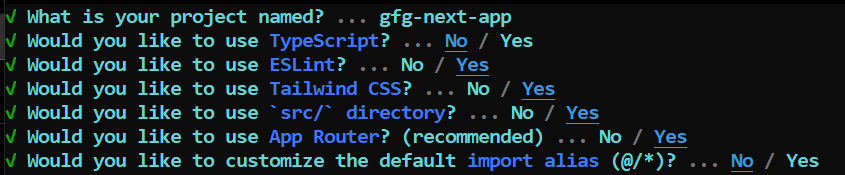
npx create-next-app@latestStep 2: Provide the necessary details to create your app as shown in the image below.
Step 3: Your project would be created by now. Go inside your project directory and start the development server through the following command:
npm run devThe updated dependencies in package.json file will look like:
"dependencies": {
 "react": "^18",
 "react-dom": "^18",
 "next": "14.1.0"
},
"devDependencies": {
 "autoprefixer": "^10.0.1",
 "postcss": "^8",
 "tailwindcss": "^3.3.0",
 "eslint": "^8",
 "eslint-config-next": "14.1.0"
}
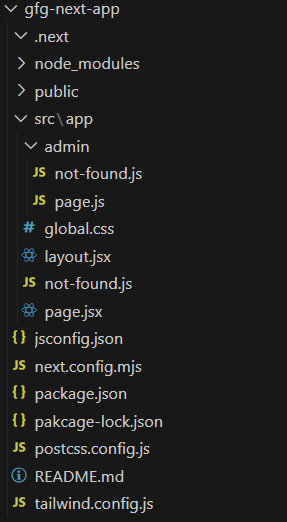
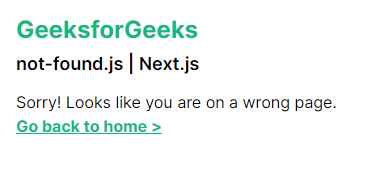
Example 1: In this example, let's create a "not-found.js" file inside the app directory which will serve whenever the user is present on an unmatched URL and provide the user with the link to go back to the home page.
Output: Now, whenever user goes to any unmatched route, suppose "http://localhost:3000/abcd", which is not defined by our application, then the user is shown the "NotFoundPage" UI.
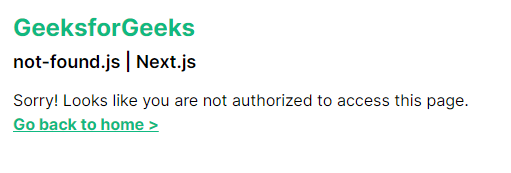
Example 2: In this example, let's create an admin page which accepts a "searchParam" telling the role of the current user. If the role is not equal to "admin" then, we throw the "notFound" function on that page, and the UI inside "not-found.js" file of that route segment is shown to the user.
Output: Now, whenver the role of the user is not equal to "admin" (in the searchParams), (for example: in case of "http://localhost:3000/admin?role=user"), the user is shown with the "NotFoundPage" UI.
The not-found.js file in Next.js allows you to define a custom 404 error page for your application. By providing a user-friendly and branded error page, you enhance the overall experience for visitors who encounter non-existent routes.