|
VOOZH | about |
|
VOOZH | about |
In Next.js, the route.js file plays a crucial role in the App Router (introduced in Next.js 13) by defining and managing routing configurations. This file helps in customizing the behavior of routes, including rendering components, handling dynamic segments, and applying middleware.
In this article, we will learn about Route Handler with its syntax and examples.
Route Handler is a feature that allows you to create custom request handlers for specific routes to handle different types of requests. route.js file is used to create a custom route handler within the app directory. By using this file you can create a API to handle web requests and responses.
You can create a custom route handler for different HTTP methods such as GET, POST, PUT, PATCH, DELETE, HEAD, and OPTIONS. You can handle HTTP requests and responses by using NextRequest and NextResponse.
Import NextResponse:
import { NextResponse } from "next/server";Handling GET request:
export async function GET(req, res) {
 return NextResponse.json({ message: "GET Request" }, { status: 200 })
}
Handling POST request:
export async function POST(req, res) {
 return NextResponse.json({ message: "POST Request" }, { status: 200 })
}
Handling PUT request:
export async function PUT(req, res) {
 return NextResponse.json({ message: "PUT Request" }, { status: 200 })
}
Handling HEAD request:
export async function HEAD(req, res) {
 return NextResponse.json({ message: "HEAD Request" }, { status: 200 })
}
Handling DELETE request:
export async function DELETE(req, res) {
 return NextResponse.json({ message: "DELETE Request" }, { status: 200 })
}
Handling PATCH request:
export async function PATCH(req, res) {
 return NextResponse.json({ message: "PATCH Request" }, { status: 200 })
}
Handling OPTIONS request:
export async function OPTIONS(req, res) {
 return NextResponse.json({ message: "OPTIONS Request" }, { status: 200 })
}
Parameters:
export async function GET(request: Request, context: { params: Params }) {
 const team = context.params.team // '1'
}
Step 1: Create a NextJS application using the following command.
npx create-next-app@latest gfg
Step 2: It will ask you some questions, so choose as the following.
√ Would you like to use TypeScript? ... No
√ Would you like to use ESLint? ... Yes
√ Would you like to use Tailwind CSS? ... No
√ Would you like to use `src/` directory? ... Yes
√ Would you like to use App Router? (recommended) ... Yes
√ Would you like to customize the default import alias (@/*)? ... Yes
Step 3: After creating your project folder i.e. gfg, move to it using the following command.
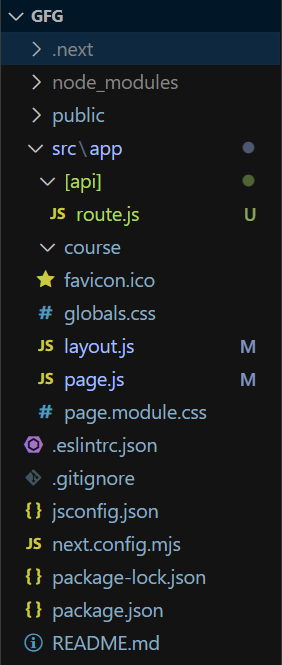
cd gfgExample: The below example demonstrates the use of route.js (Route Handler).
Note: Remove the included css file from layout.js file.
Start your application using the command.
npm run devThe route.js file in Next.js provides a flexible way to define and manage routing logic, dynamic segments, and layout configurations. It enhances control over how routes are handled, making it easier to build dynamic and feature-rich applications.