|
VOOZH | about |
|
VOOZH | about |
Next.js File Conventions are practices and rules for organizing files in a Next.js application to manage routing and components efficiently. In these conventions, the page.js file represents a specific route in the application, where each file in the pages or app directory corresponds to a route.
This convention helps in defining page-level components and their rendering logic, supporting both server-side and client-side rendering.
Table of Content
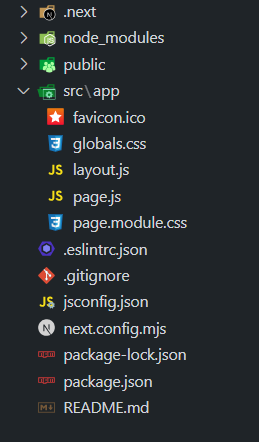
In Next.js, page.js files are used to define the content and layout of individual pages in your application. Each page.js file corresponds to a route in your application, with its location in the src/app directory reflecting the route structure. This file typically exports a React component that renders the page content. Next.js uses this file to handle server-side rendering, static site generation, or client-side rendering based on your configuration and data fetching methods.
const HomePage = () => (
 <div>
 <h1>Welcome to the Home Page</h1>
 </div>
);

export default HomePage;
The page.js file can manage dynamic routes and parameters.
Example: In a file like app/blog/[slug]/page.tsx, you can use TypeScript to define the route and handle dynamic segments.
export default function DynamicPage({
 params,
 searchParams,
}: {
 params: { slug: string },
 searchParams: { [key: string]: string | string[] | undefined }
}) {
 return <h1>Dynamic Content for {params.slug}</h1>;
}
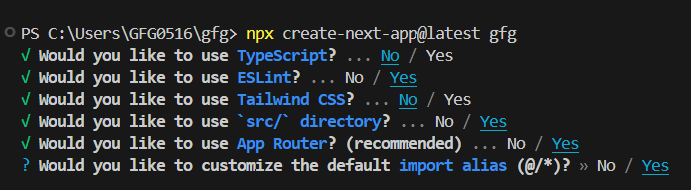
npx create-next-app@latest gfgcd gfg"dependencies": {
"react": "^18",
"react-dom": "^18",
"next": "14.2.5"
}
we are using a page.js file in a Next.js application to create a dynamic home page with interactive features. The page includes a green h1 heading and an h3 heading for context. It also features a button that, when clicked, updates the displayed text using React's useState hook. The use client directive is used to enable client-side functionality in this component.
Example: The below example demonstrates the use of File Conventions: page.js.
To run the Application open the terminal in the project folder and enter the following command:
npm run devNext.js offers various ways to render pages. The `page.js` file handles Client-Side Rendering (CSR) by updating content in the browser, Server-Side Rendering (SSR) by generating pages on the server for each request, and Static Site Generation (SSG) by pre-rendering pages at build time for faster loading.
SSG generates the page's HTML at build time rather than request time. By using getStaticProps, you fetch data and create static pages that are served quickly to users. This approach is best for pages with content that doesn’t change often.