|
VOOZH | about |
|
VOOZH | about |
Next.js provides powerful script optimization techniques to enhance website performance by managing how and when scripts load. It ensures faster page loads, better interactivity, and efficient resource usage.
next/script for optimized script loading.beforeInteractive, lazyOnload, etc.).onLoad, onError, onReady).async, defer, data-*).To load a third-party script across multiple pages, import `next/script` and add the script directly to your layout component.
import Script from 'next/script';

export default function ProfileLayout({
 children,
}: {
 children: React.ReactNode;
}) {
 return (
 <>
 <section>{children}</section>
 <Script src="https://another-example.com/different-script.js" />
 </>
 );
}
To include a third-party script in all routes, import next/script and include the script in your custom _app.js file. This ensures the script loads once across your application.
import Script from 'next/script';

export default function MyApp({ Component, pageProps }) {
 return (
 <>
 <Component {...pageProps} />
 <Script
 src="https://example.com/analytics.js"
 strategy="lazyOnload" // Load the script when the page is idle
 onLoad={() => {
 console.log('Analytics script has loaded');
 }}
 onError={() => {
 console.error('Failed to load analytics script');
 }}
 />
 </>
 );
}
This script will load and execute when any route in your application is accessed. Next.js will ensure the script will only load once, even if a user navigates between multiple pages.
The strategy property allows fine-tuning the loading behavior of scripts.
Strategy | Description |
|---|---|
beforeInteractive | Loads the script before any Next.js code and before page hydration. |
afterInteractive | Loads the script after some hydration has occurred (default). |
lazyOnload | Loads the script during browser idle time. |
worker | (Experimental) Loads the script in a web worker to improve performance. |
Using the worker strategy with Partytown lets you run certain scripts in a separate thread to keep your main site running smoothly, but it's still experimental and requires enabling a special setting in your configuration.
next.config.js:
module.exports = {
 experimental: {
 nextScriptWorkers: true,
 },
};
To install Partytown:
npm install @builder.io/partytownto run next:
npm run devOnce setup is done, defining strategy = "worker" will instantiate Partytown in your app and offload the script to a web worker.
import Script from 'next/script';

export default function Home() {
 return (
 <Script src="https://example.com/script.js" strategy="worker" />
 );
}
This can improve the performance of your site by dedicating the main thread to the rest of your application code.
Inline scripts can be written directly or using dangerously Set-Inner HTML. Ensure an id property is assigned. They can be written by placing the JavaScript within curly braces:
<Script id="show-banner">
 {`document.getElementById('banner').style.display = 'block';`}
</Script>
Or by using the dangerouslySetInnerHTML property:
<Script
 id="show-banner"
 dangerouslySetInnerHTML={{
 __html: `document.querySelector('#banner').style.display = 'block';`,
 }}
/>Use event handlers to execute additional code after script events.
import Script from 'next/script';

export default function Page() {
 return (
 <>
 <Script
 src="https://example.com/another-script.js"
 onLoad={() => {
 console.log('Another script has loaded');
 }}
 onError={() => {
 console.error('Failed to load the script');
 }}
 onReady={() => {
 console.log('Script is ready and component has mounted');
 }}
 />
 </>
 );
}
These handlers will only work when next/script is imported and used inside of a Client Component where "use client" is defined as the first line of code:
DOM attributes like nonce or custom data attributes can be forwarded to the script element.
This example uses async to load the script asynchronously, defer to delay execution until the HTML is parsed, and custom data attributes like data-custom. These attributes are passed directly to the final <script> tag in the HTML.
import Script from 'next/script';

export default function Page() {
 return (
 <>
 <Script
 src="https://example.com/another-script.js"
 async
 defer
 id="another-script"
 data-custom="value"
 />
 </>
 );
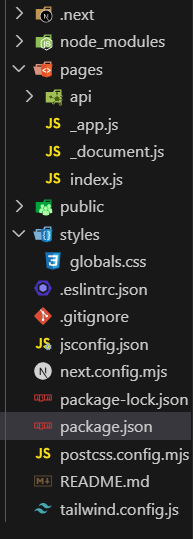
}Step 1 : Create a new Next.js app
npx create-next-app@latest script-optimization-exampleStep 2: Open the project directory by typing following command
cd script-optimization-example"dependencies": {
"next": "^14.2.5",
"react": "^18",
"react-dom": "^18"
}Step 3: Start the application by running the following command:
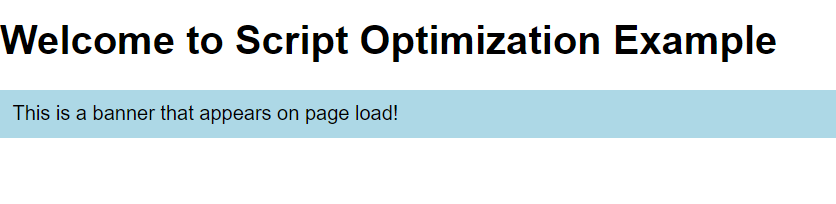
npm run devExample: This example shows Next.js script optimization using inline scripts and dangerouslySetInnerHTML to run scripts efficiently after page load.
Run development server:
npm run devOutput: