|
VOOZH | about |
|
VOOZH | about |
Let's construct a period calculator to determine the upcoming period and ovulation day. Menstruation involves the monthly shedding of the uterine lining, with an average cycle lasting 28 days (ranging from 21 to 35 days). Ovulation, the release of an egg from the ovaries, typically occurs approximately 14 days before the next menstrual period in a 28-day cycle.
Step 1: Make a project directorycreate a React app named “period-calculator” using the following command:
npx create-react-app period-calculatorStep 2: After the period-calculator app is created, switch to the new folder period-calculator using the following command:
cd period-calculatorStep 3: Install the required packages.
Install the above dependencies by using the following command:
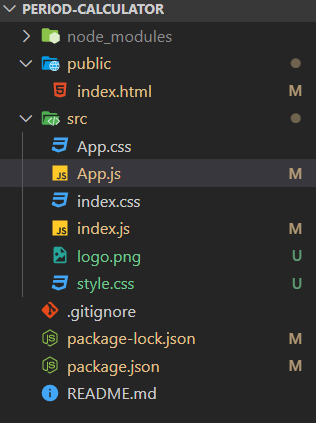
npm i react-moment react-calendarProject Structure:
The updated dependencies in package.json file will look like:
"dependencies": {
 "react": "^18.2.0",
 "react-calendar": "^4.7.0",
 "react-dom": "^18.2.0",
 "react-moment": "^1.1.3",
 "react-scripts": "5.0.1",
 "web-vitals": "^2.1.4",
}
Example: Include the following code in your index.html file, located in the public folder of your project directory.
Let's make our Next Period and Ovulation Date calculator: We will first import the Moments package to work with the dates.
import Moment from "react-moment";Next, we'll import the React Calendar component and its CSS to create a calendar in our application.
import Calendar from "react-calendar";
import "react-calendar/dist/Calendar.css";
Example: Below is the code of the above explained approach.
Step to run the Application: Run the application by using the following command:
npm startOutput: