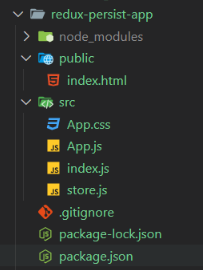
Redux Persist is a library used to save the Redux store's state to persistent storage, such as local storage, and rehydrate it when the app loads. In this article, we make a simple counter application using React and Redux, demonstrating state persistence using Redux Persist. This project includes incrementing, decrementing, and resetting the counter value functionalities.
Working on Redux Persist Library
Serialization: Whenever the Redux state changes, then Redux Persist intercepts your Redux store's state and converts it into a format suitable for storage like JSON string.
Store State: After serialization Redux Persist save this data to a specified storage (e.g., local storage).
Rehydration: When the application loads, Redux Persist retrieves the persisted state from storage and injects it back into the Redux store before rendering the UI.
Approach
Project Setup : Create a React Application and install required module like "redux-persist".
Set Up Redux Store with Persistence : Create an initial state and reducer for the counter, configure Redux Persist to use local storage, and create the Redux store with the persisted reducer and persistor.
Setup Redux Provider and PersistGate : Wrap the application in Provider to pass the store and PersistGate to ensure the persisted state is loaded before rendering the UI.
Steps to Create Application
Step 1: Create a React application using the following command.
npx create-react-app redux-persist-app
Step 2: After creating your project folder i.e. redux-persist-app, move to it using the following command.
cd redux-persist-app
Step 3 : Install required dependencies like redux-persist, and redux.