|
VOOZH | about |
|
VOOZH | about |
React suite is a library of React components, sensible UI design, and a friendly development experience. It is supported in all major browsers. It provides pre-built components of React which can be used easily in any web application.
In this article, we’ll learn about React suite DatePicker Usage Controlled. The DatePicker Component is used to choose a time or date from the picker. DatePicker Controlled is used to create the controlled component.
Syntax:
<DatePicker
 value={value}
 onChange={setValue}
/>
Creating React Application And Installing Module:
Step 1: Create a React application using the given command:
npm create-react-app projectname
Step 2: After creating your project, move to it using the given command:
cd projectname
Step 3: Now Install the rsuite node package using the given command:
npm install rsuite
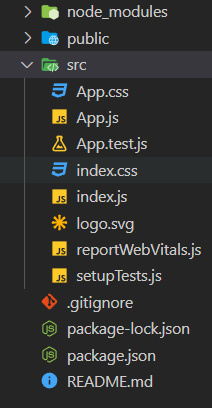
Project Structure: Now your project structure should look like the following:
Example 1: Below example demonstrates the use of the controlled DatePicker component.
Output:
Example 2: Below example demonstrates the use of the controlled DatePicker component in which the chosen date is rendered in the string form.
Output:
Reference: https://rsuitejs.com/components/date-picker/#controlled