|
VOOZH | about |
|
VOOZH | about |
React Suite is a front-end library designed for the middle platform and back-end products. The React Suite Dropdown component allows navigating with a number of options to select from a dropdown. React Suite Dropdown Used with next/link helps to wrap the items in the dropdown into hyperlinks.
Syntax:
<Dropdown.Item as={} href="" />
Prerequisite:
Creating React Application and Module installation:
Step 1: Create the react project folder, for that open the terminal and write the command npm create-react-app folder name. If you have already installed create-react-app globally. If you haven’t, install create-react-app globally using the command npm -g create-react-app or install locally by npm i create-react-app.
npm create-react-app project
Step 2: After creating your project folder(i.e. project), move to it by using the following command.
cd project
Step 3: now install the dependency by using the following command:
npm install rsuite
npm install next
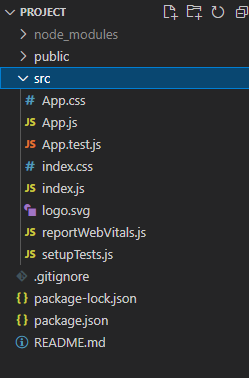
Project Structure: It will look like this:
Step to Run Application: Run the application using the following command from the project's root directory.
npm start
Example 1: We are importing the Dropdown Component from "rsuite", and to apply the default styles of the components we are importing "rsuite/dist/rsuite.min.css". We are adding the <Dropdown.Item> components within the Dropdown Component, the first <Dropdown.Item> one we have kept it simple to the other components we are passing the as prop as 'a' and passing values the href respectively.
Output:
Example 2: We are importing the Dropdown Component from "rsuite" and importing Link from 'next/Link', and to apply the default styles of the components, we are importing "rsuite/dist/rsuite.min.css". We are creating a Component naming it newLink , this new component takes the href and children from the <Dropdown.Item> and wraps it within <Link> and <a> tags. Now to every <Dropdown.Item> component we are passing as a prop as newLink.
Output:
Reference: https://rsuitejs.com/components/dropdown/#used-with-code-next-link-code