|
VOOZH | about |
|
VOOZH | about |
React suite is a library of React components, sensible UI design, and a friendly development experience. It is supported in all major browsers. It provides pre-built components of React which can be used easily in any web application.
In this article, we'll learn about React suite Modal Accessibility WAI-ARIA Roles, States, and Properties. A modal component is used to prompt acknowledgment messages, submissions, etc. Accessibility is a tool or a way that enables a website accessible easily by the user by providing features like buttons, breadcrumbs, checkboxes or dropdowns, etc.
As per WAI-ARIA, Modal has default role- dialog, aria-modal set to true, aria-labelledby, aria-describedby for title and description of modal respectively.
Syntax:
 <Modal
 aria-labelledby="modal-title"
 aria-describedby="modal-description"
>
 ...
</Modal>
Creating React Application And Installing Module:
Step 1: Create a React application using the given command:
npm create-react-app projectname
Step 2: After creating your project, move to it using the given command:
cd projectname
Step 3: Now Install the rsuite node package using the given command:
npm install rsuite
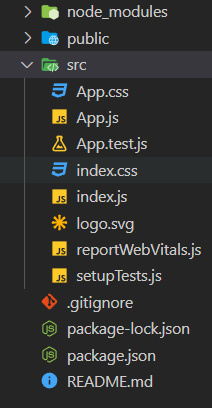
Project Structure: Now your project structure should look like the following:
Example 1: The below example demonstrates the usage of aria-labelledby and aria-describedby in the modal component.
Output:
Example 2: The below example demonstrates the usage of an alert dialog using a static backdrop in the modal component.
Output:
Reference: https://rsuitejs.com/components/modal/#wai-aria-roles-states-and-properties