|
VOOZH | about |
|
VOOZH | about |
React Suite is a front-end library designed for the middle platform and back-end products. The React Suite Nav component acts as a navigator it allows the user to provide an easy way to navigate.
The props are:
Syntax:
<Nav></Nav>
Prerequisite:
Creating React Application and Module installation:
Step 1: Create the react project folder, for that open the terminal, and write the command npm create-react-app folder name, if you have already installed create-react-app globally.
npm create-react-app project
Step 2: After creating your project folder(i.e. project), move to it by using the following command.
cd project
Step 3: now install the dependency by using the following command:
npm install rsuite
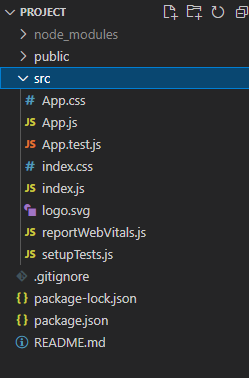
Project Structure: It will look like this:
Step to Run Application: Run the application using the following command from the project's root directory.
npm start
Example 1: We are importing the Nav Component from "rsuite", and to apply the default styles of the components we are importing "rsuite/dist/rsuite.min.css".
In this example, we are adding two Nav Components, in the first one we are passing the appearance prop as "subtle" and the justified prop. For the second one, we are passing vertical, appearance prop as "tabs" and activeKey as "Articles".
Output:
Example 2: We are adding three Nav Components and passing different values to the classPrefix prop. In the first component, we are also calling an onSelect function named as onSelectHandle that shows the eventKey we selected.
Output:
Reference: https://rsuitejs.com/components/nav/#code-lt-nav-gt-code