|
VOOZH | about |
|
VOOZH | about |
React useId Hook is introduced for the ReactJS versions above 18. This hook generates unique IDs i.e, returns a string that is stable across both the server and the client sides.
Prerequisite:
Syntax:
const id = useId()
Creating React Application:
Step 1: Create a react project folder, for that open the terminal, and write the command npm create-react-app folder name. Suppose you have already installed create-react-app globally. If you haven’t, install create-react-app globally using the command npm -g create-react-app or install locally by npm i create-react-app.
npm create-react-app project
Step 2: After creating your project folder(i.e. project), move to it by using the following command.
cd project
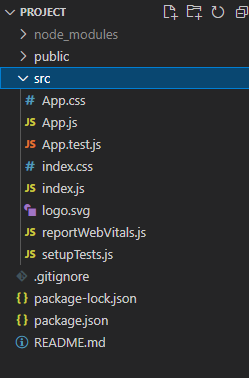
Project Structure: It will look like this:
Example1: In this example, we are getting two random unique ids from the useId Hook and storing them within id1 and id2. We are importing useId hook from react.
Then within the <p> tag, we display the value of the ids that we have retrieved using the useId hook.
Step to Run the Application: Run the application using the following command from the root directory of the project.
npm start
Output:
:r2: and :r3: are the two unique ids respectively.
Example 2: We are creating a state name using useState Hook, which will store the name we will enter in our input field.
Within the form, we are creating an input field with an onChange function that will store the value I,e the text we enter to our name state. A variable id will store the unique id we get from the useId hook.
The onSubmit function i,e the handleSumit function will show the name with the id as an alert after submitting.
Step to Run the Application: Run the application using the following command from the root directory of the project.
npm start
Output:
Reference: https://legacy.reactjs.org/docs/hooks-reference.html#useid