|
VOOZH | about |
|
VOOZH | about |
useLocalStorage hook makes it easy. It creates a stateful value for localStorage and gives us a function to update that value like useState.
In our projects, we frequently use localStorage and state but it's a bit tricky to work localStorage's value with the state.
Syntax:
const [ count, setCount ] = useLocalStorage(key, defaulValue)
Setting up Application: Follow the below steps to set up the application:
Step 1: Create a React application using the following command:
npx create-react-app foldernameStep 2: After creating your project folder i.e. foldername, move to it using the following command:
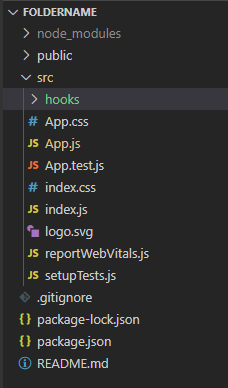
cd foldernameStep 3: create a hooks folder in src/hooks.
mkdir src/hooksProject Structure: The project should look like below:
Example 1: Below example will illustrate the use of useLocalStorage:
useLocalStorage.js:
Create
The useLocalStorage.js in the hooks folder.
Now your custom hook is ready to use in your component like below.
App.js:
Write the below code in the app.js file.
Steps to run the application: Write the below code in the terminal to run the application:
npm start
Output:
Example 2: Let's build another example with useLocalStorage custom hook
App.js:
Write the below code in the app.js file.
Output: