VOOZH about

URL: https://www.geeksforgeeks.org/reactjs/reactjs-useselect-hook/

⇱ ReactJS useSelect hook - GeeksforGeeks


  • Courses
  • Tutorials
  • Interview Prep

ReactJS useSelect hook

Last Updated : 27 Feb, 2026

The useSelect is a custom hook provided by the Rooks package for React. It is a list selection hook that helps select values from a list.

Arguments:

  • list: It is of the type array which describes the list of items for the selection. The default value is undefined.
  • initialIndex -It is of the type number which describes the initially selected index. The default value is 0.

Return Value- Object that contains the following attributes:

  • index: It is of the type int which describes the currently selected index.
  • item: It denotes the currently selected item.
  • setIndex:  It is of the type function which updates the index.
  • setItem: It is of the type function which updates the selected item.

Modules Required:

  • npm
  • create-react-application

Creating React Application And Installing Module

Step 1: Create a React application using the following command:

npx create-react-application demo

Step 2: After creating your project folder i.e. demo, move to it using the following command:

cd demo

Step 3: Install Rooks from npm.

npm i rooks

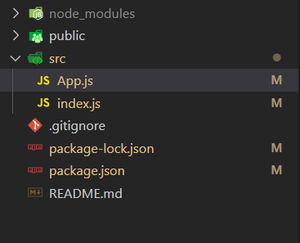
Open the src folder and delete the following files:

  • logo.svg
  • setupTests.js
  • App.test.js
  • index.css
  • reportWebVitals.js
  • App.css

Project Structure: The project should look like this:

👁 Image
 

Example: Let's understand the use of this hook by a list example.


Step to Run Application: Run the application using the following command from the root directory of the project:

npm start

Output: Now open your browser and go to http://localhost:3000/, you will see the following output:

👁 Image
Comment
Article Tags: