|
VOOZH | about |
|
VOOZH | about |
Building applications with Next.js requires clean, reliable code—but ensuring that consistently can be tough. Unit testing acts like a health check, verifying that each component or function works in isolation.
Since Next.js supports both server-side and client-side rendering, testing is even more crucial. With the right setup using tools like Jest, React Testing Library, Enzyme, and Cypress, you can catch bugs early, simplify maintenance, and deploy with confidence.
jest-html-reporter for detailed reports.Create a NextJS Application using the following command.
npx create-next-app@latestInstall Jest, React Testing Library, Enzyme, or Cypress based on your chosen approach.
For Jest and React Testing Library:
npm install --save-dev jest @testing-library/react @testing-library/jest-dom --force

For Enzyme:
npm install --save-dev enzyme enzyme-adapter-react-16 --foce

For Cypress:
npm install --save-dev cypress --force
Set up Jest configuration (jest.config.js), React Testing Library configuration (setupTests.js), Enzyme adapter configuration, or Cypress configuration as required.
"scripts": {
 "test": "jest"
}
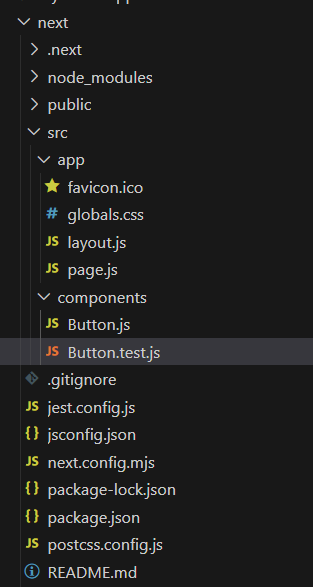
Create test files for your components, pages, or other units of code, and write tests to verify their behavior.
Use the appropriate command to run your tests. For Jest, use npm test. For Enzyme, configure Jest to run tests with Enzyme and then use npm test. For Cypress, use npx cypress open to open the Cypress test runner and run your tests interactively.
Ensure that you have installed the jest-html-reporter package as a development dependency in your project. You can install it using npm or yarn:
npm install --save-dev jest-html-reporter --forcejest.config.js like this.
module.exports = {
 // other Jest config options
 reporters: [ 'default',
 [
 'jest-html-reporter',
 {
 pageTitle: 'Test Report'
 }
 ] ],
};
The updated dependencies in package.json file will look like:
"dependencies": {
 "next": "14.1.0",
 "react": "^18",
 "react-dom": "^18"
},
"devDependencies": {
 "jest": "^27.0.6",
 "@testing-library/react": "^12.1.2",
 "@testing-library/jest-dom": "^5.14.1",
 "enzyme": "^3.11.0",
 "enzyme-adapter-react-16": "^1.15.6",
 "cypress": "^8.6.0"
}
Example: Let's consider a simple example of testing a React component in a NextJS project. Assume you have a Button component in components/Button.js:
Run your application test cases using the following command and run the test-report.html file i.e. live to server.
npm testOutput :