|
VOOZH | about |
|
VOOZH | about |
Redux is widely employed in React apps for robust state management. Key tools like Redux Form, Formik, React Final Form, and Redux Toolkit streamline form handling by centralizing input state management, validation, and submission processing. Integrating form state with the global Redux store ensures consistent behavior and enhances predictability in React applications. There are several libraries with their unique features which are used to facilitate this process.
Below are some common libraries/tools for form handling in Redux:
Table of Content
Redux Form used to be highly favored when it came to handling forms in strictly Redux based applications. It makes use of a Redux form higher-order component which actually connects those form components with a Redux store. Every field which belongs within any form becomes part of Redux state making this approach simple to enforce both validating inputs provided by users as well as dealing properly with submission errors or any possible field level error handling.
npm i redux-formdependency:
"dependencies": {
 "redux-form": "^8.3.9"
}
Example: This demonstrates 'reduxForm' HOC connects the form to the Redux store and 'Field' components are used to manage individual form fields.
import { reduxForm, Field } from 'redux-form';

const MyForm = ({ handleSubmit }) => (
 <form onSubmit={handleSubmit}>
 <Field name="username" component="input" type="text" />
 <Field name="password" component="input" type="password" />
 <button type="submit">Submit</button>
 </form>
);

export default reduxForm({ form: 'myForm' })(MyForm);
Formik is a form library that manages form state locally within components. It simplifies the work of form validation, error handling and submission. By using Formik hooks like 'useFormik' and components like <Formik>, <Form> and <Field> forms can be managed without any dependency on Redux.
npm i formikdependency:
"dependencies": {
 "formik": "^4.0.0",
}
Example: This demonstrates '<Formik>' component initializes form state and handles submission, '<Form>' and '<Field>' components are used to render the form and fields.
import { Formik, Form, Field } from 'formik'

const MyForm = () => (
	<Formik
		initialValues={{
			username: '',
			password: ''
		}}
		onSubmit={values => console.log(values)}
	>
		{() => (
			<Form>
				<Field name='username' type='text' />
				<Field name='password' type='password' />
				<Field name='confirm password' type='password' />
				<button type='submit'>Submit</button>
			</Form>
		)}
	</Formik>
)
React Final Form is a lite and flexible approach for controlling the state of the form or state management. It focuses more on simplicity and performance. Form can also be connected to Redux in terms of custom reducers and actions through which the local form states can also integrate with the Redux store whenever necessary.
npm i react-final-formdependency:
"dependencies": {
 "react-final-form": "^8.4.1",
}
Example: This demonstrates '<Form>' component wraps the form, handling submission and '<Field>' component is used for input fields.
import { Form, Field } from "react-final-form";

const myForm = () => (
	<Form
		onSubmit={(values) => console.log(values)}
		render={({ handleSubmit }) => (
			<form onSubmit={handleSubmit}>
				<Field name="username" component="input" type="text" placeholder="Username" />
				<Field name="password" component="input" type="password" placeholder="Password" />
				<button type="submit">Login</button>
			</form>
		)}
	/>
);
The modern way of managing Redux state including form state should be known as Redux Toolkit. Through creating slices using reducers for form state, we can manage submission processes during updates with severally leveraging on Redux Toolkit features like 'createSlice' as well as 'configureStore'.
npm i redux-formdependency:
"dependencies": {
 "@reduxjs/toolkit": "^1.9.2",
}
Example: This illustrates 'createSlice' creates a slice for form state with reducers to handle field updates and form submission, 'useDispatch' and 'useSelector' are used to connect the form component with Redux.
import { createSlice } from '@reduxjs/toolkit';
import { useDispatch, useSelector } from 'react-redux';

const formSlice = createSlice({
	name: 'form',
	initialState: { username: '', password: '' },
	reducers: {
		updateField: (state, action) => {
			state[action.payload.field] = action.payload.value;
		},
		submitForm: (state) => {
			// Handle form submission
		},
	},
});

export const { updateField, submitForm } = formSlice.actions;

const MyForm = () => {
	const dispatch = useDispatch();
	const formState = useSelector((state) => state.form);

	const handleChange = (e) => {
		dispatch(updateField({ field: e.target.name, value: e.target.value }));
	};

	return (
		<form onSubmit={() => dispatch(submitForm())}>
			<input name="username" value={formState.username} onChange={handleChange} />
			<input name="password" value={formState.password} onChange={handleChange} />
			<button type="submit">Sign in</button>
		</form>
	);
};
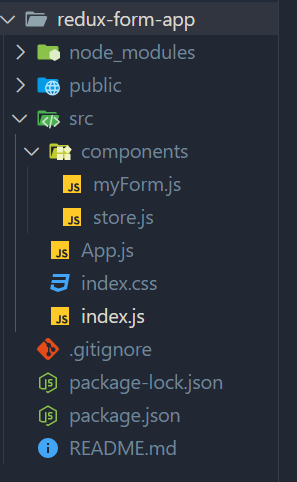
There are a number of steps that need to be taken in creating a Redux-based form application. They involve setting up the project, installing dependencies and integrating libraries for form handling. Using Redux Form as an example, here is a step-by-step guide:
npx create-react-app redux-form-app
cd redux-form-app
npm install redux react-redux redux-form
Updated dependencies in package.json file:
"dependencies": {
 "react": "^18.2.0",
 "react-dom": "^18.2.0",
 "react-redux": "^8.1.0",
 "redux": "^4.2.1",
 "redux-form": "^8.3.9"
}
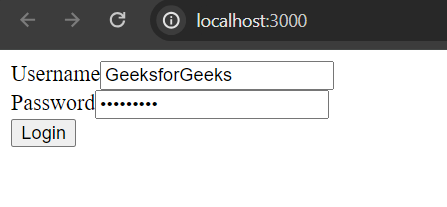
Example: To illustrate the output, consider a simple login form created using Redux Form.
Output: