|
VOOZH | about |
|
VOOZH | about |
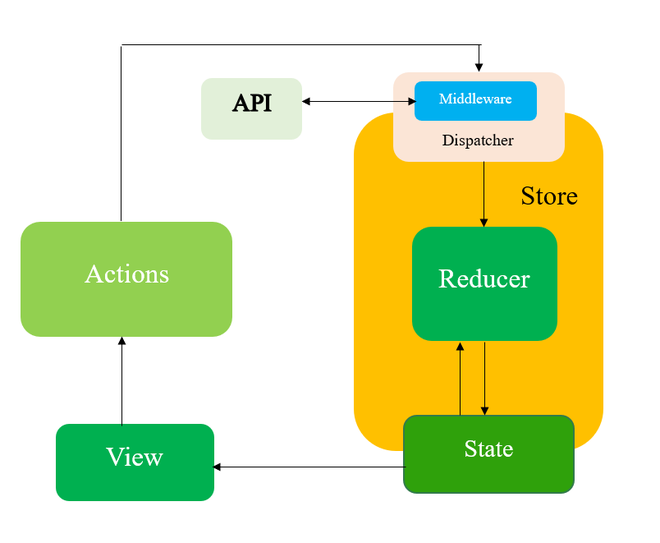
Redux Saga is a middleware library for Redux that provides an elegant way to handle side effects in your React applications. Side effects can include asynchronous actions like making API calls, managing WebSocket connections, and more.
Before we dive into the implementation details, let's gain a basic understanding of Redux Saga.
Redux Saga is built on the concept of generators, a feature introduced in ES6. Generators are special functions that can be paused and resumed, making them perfect for handling asynchronous operations in a non-blocking manner. Redux Saga uses these generators to manage side effects in a declarative and testable way.
Redux-Saga is a library that aims to make application side effects (i.e., asynchronous things like data fetching and impure things like accessing the browser cache) easier to manage, more efficient to execute, easy to test, and better at handling failures.
npx create-react-app saga-appcd saga-app
npm install @reduxjs/toolkit react-redux redux-saga
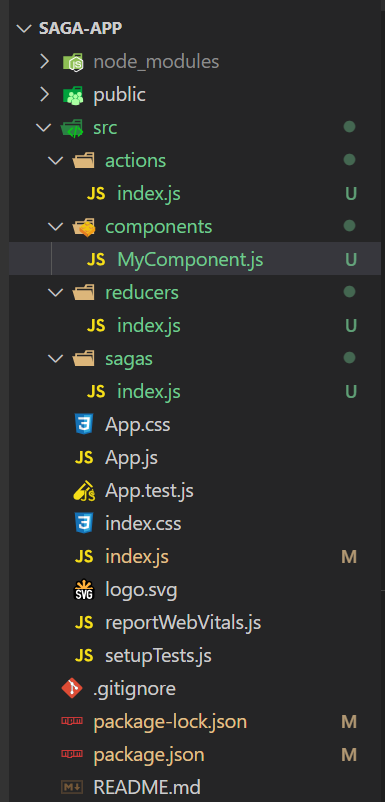
Now create a index.js file in a directory actions inside the src directory.
The saga-app is a React-based web application showcasing Redux Saga, a middleware for handling asynchronous tasks. It fetches data from JSONPlaceholderAPI, a mock RESTful API for testing, and displays it on the web page. Users can delete the displayed data. JSONPlaceholderAPI provides simulated data, making it ideal for testing and development. The app demonstrates how to manage asynchronous actions effectively with Redux Saga in a React application.
Create action creators in the actions/index.js file. These actions will be used to trigger sagas.
Create reducers in the reducers/index.js file to manage the state based on the actions.
In the sagas/index.js file, you can define your sagas. Sagas are generator functions that watch for specific actions and perform asynchronous operations.
In your index.js file, set up the Redux store with middleware to include Redux Saga.
Now, you can use Redux Saga in your components to trigger asynchronous actions. In your components/MyComponent.js file:
Step 4: use npm command to run the application and output will be on http://localhost:3000/
npm startOutput: