Code Coverage Testing is a white-box testing technique that measures the extent to which the source code of an application is executed during testing. It helps determine whether test cases are adequately covering the program logic and identifies untested parts of the code.
Measures the percentage of code executed by test cases.
Helps identify uncovered or untested code sections.
Improves the effectiveness and quality of software testing.
Code Coverage Formula
Code Coverage is calculated by dividing the number of code elements executed during testing by the total number of code elements in the program and then multiplying by 100.
Code Coverage (%) = (Number of Executed Code Elements ÷ Total Number of Code Elements) × 100
Example: Suppose a program contains 200 lines of code, and 160 lines are executed during testing.
Code Coverage (%) = (160 ÷ 200) × 100 = 80%
Interpretation:
100% Coverage: All code elements are executed during testing.
80% Coverage: Most of the code is tested, but some portions remain untested.
Low Coverage: Indicates that additional test cases may be needed to improve testing effectiveness.
Code Coverage Metrics
To perform code coverage analysis various criteria are taken into consideration. These are the major methods/criteria which are considered.
Statement Coverage (Block Coverage)
Statement Coverage measures the percentage of executable statements that are executed during testing.
Formula: Statement Coverage (%) = (Number of Statements Executed ÷ Total Number of Statements) × 100
Decision Coverage (Branch Coverage)
Decision Coverage measures the percentage of decision outcomes (True and False branches) that are executed during testing.
Formula: Decision Coverage (%) = (Number of Decision/Branch Outcomes Exercised ÷ Total Number of Decision Outcomes) × 100
Function Coverage
Function Coverage measures the percentage of functions or methods that are called and executed at least once during testing.
Formula: Function Coverage (%) = (Number of Functions Called ÷ Total Number of Functions) × 100
Condition Coverage (Expression Coverage)
Condition Coverage measures the percentage of Boolean conditions or expressions that are evaluated during testing.
Formula: Condition Coverage (%) = (Number of Executed Operands ÷ Total Number of Operands) × 100
Types of code coverage
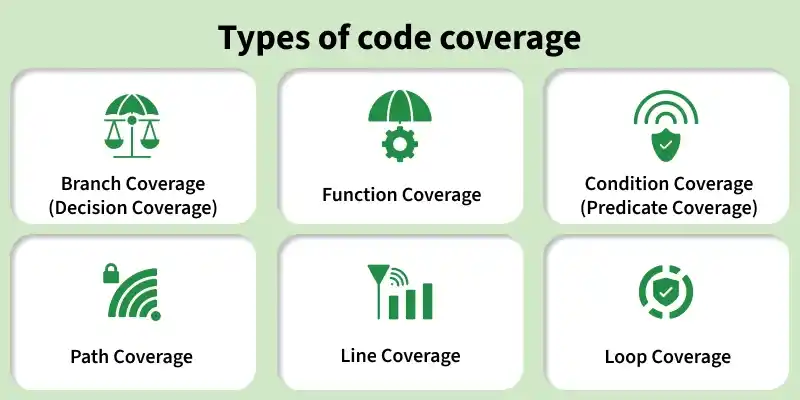
Understanding the different types of code coverage helps ensure comprehensive testing by evaluating various aspects of the source code.
Branch Coverage (Decision Coverage): Branch Coverage verifies that every possible decision outcome (True and False) in the program is executed during testing. It helps ensure that all branches of conditional statements are tested.
Function Coverage: Function Coverage checks whether every function or method in the application is called and executed at least once during testing. It ensures that all functional units of the code are covered.
Condition Coverage (Predicate Coverage): Condition Coverage ensures that each individual condition within a decision statement evaluates to both True and False. It helps detect logical errors in complex conditional expressions.
Path Coverage: Path Coverage verifies that all possible execution paths through a program are tested. It provides comprehensive testing of the program's control flow.
Line Coverage: Line Coverage measures the percentage of executable code lines that are executed during testing. It helps identify lines of code that remain untested.
Loop Coverage: Loop Coverage checks whether loops are tested for different execution scenarios, such as zero, one, and multiple iterations. It helps ensure the correct functioning of looping structures.
Code Coverage Testing Process
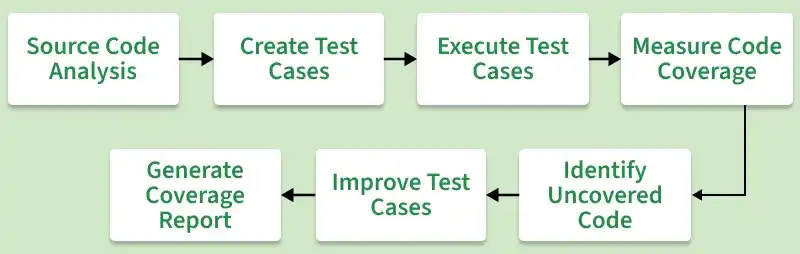
Code Coverage Testing follows a systematic process to measure how much of the source code is executed during testing. The goal is to identify untested code areas and improve test effectiveness.
Analyze the Source Code: The source code is reviewed to identify functions, branches, conditions, loops, and execution paths that need to be tested.
Create Test Cases: Test cases are designed to cover different parts of the code and ensure that various execution scenarios are tested.
Execute Test Cases: The created test cases are executed to run the application and observe its behavior under different conditions.
Measure Code Coverage: A code coverage tool is used to track which lines, branches, functions, and paths are executed during testing.
Identify Uncovered Code: The coverage report is analyzed to identify code sections that were not executed by the test cases.
Improve Test Cases: Additional test cases are created and executed to cover the previously untested portions of the code.
Generate Coverage Report: A final coverage report is generated to show the percentage of code covered and highlight any remaining untested areas.
Tools Used for Code Coverage Testing
Code coverage tools help measure how much of the source code is executed during testing. They generate coverage reports that identify tested and untested parts of the application.
JaCoCo: A widely used Java code coverage tool that provides detailed coverage reports for classes, methods, and branches.
Cobertura: An open-source Java tool that measures code coverage and generates comprehensive coverage reports.
Istanbul (NYC): A popular JavaScript code coverage tool that tracks code execution and reports coverage statistics.
Coverage.py: A Python code coverage tool that measures code execution and identifies untested code sections.
OpenCppCoverage: A code coverage tool for C and C++ applications that helps evaluate test effectiveness through coverage reports.
BullseyeCoverage: A commercial C/C++ code coverage tool known for its accurate and detailed coverage analysis.
Visual Studio Code Coverage: A built-in .NET code coverage tool in Visual Studio that measures test coverage directly within the IDE.
Advantages of Code Coverage Testing
Identifies Untested Code: Code coverage testing helps detect parts of the source code that have not been executed during testing.
Improves Test Effectiveness: It ensures that test cases cover more code, making the testing process more comprehensive.
Enhances Software Quality: By increasing code coverage, potential defects can be identified and fixed early in the development cycle.
Reduces Risk of Errors: Testing a larger portion of the code helps minimize the chances of defects reaching production.
Provides Measurable Results: Coverage metrics provide a clear indication of how much code has been tested.
Supports Better Maintenance: Well-tested code is easier to maintain, modify, and enhance in the future.
Increases Confidence in the Application: Higher code coverage gives developers and testers greater confidence in the reliability and stability of the software.
Facilitates Early Defect Detection: Coverage analysis helps uncover testing gaps, enabling defects to be identified and resolved at an early stage.
Limitations of Code Coverage Testing
Does Not Guarantee Bug-Free Software: High code coverage does not ensure that the application is free from defects or logical errors.
Cannot Detect Missing Requirements: Code coverage measures executed code but cannot identify missing features or requirements.
Time-Consuming and Costly: Achieving high coverage levels may require creating and maintaining a large number of test cases.
May Miss Logical Errors: Code can be executed during testing while still producing incorrect results due to faulty logic.
Difficult for Complex Applications: Achieving complete path or branch coverage can be challenging in large and complex systems.
Focuses Only on Code Execution: It measures which code is executed but does not evaluate the quality or effectiveness of the test cases.
100% Coverage Is Not Always Practical: Some code paths may be difficult or unnecessary to test, making full coverage impractical in real-world projects.
Best Practices for Code Coverage
Focus on meaningful coverage rather than just achieving high coverage percentages.
Prioritize testing critical business logic and high-risk areas of the application.
Use code coverage reports to identify testing gaps and untested code sections.
Integrate code coverage tools into CI/CD pipelines for continuous monitoring.
Avoid writing test cases solely to increase coverage metrics.
Maintain a balance between unit, integration, and system testing.
Difference Between Code Coverage and Test Coverage
Aspect
Code Coverage
Test Coverage
Definition
Measures the percentage of source code executed during testing.
Measures how much of the requirements or features are tested.