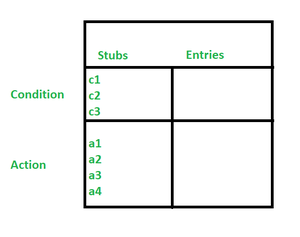
A Decision Table is a software testing technique used to represent combinations of conditions and their corresponding actions in a tabular format. It helps testers verify complex business logic by ensuring all possible scenarios are tested systematically.
- Organizes conditions, actions, and decision rules in a structured table.
- Ensures accurate and complete testing of multiple input combinations.
Key Components of a Decision Table
A decision table generally contains the following elements:
- Conditions: Input factors or variables that affect the decision-making process.
- Condition Alternatives: Possible values for each condition, such as Yes/No, True/False, or value ranges.
- Actions: Operations or outputs produced based on specific condition combinations.
- Decision Rules: Unique combinations of conditions that determine which action should occur.
- Action Entries: Indicators showing which actions are executed for each rule.
- Decision Outcome: The final result obtained after evaluating conditions and actions, helping verify correct system behavior.
👁 ImageTypes of Decision Tables
Decision tables are classified based on the complexity of conditions and decision logic:
- Limited Decision Table: Used when conditions are simple and independent with binary values. For example, a login system checks whether the username is valid and the password is correct.
- Extended Decision Table: Used when multiple conditions have several possible values. For example, a loan approval system evaluates income, credit score, and debt-to-income ratio.
- Condition-Action Table: Directly maps conditions to specific actions. For example, a discount system applies offers based on membership status and purchase amount.
- Switch Table: Used when decisions depend on a single condition. For example, a traffic light system changes actions based on the signal color.
- Rule-Based Decision Table: Applies multiple rules to handle complex decision logic. For example, an insurance eligibility system considers age, driving record, and location.
Steps to Create a Decision Table
- Identify Conditions: Determine inputs affecting decisions.
- Define Condition Alternatives: List possible states for each condition.
- Define Actions: Identify the outcomes triggered by conditions.
- Map Rules: Create rows representing all combinations of conditions.
- Fill the Table: Assign corresponding actions to each combination.
- Simplify: Remove redundancies and resolve conflicts for clarity.
Examples of Decision Tables in Software Testing
- Login System: Checks username and password validity.
- Discount System: Offers discounts based on membership and purchase total.
| Is Member | Total > $100 | 10% Discount | 5% Discount | No Discount |
|---|
| Yes | Yes | Yes | No | No |
| Yes | No | No | Yes | No |
| No | Yes | No | Yes | No |
| No | No | No | No | Yes |
Use Cases of Decision Tables in Software Testing
- Validating Business Logic: Ensures all business rules are covered.
- Generating Test Cases: Creates exhaustive test scenarios.
- Verifying System Behavior: Confirms correct outcomes for all condition combinations.
- Automating Tests: Easily translated into automated scripts.
- Ensuring Regulatory Compliance: Maps conditions to compliance rules.
Advantages of Decision Tables
- Clear representation of logic for developers, testers, and stakeholders.
- Ensures thorough test coverage, including edge cases.
- Simplifies complex decision-making scenarios.
- Automation-friendly for consistent and repeatable tests.
- Enhances team communication and alignment.
Challenges of Using Decision Tables in Software Testing and Solutions
Large Number of Conditions: Tables can become complex and hard to manage.
Solution: Split into smaller tables and focus on critical combinations.
Interdependent Conditions: Dependencies increase table complexity.
Solution: Use multiple tables or decision matrices to simplify logic.
Evolving Systems: Frequent rule changes require updates.
Solution: Maintain version control and automate updates where possible.
Continuous Data: Difficult to represent infinite values.
Solution: Use value ranges and apply boundary value analysis.
Best Practices for Using Decision Tables in Testing
- Test in realistic user environments (e.g., BrowserStack Automate).
- Break down large tables into smaller, manageable sections.
- Keep conditions independent where possible.
- Leverage equivalence partitioning for value ranges.
- Validate boundary conditions for robustness.
- Regularly review and simplify tables.
- Automate tests to improve efficiency and consistency.
- Collaborate with stakeholders to ensure coverage aligns with business rules.