|
VOOZH | about |
|
VOOZH | about |
DO loop in SAP ABAP is an unconditional loop that executes a block of code several times without providing a specific condition. It is a fundamental construct that facilitates the iterative execution of a code block until a specified condition is met. Programmers, through the incorporation of do loops, can automate processes; manipulate data, and control program flow based on dynamic conditions. In this article, we'll delve into the syntax, flow diagram, and practical examples of the DO loop in SAP ABAP.
The syntax of the DO loop in SAP ABAP is straightforward and resembles the structure of other programming languages.
DO .

 <Code to be executed repeatedly>

ENDDO.
The DO loop creates a block of code enclosed between DO and ENDDO. The loop will continue to execute the code within this block until a specified condition is met.
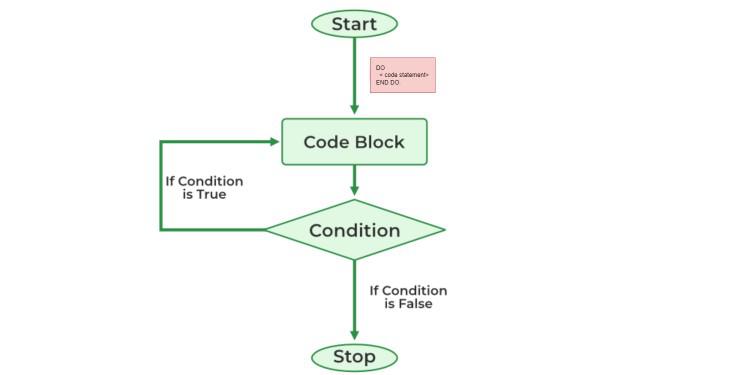
DO LoopBefore we explore examples, let's visualize the flow of the DO loop:
Explanation of Flow Diagram of Do loop
DO loop is executed.ENDDO.Now, let's dive into practical examples to illustrate the usage of the DO loop.
DATA: counter TYPE i VALUE 1.

DO.
 WRITE: / 'Iteration:', counter.
 counter = counter + 1.
 IF counter > 5.
 EXIT. " Exit the loop when counter exceeds 5
 ENDIF.
ENDDO.
Output:

Iteration: 1
Iteration: 2
Iteration: 3
Iteration: 4
Iteration: 5
Explanation
This example demonstrates a basic usage of the DO loop. First, the counter variable is initialized by 1. Subsequently, it enters a do loop, in each iteration of this loop until counter is greater than 5 , it prints out and updates (increments) its counter variable: It iterates five times, printing the current iteration number. The loop exits when the counter exceeds 5.
DATA: names TYPE TABLE OF string,
 index TYPE i VALUE 1.

names = VALUE #( ( 'Alice' ) ( 'Bob' ) ( 'Charlie' ) ).

DO.
 WRITE: / 'Name:', names[ index ].
 index = index + 1.
 IF index > lines( names ).
 EXIT. " Exit when all names are processed
 ENDIF.
ENDDO.
Output:

Name: 'Alice'
Name: 'Bob'
Name: 'Charlie'
Explanation:
In this example, names is an internal table of strings containing the names 'Alice', 'Bob', and 'Charlie'. The DO loop iterates over the elements of the internal table. In each iteration, it writes the current name to the output. The loop continues until all names in the internal table are processed. The condition IF index > lines( names ). checks whether the current index index exceeds the number of lines in the internal table (lines(names )). So the output is 'Alice', 'Bob', 'Charlie'.
DATA: limit TYPE i VALUE 3,
 counter TYPE i VALUE 1.

DO.
 WRITE: / 'Current Counter:', counter.
 counter = counter + 1.
 IF counter > limit.
 EXIT. " Exit when the counter exceeds the dynamically set limit
 ENDIF.
ENDDO.
Output

Current Counter: 1
Current Counter: 2
Current Counter: 3
Explanation:
In this Example, limit variable is set to 3. Do loop iterates over the counter variable, writing its current value to the output in each iteration. The loop continues until the counter variable (counter) exceeds the dynamically set limit (limit).The EXIT statement is used to exit the loop when the counter exceeds the limit. So the output is 1,2,3.
Here, the loop iterates until the counter exceeds a dynamically set limit. This showcases the flexibility of the DO loop
DATA: input TYPE i.

DO.
 WRITE: / 'Enter a number (0 to exit):'.
 READ input.
 IF input = 0.
 EXIT. " Exit when the user enters 0
 ENDIF.
 WRITE: / 'You entered:', input.
ENDDO.
Input :

10
5
0
Output:
Enter a number (0 to exit):
You entered: 10
Enter a number (0 to exit):
You entered: 10
Enter a number (0 to exit):
Explanation:
This example creates an interactive loop, continuously prompting the user for input until they enter 0 to exit. It reads the user's input into the variable input. It checks if the entered value is 0. If so, it exits the loop using the EXIT statement. If the entered value is not 0, it displays the message indicating the entered number.
DO loop in SAP ABAP is a versatile construct for handling repetitive tasks efficiently. Its simple syntax and adaptability make it a powerful tool for developers working within the SAP environment. As you explore more in ABAP programming, mastering the nuances of the DO loop will undoubtedly enhance your ability to create robust and efficient SAP applications.