|
VOOZH | about |
|
VOOZH | about |
Discord, a leading platform for community interaction, provides an array of features to enhance communication and engagement. Creating polls on Discord is an easy way to gather opinions or votes from your community. Using a Discord poll bot or the Discord poll command, you can quickly set up polls that allow members to participate and share their views. For a quick setup, you can try Simple Poll Discord, which offers an easy solution.
If you're on mobile and need to know how to poll on Discord mobile, the process remains simple, with bot commands or reactions available for use. Keep an eye out for the latest Discord poll update to ensure you're using the newest features, especially if you're experiencing issues like Discord polls not showing.
Table of Content
Here in this section, we have listed multiple methods to make a poll on the Discord app. Explore the steps and do it by yourself.
To create a poll on Discord, you can use a Discord poll bot like Simple Poll or Pollmaster by entering the bot's poll command to generate a voting option. Alternatively, you can manually create a poll by using reactions, where members vote by reacting with specific emojis. Here we will learn how to create a discord ball on desktop and mobile as well.
It is one of the simplest methods as it doesn't require any external bot. For participating in the poll users will use different emojis to represent their vote. Each emoji corresponds to a predefined option set by the poll creator.
As an example, a poll with a No/Yes choice can be represented by thumb-down emojis and thumbs-up emojis respectively.
Install Discord on mobile /desktop and sign up/log in to your Discord account or simply use Discord web.
Select the server in which you want to create a poll. For example here my server name is Dummy_GFG. Single click to open it.
👁 How to Create a Poll in Discord
Decide whether you want to create a dedicated channel for the poll or use an existing text channel.
👁 How to Create a Poll in Discord
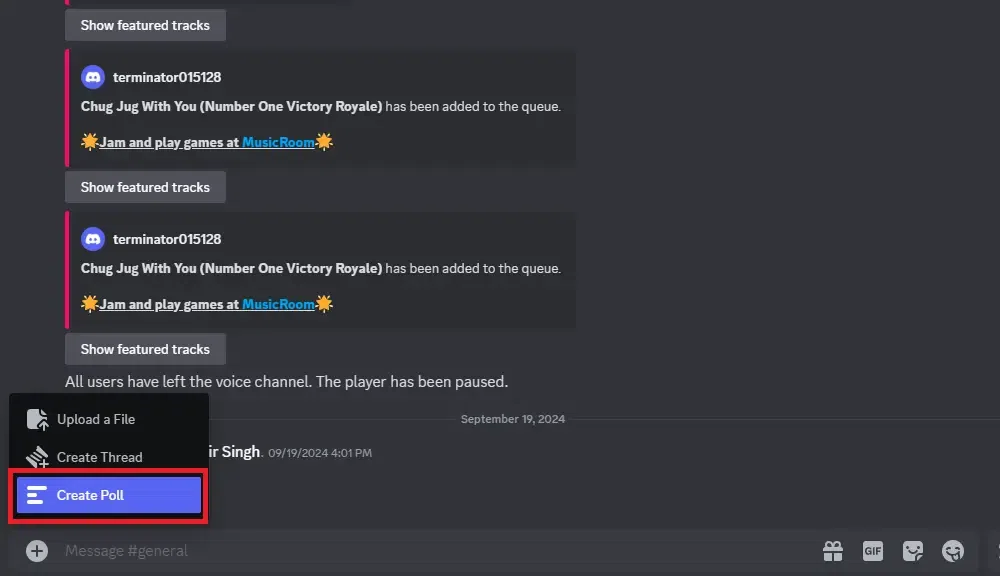
In the channel click on the Create Poll button and create a poll.
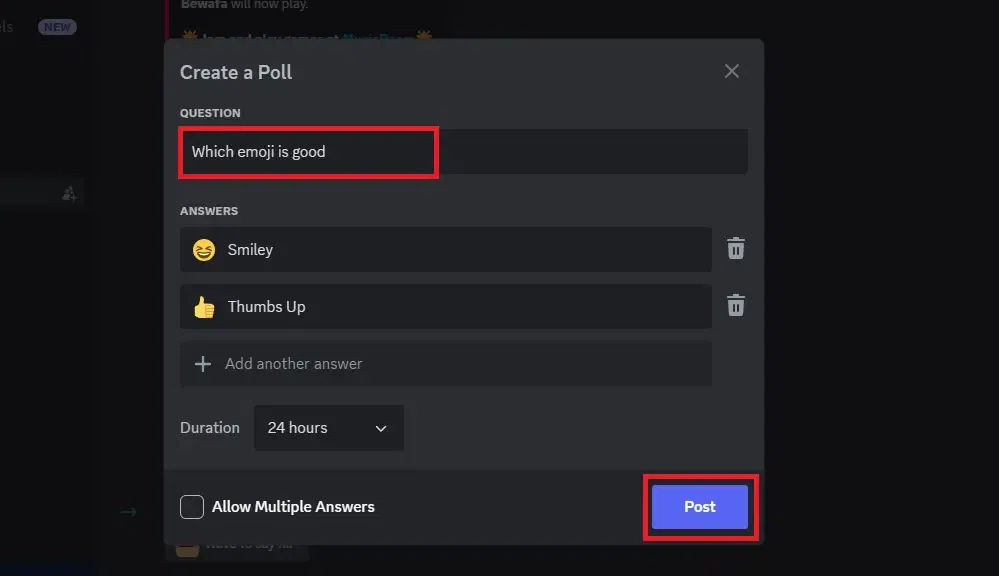
Type a Poll Question and Add emojis in it, that will be acted as a reaction poll for all your discord members.
Also Read: How to Use Emojis on Discord
Simple Poll Bot makes creating a variety of polls easy, encouraging participation and engagement. Let's implement it.
Open a web browser and go to the Simple Poll Discord Bot page by navigating to the official webpage.
On the Simple Poll Discord Bot page, locate and click on the "Invite" button (as shown in picture below).
👁 How to Create a Poll in Discord
If you're not already signed in to Discord, you'll be prompted to do so. Enter your Discord credentials to log in.
After logging in, you will be asked to select a server to add Simple Poll Bot to. Use the drop-down menu labeled "Add to server" to choose the desired server.
👁 How to Create a Poll in Discord
Discord will ask for authorization to add Simple Poll Bot to the selected server. Confirm the action by clicking "Authorize" or any equivalent authorization button.
👁 How to Create a Poll in Discord
You should receive a confirmation message indicating that Simple Poll Bot has been successfully added to the chosen server.
👁 How to Create a Poll in Discord
You can follow the same steps that we did in previous method. Navigate to the Discord server where you added the Simple Poll Bot and select an already existing text channel or create a new one.
Discord Poll Bot Command: Type the following command in the selected text channel.
Format: /poll: "Your Yes-or-No Question" and press Enter.
For example: /poll: "Have you attempted yesterday's Gfg contest?".
👁 How to Create a Poll in Discord
Now your poll has been created using simple poll.
👁 How to Create a Poll in Discord
Simple Poll will generate a poll with thumbs-up and thumbs-down reaction emojis for users to vote.
Type the following command in the text channel.
Format: /poll: "Your Question" "Option A" "Option B" ... and press Enter. Remember - You can include up to 20 multiple-choice options.
For example: /poll: "How many questions did you solve in the last contest?" "0" "1" "2" "3".
👁 How to Create a Poll in Discord
👁 How to Create a Poll in Discord
Simple Poll will create a poll with options labeled "A", "B", "C", etc., and users can click the corresponding box to vote.
Also Read:How to Create a Discord Bot
Dyno is another powerful bot that can be used to create polls. Here are the steps to create a poll on discord with Dyno bot.
Visit the website to add Dyno.
On the website, look for the "Add to Server" option to connect bot with the Discord. Click on it to proceed.
👁 How to Create a Poll in Discord
After clicking "Add to Server," a window displays various plans, including Free, Premium, and Custom. Each plan comes with different features. This tutorial is demonstrated using the Free plan. Select the suitable plan to continue.
👁 How to Create a Poll in Discord
Another screen will appear where you can choose the server where you want to create a poll. Use the "Add to Server" dropdown to select your desired server.
👁 How to Create a Poll in Discord
Once you've selected the server, click on the "Continue" button.
👁 How to Create a Poll in Discord
Follow any additional prompts or settings as per your requirements. Afterward, authorize the Dyno bot to access the selected server.
👁 How to Create a Poll in Discord
After authorization, you'll be directed to a window to set up general settings. Here, you can configure parameters such as the special character to mark the beginning of commands and the time zone.
👁 How to Create a Poll in Discord
Review your settings and make any necessary adjustments. Once satisfied, proceed to complete the setup process. Your Dyno bot is now added to the selected server.
In the text channel, type "/poll" to trigger the poll creation process. Two options will appear. Choose "/poll create" to start the poll creation.
👁 How to Create a Poll in Discord
After selecting "/poll create," a formatted space will appear. Type your question for the poll in the designated space. Add up to 10 choices for participants to vote on.
👁 How to Create a Poll in Discord
Once you've entered your question and choices, review the information to ensure accuracy. Press Enter to create the poll in the text channel.
👁 How to Create a Poll in Discord
Also Read:
Making a poll on Discord is simple and effective for gathering feedback or votes. Whether you use a Discord poll bot or the built-in Discord poll command, you can quickly engage your community with voting options. Stay updated with the latest Discord poll update to ensure smooth functionality, and troubleshoot issues like Discord polls not showing to keep your polls accessible to all members. Creating a poll on Discord, whether on desktop or mobile, helps foster interaction and decision-making within your server.


-660.png)