
Summary
- I learned premium boards manage USB/PCIe bandwidth better, so devices and hubs don't compete.
- I found stronger VRMs give stable tuning and let me upgrade to higher-end CPUs without swapping boards.
- I realized a pricier board ages better, with more lanes, ports, and fewer hidden resource limits as needs grow.
I used to think motherboard discussions were mostly enthusiast fluff. As long as the chipset supported my CPU, had RAM slots to spare, and booted reliably every morning, I was happy. When I built my first honest-to-goodness gaming PC three years ago, a B650 motherboard was just good enough, and an X670 or X850 motherboard was simply overkill and a waste of money I could otherwise have spent on other components.
Over the years, though, slowly but surely, my PC evolved into a workstation, a media hub, a test bench, and everything in between. As I've added more drives, faster storage, capture devices, the occasional VR headset, USB hubs, and even desktop lights, I've run into limitations I didn't even realize existed in the first place. It's not like my budget motherboard became bad or insufficient overnight, but I just ended up growing into a user who could finally see where the corners had been cut.
10 reasons skimping on your motherboard is a false economy
It's always tempting to save money by skipping the flagship motherboards but you might be losing out on features by doing so.
Using a mid-range motherboard made me care about connectivity
High-end motherboards remove the ceilings you run into
For the longest time, motherboard USB discussions felt like meaningless spec-sheet filler. After all, USB ports are just USB ports, right? If I need more, I just add a splitter or a hub, and call it a day. That logic worked perfectly fine, but only until the webcams, the wireless peripherals, the splitters, and the 2.4GHz dongles got a little too much, and they all began fighting for the same bandwidth at the same time.
That's when I learned that high-end motherboards don't simply offer more ports. What they do offer is more bandwidth allocation and better controllers, which results in cleaner power delivery to all the connected devices and much fewer compromises behind the scenes. With more bandwidth to go around, an external SSD and HDD won't drop transfer speeds, and a webcam won't stutter while connected to the same hub. In fact, on more premium motherboards, even basic USB hubs tend to behave more consistently because the board itself distributes lanes and controller resources far more intelligently.
A PC will always have just one keyboard and one mouse connected to it, sure, but power users end up building entire ecosystems around their PCs. That's when motherboard connectivity determines how gracefully that ecosystem scales over time.
Please stop treating your USB hubs as port replicators
It's not quite the same
I finally understand why people spend extra on motherboard VRMs
Conservative overclocking made me finally want higher VRMs
Overclocking has always felt like a fun, enthusiast-only activity for me rather than something I genuinely care about. My CPU already has aggressive clocks out of the box, and my RTX 4070 Ti has handled every game I've thrown at it rather comfortably. However, things changed once I finally started experimenting with undervolting, manual tuning, PBO adjustments, memory tweaking, and GPU overclocking. That's when I quickly discovered that my motherboard might just be the weakest link in this entire chain.
With every attempt at pushing my hardware, I kept running into hidden instability walls. Every time I saw higher temperatures around the VRMs and random crashes during sustained loads, overclocking felt more dangerous. In fact, even while my CPU has more headroom, my B650 motherboard simply isn't built to sustain that kind of tuning comfortably for long sessions.
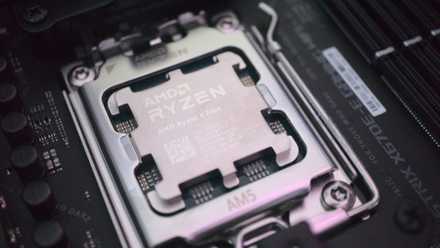
That's what changed the way I view premium motherboards. Better VRMs do help a lot of folks get absurd benchmark numbers with their liquid cooling setups, sure, but they also help users unlock more consistent performance from the expensive hardware they already own. Even the fact that I'm moving to an X3D chip when the RTX 60-series comes around means that my B650 motherboard's VRMs won't support a Ryzen 9 X3D chip if I were to ever go that way, even if I had the budget to upgrade that way. That's why I've made up my mind about moving to an X870 board soon, since it will provide me with stronger power phases and larger heatsinks, letting my CPU stretch its legs properly, and most importantly, letting me upgrade to a high-end CPU without having to get a new motherboard from the same generation.
I let the NVIDIA App overclock my GPU, and it left me impressed
For a "conservative" OC tool, the NVIDIA App gave me remarkable results
PCIe lane limitations became annoying faster than I expected
The second SSD slot shouldn’t feel like a downgrade
"How could I possibly want more than 2TB?" That's the question I'd asked myself when I bought a Gen4 2TB SSD while building my dream PC. Two years later, I've found myself deleting one 100GB open-world AAA game to download another, and reallocating drive space every few weeks. I may have gotten an additional NVMe drive just to act as my primary OS drive and plugged it into the motherboard's second Gen4 slot, but what happens when I need to add another terabyte or two? Any additional SSDs will have to live on the Gen3 slot, which, while still sufficient, would still be unable to harness the true speed and performance of any new NVMe SSDs I slot into it. On many budget and mid-range boards, secondary slots often share bandwidth with SATA ports or operate at reduced PCIe speeds depending on how your system is configured.
In fact, this problem is exacerbated in real-world usage, when you start combining high-speed storage, additional PCIe devices, capture cards, and expansion hardware. One fine day, adding a new SSD might disable the SATA ports, or a PCIe slot will just end up dropping lanes. Your motherboard will have to negotiate resources behind your back to accommodate all the PCIe devices, and that's exactly the issue that never crops up when you spend more early on while buying a more premium motherboard. A good high-end motherboard would let all your hardware operate properly at the same time, without ever letting hidden caveats quietly undermine the experience.
Your SSD has built-in maintenance tools that Windows keeps hidden from you
Windows can maintain your SSD really well, but it sure makes you work for those features
Premium motherboards age better than most other PC components
The expensive board becomes cheaper over time
The funny thing about enthusiast PC hardware is that your priorities evolve alongside your setup. Years ago, I cared almost exclusively about GPU performance because that was the easiest metric to understand. Now, after years of living with increasingly demanding workflows and increasingly complex setups, I've come to realize that the best motherboard upgrades are about eliminating friction from the daily experience, with ports that never bottleneck and storage that never has to awkwardly negotiate bandwidth.
Save on PC upgrades: deals for computers & work setups
Expensive motherboards still aren't necessary for everyone, and budget boards remain ever the incredible value for mainstream gaming builds. However, once your PC starts becoming central to how you work, create, archive, multitask, and experiment, motherboard quality genuinely begins to feel like infrastructure rather than a luxury expense.
MSI Pro X670-P Wi-Fi
MSI's Pro X670-P motherboard comes with a 14+2+1 stage VRM, four M.2 slots, and support for PCIe 5.0 SSDs.
5 things I'd do differently if I were building a gaming PC today
The PC hardware market has changed, and I need to change with it
Your next motherboard upgrade should be about who you're becoming as a user
A good PC rarely stays frozen in time.
One of the biggest mistakes I made as a PC enthusiast was assuming that my future needs would look exactly like my current ones. When you're building a system, it's easy to optimize for the games you're playing today, the peripherals you own today, and the workloads you run today. The problem is that a good PC rarely stays frozen in time.