
When you're planning an SFF build, you're probably thinking about saving desk space, going for a unique look, or crafting a compact machine for your streaming server or home lab. While each of these is a noble pursuit, going SFF has many other benefits that not all people realize, until they're well into the process of building one.
Not only is an SFF PC a worthy challenge to take on, but it will open up avenues that you never considered. Plus, they can be more silent than regular builds and can completely change the look of your PC setup. So, here's your sign to get started on your SFF build, if you've never built one.

5 pros and cons of small-form-factor PC builds
SFF PCs can be a fun way to save space and keep the aesthetic of a room together, but they're not for everyone.
5 SFF PCs make you a better PC builder
They force you to be smarter with your components
I mentioned that building an SFF PC is a worthy challenge. Even if you've built multiple mid-towers and full-towers in the past, embarking on an SFF build will teach you new things about PC building. First, you'll naturally need to be conscious of your component choices, considering you can't just fit any regular-sized power supplies, motherboards, coolers, and graphics cards. Second, you'll also probably end up with PSUs with better efficiency, higher-quality case fans, and coolers with top-notch performance.
And third, SFF PCs will force you to plan better, making smart choices when it comes to cable management, assembling components, and fan configuration. You'll also have limited space for your storage drives, and will have to choose which ones to discard. All of these choices will force you to pick up skills you never needed to before. It's not only a great learning process, but an enjoyable one at that.

Don't forget these 5 things before building a small form factor PC
An SFF PC can be an exciting project, but keep these things in mind before you start building one
4 You can actually move them around
Have you ever removed your mid-tower from your desk?
Out of all the things you might ponder before building a PC, moving it around the house probably isn't one of them. Most people build their PC once and keep it on their desk forever. An SFF PC, however, can unlock portability that you never had with a mid-tower or full-tower PC. Being considerably lighter than regular-sized counterparts, SFF PCs can be picked up and placed next to your TV for occasional large-screen gaming, or taken to your friend's place for some much-needed gaming sessions.
Many SFF cases can even fit inside luggage if you want to fly to a new country. Maybe you're moving permanently or visiting someone abroad, and don't want to stay away from your PC even for a few days. This freedom allows you to extract more value out of your SFF PC, forging a stronger bond. You might never return to a mid-tower build again after experiencing the joys of going SFF, and might even convince your friends to do the same.
Cooler Master Qube 500
- Material
- Steel, plastic, tempered glass
- Motherboard Size (Max.)
- E-ATX
- Graphics Card Size (Max.)
- GPU up to 368mm
- 3.5" Drive Slots
- 4
- Viewing Window
- Gray TG
- 2.5" Drive Slots
- 3
The Cooler Master Qube 500 is a compact case for those who want something different. Unlike most cases, this one comes flat-packed, and you build it as you install your components. It can fit high-end components, and has enough airflow to keep them cool.

ASUS ROG G22CH review: Big performance in a tiny package
It's just as small and compact as my UPS
3 They're better conversation pieces
Show off your skills
Successfully crafting a powerful and good-looking SFF PC is much more impressive than building a regular mid-tower. Not only do you feel a bigger sense of accomplishment, but you also have much more to talk about with friends and family when they visit your room and admire your handiwork. PC builders are always proud of their rigs, but SFF PCs multiply that pride manifold.
SFF PCs naturally stand out from the rest, owing to the compact form factor and impressive case designs. The care and attention needed to put one together make it a more interesting conversation piece than, say, a common dual-chamber or massive full-tower build.
Cooler Master NCORE 100 MAX
The Cooler Master NCORE 100 MAX is an ITX case that looks stunning and offers plenty of versatility.

6 tips to ensure your new gaming PC doesn't look boring
If you're not careful, your new gaming PC might turn out a visual disappointment
2 They can completely change your desk setup
Not just space, you're also saving your setup esthetics
My mid-tower build currently resides on an adjacent desk since I prefer having enough space for my monitor, peripherals, and accessories on my main desk. While it isn't a bad look by any means, I'd love to keep everything on the same desk. This can be possible with an SFF build that takes half the space and gives my setup a more cohesive look.
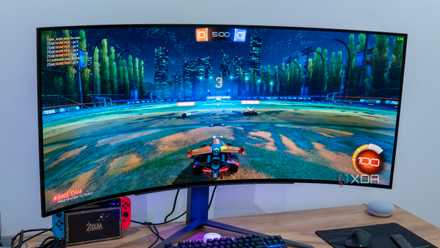
You can rethink your desk layout by going SFF — maybe you no longer need to keep your tower hidden away on the floor. You can free up space for a larger monitor, deskmat, and headset stand, all without upgrading to a larger desk that will make your room look smaller. SFF PCs save space on your desk, yes, but the bonus of achieving a better-looking setup should not be ignored.
5 best visual upgrades you can make to your PC setup
The desktop PC experience is a highly visual one. Here are the 5 biggest upgrades you can make to enhance the beauty of your setup.
1 They can actually be more silent
As long as you're not going overboard with parts
SFF PCs usually have only a handful of fan mounts compared to mid-towers or full-towers. The fewer spinning fans inside your PC, the less noise you need to deal with. Plus, many SFF cases accommodate 140mm fans, which can run quieter than 120mm fans while pulling the same amount of air. The CPU cooler does the bulk of the heavy lifting when it comes to airflow, and provided you choose a high-quality, silent air or liquid cooler, you can build a more silent PC than ever.
Of course, you can't just install flagship graphics cards and CPUs, and expect everything to stay whisper-silent. The more power-hungry your components, the harder your fans need to work, and the silence goes out the window. So, don't go crazy with your component choices, avoid common mistakes when buying case fans, and choose a high-quality CPU cooler. SFF PCs can cost you more than a mid-tower build, but the benefits can be worth it.

7 tips to build a completely silent, fanless PC
Going fanless is the last word in silent PCs, and building one is more than possible
Going SFF has unexpected advantages
Most people only think of space-saving when they think about building an SFF PC. However, not only can you put together a more silent and good-looking build, but you also get a more portable PC that can completely transform your boring desk setup. Plus, the learnings along the way are priceless, since you need to make smarter component choices, learn better cable management, and optimize airflow like you never needed to before.