
Mesh Wi-Fi seems to be the most preferred solution to address poor Wi-Fi these days. Mesh systems claim to cover your entire house in a seamless "mesh" of wireless connectivity, eliminating the dreaded dead zones. While they're perfectly capable of doing so, most people don't make the most of their mesh nodes. They continue to use wireless backhaul between the nodes and the main router, bottlenecking their Wi-Fi speeds. This is the default way of using a mesh network, but it's also the worst. Unless you have an expensive, tri-band mesh system for dedicated wireless backhaul, you can achieve maximum Wi-Fi speeds only by connecting your nodes to the router with Ethernet. This wired connection handles the backhaul traffic between the nodes and the router, while the nodes themselves are free to maintain a fast and reliable connection with your devices. You no longer need to settle for half of your Wi-Fi bandwidth just because your mesh Wi-Fi doesn't have a third band.

Your mesh Wi-Fi isn't the problem, your backhaul is
Running wires beats running circles around the problem
Most mesh systems slash the Wi-Fi speed reaching your device
It's just how wireless backhaul works
The way a mesh network works is by connecting a primary node to the modem and the rest of the nodes to this primary node wirelessly. This setup is preferred since it's plug-and-play, requiring nothing more than a guided setup on an app. The problem here is that data needs to flow not just from the primary node to the satellite nodes and your wireless devices, but also the other way around. Since this backhaul transmission also takes place on the same dual-band setup that the nodes use for the downlink transmission, your devices rarely enjoy the maximum Wi-Fi speed your internet plan is capable of.
Most affordable mesh Wi-Fi systems lack a dedicated third band to offload the backhaul traffic, and tank your Wi-Fi speeds as a result. This third band can be 5Ghz or 6GHz, depending on the Wi-Fi protocol supported by your mesh system. Since the majority of people use the more affordable dual-band mesh setup, their Wi-Fi performance doesn't benefit too much, despite the coverage being technically better. This is why a mesh network often feels like one step forward, two steps back.
5 home networking choices I regret making
Don't follow in these home networking footsteps.
Wired backhaul takes some effort, but restores your speed
Stop using just half of your Wi-Fi speed
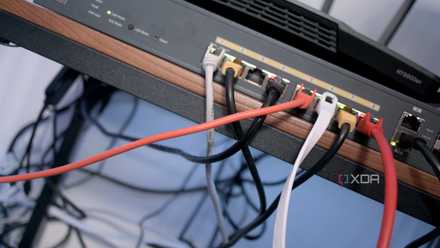
I'm afraid the solution to restoring peak Wi-Fi speeds is the thing mesh networks told you to eliminate: cables. If you really want uninterrupted Wi-Fi coverage from each of your nodes, you'll have to offload the backhaul duties to Ethernet. Without a third band on your mesh, your only option is to convert your mesh node into a wired access point (AP) by connecting it directly to the primary router. Ironically, the best way to use a mesh system (in this case) is not to use it as a mesh. With wired backhaul handling the upstream traffic from the nodes to the router, the wireless radios are no longer pulling double duty. They can exclusively focus on the downlink connection between your router and our devices, allowing you to enjoy the full wireless speed your network is capable of.
I admit it's not possible to wire every single mesh node to the primary router. Still, by wiring most of them, you're still getting most of the way in terms of clearing the wireless bands of the backhaul traffic. A single node communicating with the router on the wireless radio won't be as bad as the entire mesh network on a wireless backhaul. Running a Cat 6a cable from one or two nodes to the router will need some time and money if you don't want the cables snaking around the floor or the walls. That said, it's a one-time effort that will pay dividends for as long as you're living in the same house.
Smolink Cat 6a Ethernet Cable
The Smolink Cat 6a Ethernet cable supports up to 10 Gbps speeds and 750 MHz bandwidth. It is ideal for connecting computers, smart TVs, gaming consoles, and more. The cable features a durable PVC jacket, gold-plated RJ-45 connectors, and twisted wires with aluminum foil shielding to reduce crosstalk and interference with other signals.

5 reasons I'm still hard-wiring Ethernet even when I have a Wi-Fi 7 AP
Wi-Fi is pretty fly but I'm a consistency guy.
Mesh Wi-Fi isn't always the default solution to Wi-Fi coverage woes
You'd be surprised
It might seem that mesh Wi-Fi is indispensable to fixing poor Wi-Fi range in your house, but that's not always the case. In many cases, you probably just need a slightly better router. When my ISP replaced my Wi-Fi 5 router with a Wi-Fi 6 model, the dead zone in my apartment vanished instantly. The more advanced Wi-Fi protocol improved the connection range, so I didn't have to invest in a mesh network or spend on a new router myself. In fact, it might just be a bad router location that's killing your Wi-Fi performance. Try repositioning your router to a more central location and at an elevated spot to improve the Wi-Fi coverage.
The other thing you can do is similar to what I showed in the previous section. Using wired access points is the best way to retain peak Wi-Fi speeds across the house without spending on a mesh network. You can repurpose old routers into APs instead of spending on commercial APs or mesh nodes. Chances are that you have at least one old router lying around the house. It's perfect for a DIY access point — you just need to disable DHCP on it and set the same SSID and password as the main router. Your devices will seamlessly switch between the main router and your old one as you move through the house.
TP-Link AXE5400 Tri-Band Router (Wi-Fi 6E)
If you want a great Wi-Fi 6e router but don't want to spend a whole lot of money, check out this one from TP-Link.

I fixed my home network lag without buying a new router or a mesh system
Cheap and free network upgrades can do much more than you think
Wired backhaul is indispensable to your mesh network
If your mesh system is a dual-band setup, you absolutely need to wire your nodes to the main router. Without backhaul traffic flowing on a dedicated wired connection, you'll never enjoy full Wi-Fi speeds through your nodes. I know this is cheating since your mesh network isn't really a mesh anymore, but it works. You can also use wired access points instead of a mesh network if your Wi-Fi coverage is poor. Old routers make for perfect wired APs.