
ServiceNow
To find out if this integration is available in your organization, see your Datadog Integrations page or ask your organization administrator.
To initiate an exception request to enable this integration for your organization, email support@ddog-gov.com.
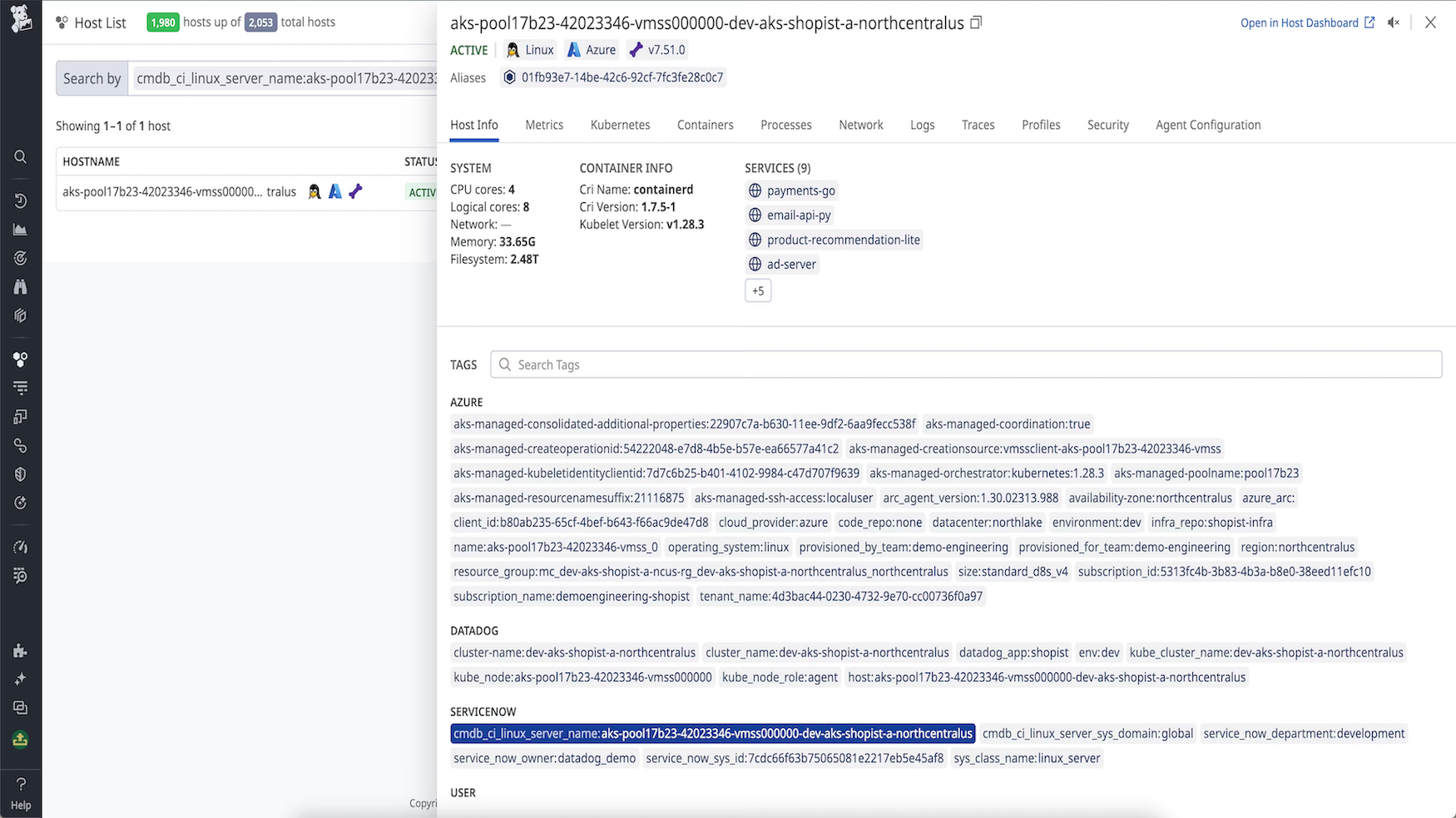
Enrich your Datadog hosts with CMDB metadata.
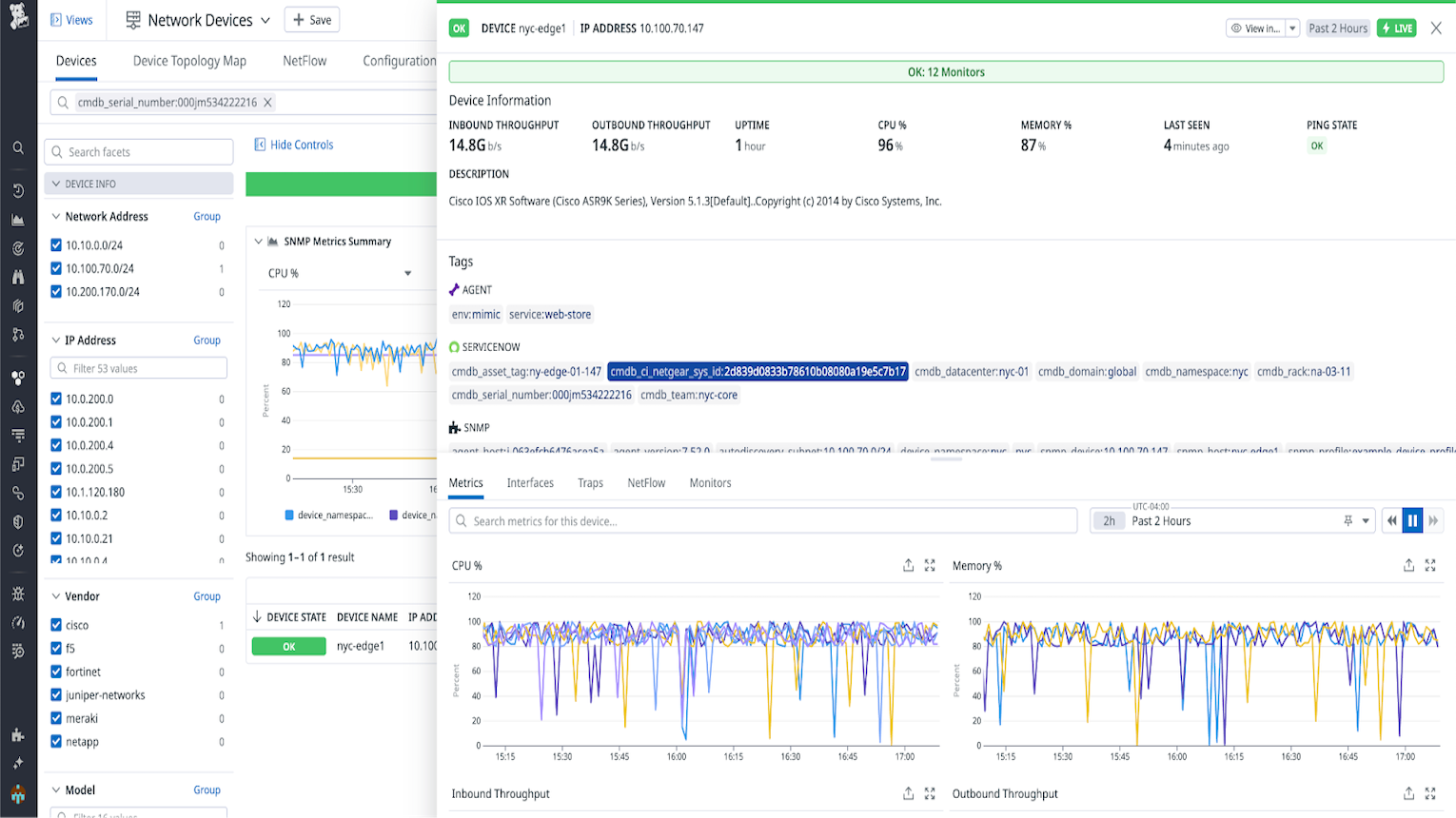
Enrich your Datadog network devices with CMDB metadata.
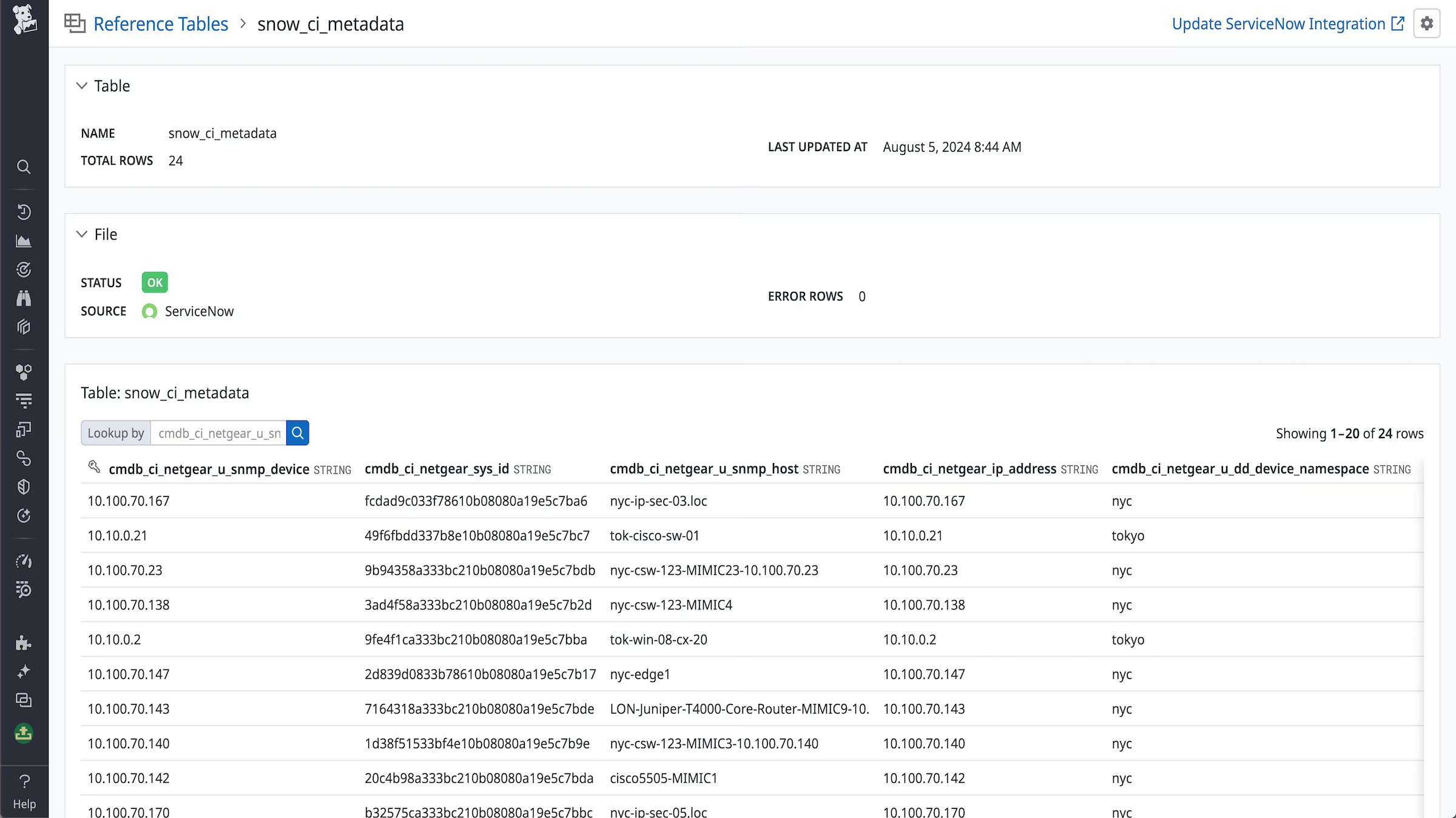
Enrich logs and events with CMDB reference tables.
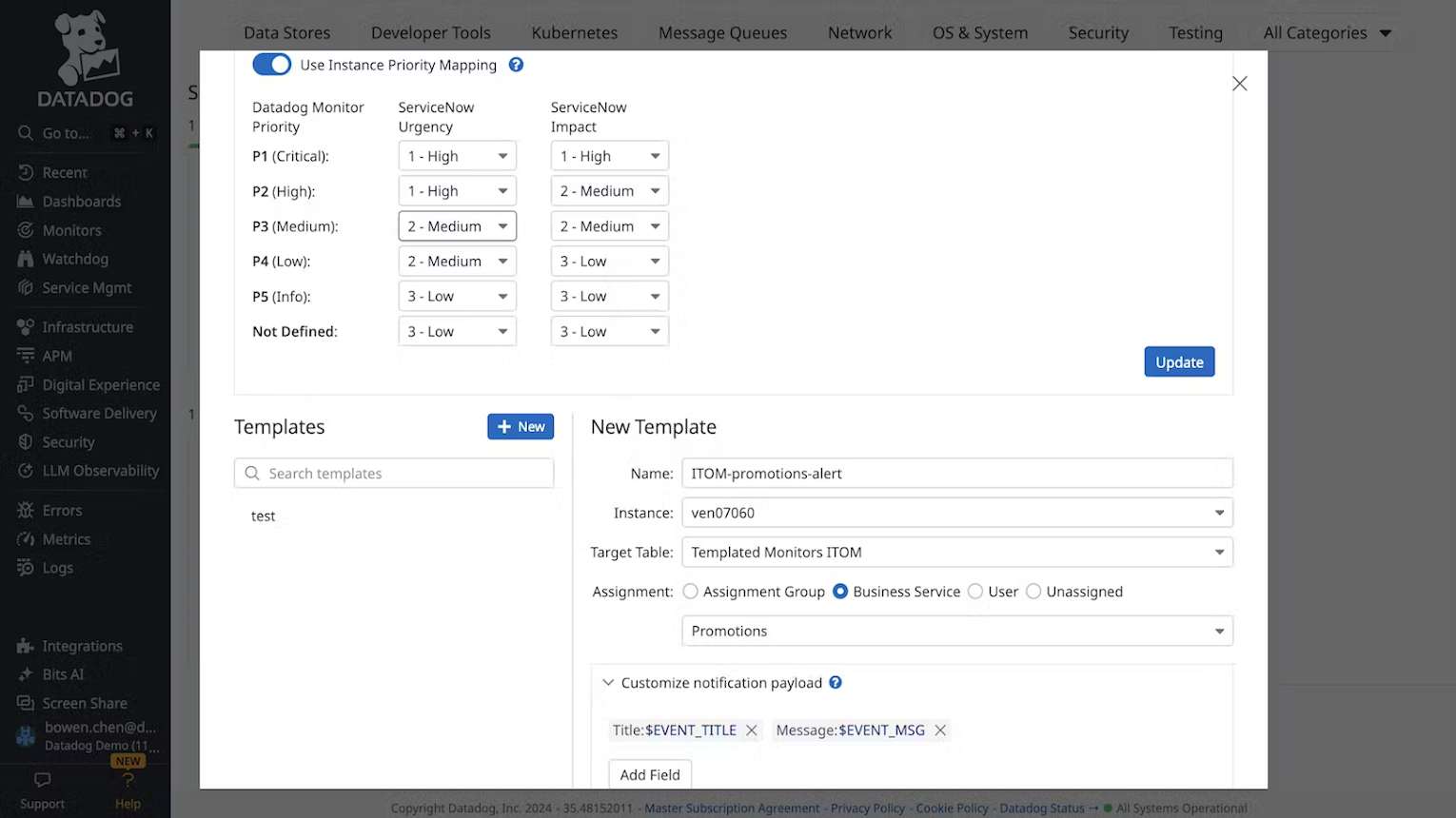
Create ServiceNow tickets from Datadog Alerts.
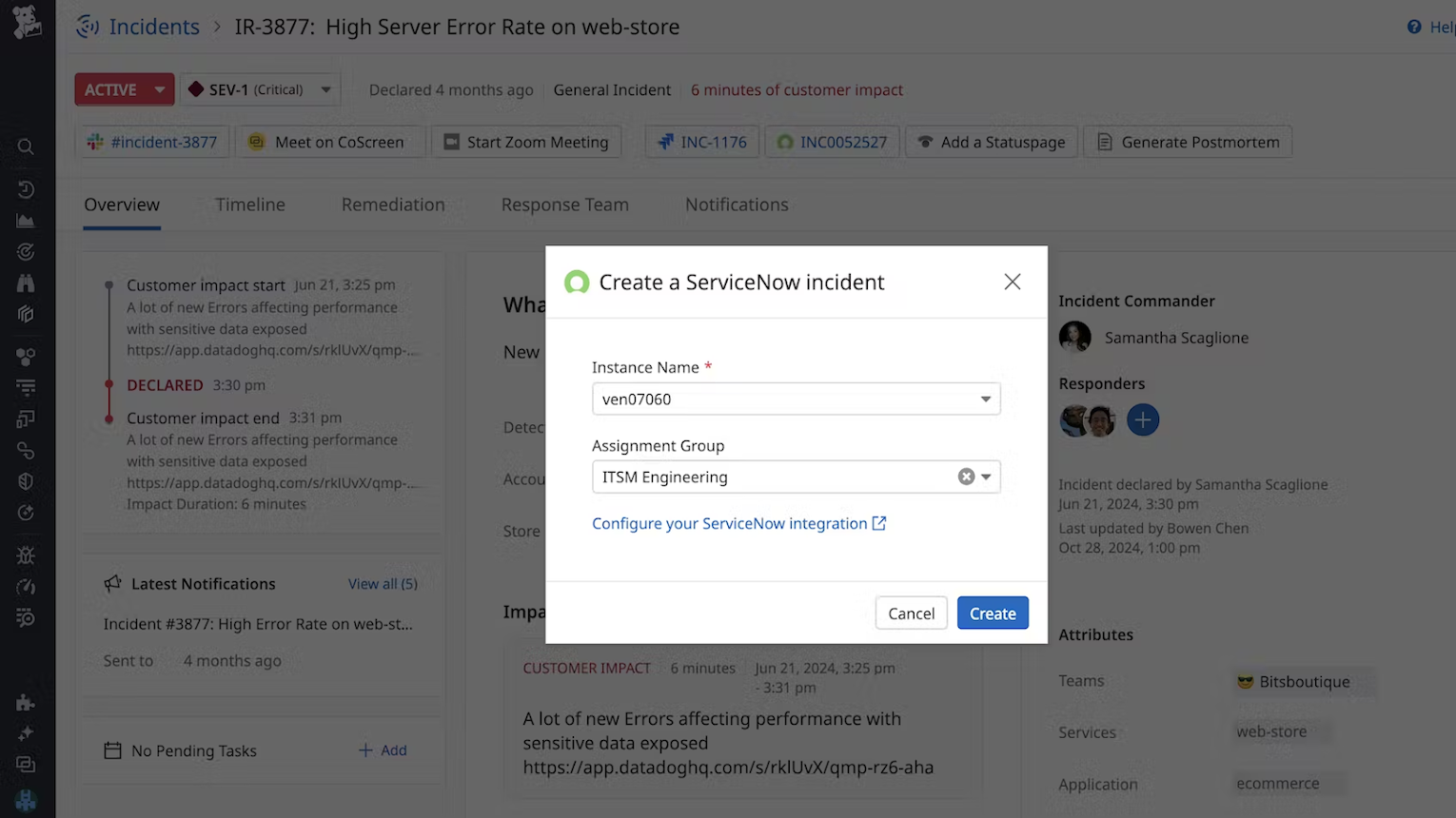
Create ServiceNow incidents with Datadog Incident Management.
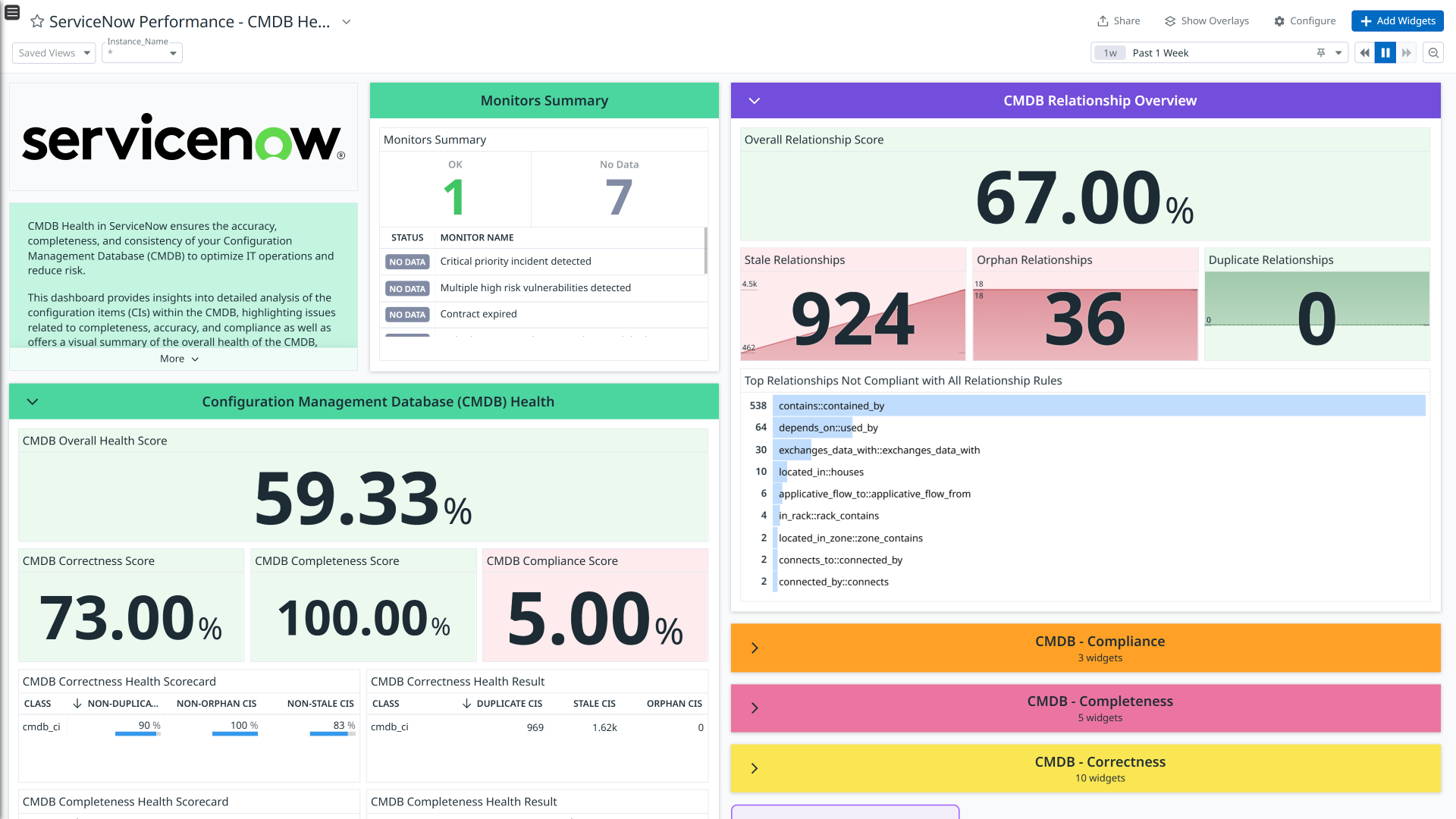
CMDB Health dashboard: provides insights into detailed analysis of the configuration items (CIs) within the CMDB.
Overview
ServiceNow is an IT service management (ITSM) platform used to record, track, and manage enterprise-level IT processes in one centralized system.
The Datadog-ServiceNow integration bridges observability and IT service management, enabling seamless collaboration between operations and service teams. This bi-directional integration consists of the following key components:
Send alerts, cases, and incidents generated in Datadog to ServiceNow as records in the Incident or Event tables. Manage and resolve these issues directly from Datadog, creating a seamless connection between observability and IT service workflows across IT service management (ITSM) and IT operations management (ITOM).
Enrich Datadog hosts, services, and devices with business-specific information stored as CIs in Configuration Management Database (CMDB), enabling you to better understand your infrastructure usage, accelerate troubleshooting, and visualize your Datadog entities with the metadata you care about.
Use Datadog as a discovery mechanism for ServiceNow CMDB Configuration Items (CIs) with the Datadog Service Graph Connector.
Monitor the health and performance of your ServiceNow instances. This integration provides logs and metrics giving you rich insights into how your teams are working with the various ServiceNow modules.
You can forward ServiceNow change request events to Datadog, so you can correlate change activity in ServiceNow with metrics, logs, and traces.
Bits AI references your ServiceNow content, such as incidents, changes, and knowledge, to guide investigations in real time.
Note: The Datadog ServiceNow integration supports ServiceNow releases that are not listed as end of life.
Setup
Click the links above to view setup guides for each component. For each integration, begin by configuring the ServiceNow tile.
Configure the ServiceNow tile in Datadog
Configuration for all ServiceNow integrations starts with entering your ServiceNow instance details into Datadog. This configuration enables the integration to support the following features:
- IT Operations Management (ITOM) and IT Service Management (ITSM)
- CMDB Enrichment
- Collection of ServiceNow Performance Monitoring metrics and logs
- Change request event forwarding
To configure a new instance, follow these steps:
<INSTANCE_NAME>.servicenowservices.com. Because this is a custom domain, contact Datadog Support to enable it for your account.- In Datadog, navigate to the ServiceNow integration tile on the Integrations page.
- Click Add New Instance.
- Choose an authentication method. See the tabs below for details:
- Use OAuth 2.0 Client Credentials (recommended).
- Use basic authentication (legacy).
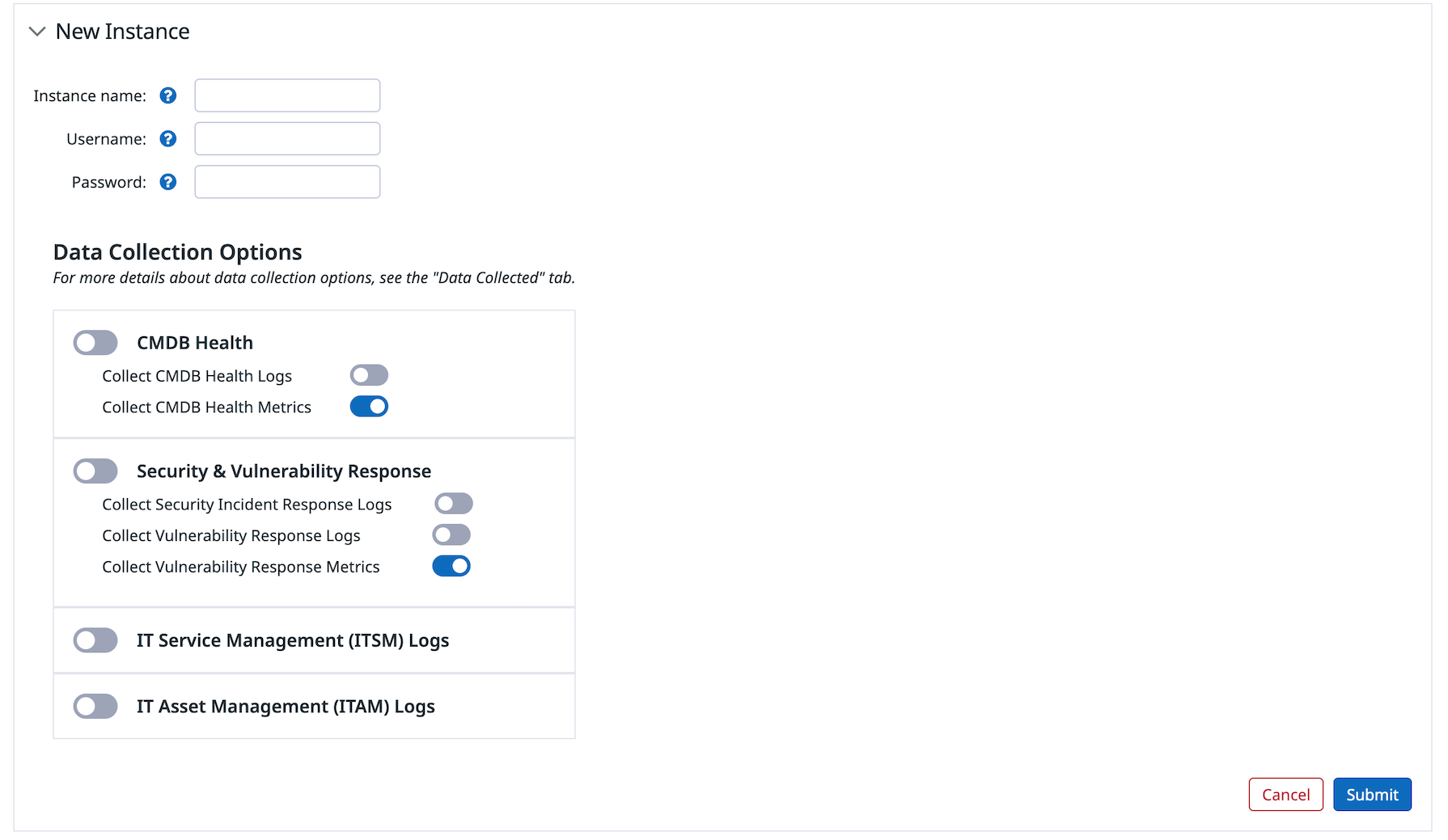
- Add the instance name, which is the subdomain of your ServiceNow domain:
<INSTANCE_NAME>.service-now.com. If your ServiceNow instance uses a custom domain, reach out to Datadog Support. You enter this field within the Authentication section after selecting a method. - Select the type of performance metrics and logs you want to receive:
- ITSM
- ITAM
- CMDB Health
- Security Incident Response
- Vulnerability Response
👁 servicenow integration new instance
OAuth 2.0 uses the Client Credentials flow and is the recommended and most secure option.
To configure a new instance using OAuth 2.0 Client Credentials:
- Follow the steps above to open the ServiceNow integration tile, add a new instance, set the instance name, and select your desired data collection options.
- Under Authentication Method, select OAuth2. Paste the Client ID and Client Secret generated when you registered the OAuth application in ServiceNow (Client Credentials grant).
- Ensure the OAuth Application User has the correct permissions for Datadog and the specific roles for each functionality used. See Create a ServiceNow Account with correct permissions for Datadog below.
Basic authentication uses a ServiceNow username and password and is considered legacy. Use OAuth 2.0 whenever possible.
If you must use basic authentication, ensure the Datadog user has the correct permissions. See Create a ServiceNow Account with correct permissions for Datadog below.
Create a ServiceNow Account with correct permissions for Datadog
To use the integration, create a ServiceNow user (for example, with username datadog or datadog_integration) and assign the user the following roles:
x_datad_datadog.userandimport_set_loaderandimport_transformer
To enable Bits AI access, the same user account also needs the itil role, which grants read access to incidents, change requests, and CMDB configuration items via the REST API.
For knowledge article access, the itil role is necessary but not sufficient — the account must also be included in the Can Read user criteria on each knowledge base you want Bits to access. To configure this, open the knowledge base in ServiceNow, navigate to the Can Read related list, and add the Datadog integration user or a group it belongs to.
ServiceNow performance logs and metrics
To receive logs and metrics about your instance performance, configure ServiceNow metric settings using a user account that has the following roles and plugins installed:
| Module | Data Collected | User Roles Required | Plugin Required |
|---|---|---|---|
| ITSM | logs | itil | - |
| ITAM | logs | asset | - |
| CMDB Health | logs, metrics | cmdb_dedup_admin | - |
| Vulnerability Response (VR) | logs, metrics | sn_sec_analytics.readsn_vul.app_read_allsn_vul.read_allsn_vul_container.read_all | Vulnerability Response and Configuration Compliance for ContainersVulnerability Response |
| Security Incident Response (SIR) | logs | sn_si.read | Security Incident Response |
Tip: You can create a dedicated limited user in ServiceNow for Datadog.
Forward change request events to Datadog
The ServiceNow integration supports forwarding ServiceNow change request events to Datadog. This allows you to correlate change activity in ServiceNow with metrics, logs, and traces inside Event Management Explorer.
When a change request is created, updated, or deleted in ServiceNow, a business rule can send an event payload to the Datadog Events API. It can add tags with ServiceNow metadata (such as change number, CI, state, and priority) to these events to appear in the Event Management explorer.
- In Datadog, on the ServiceNow integration tile, go to Configure > Change Request Events.
- Follow the instructions on the page to select or create a Datadog API key, securely store it in ServiceNow as a system property, and create a ServiceNow business rule with the script Datadog provides.
Enable Bits AI access
- On the ServiceNow integration tile, navigate to the “Bits AI” section for your instance.
- Select the Enable account access toggle to grant Bits AI SRE access to your ServiceNow instance.
- Optionally, use the fine-grained toggles to limit Bits AI SRE to the ServiceNow data relevant to your environment:
- Access incidents
- Access knowledge articles
- Access change requests
- Access items in CMDB
- Ensure the ServiceNow user account has read access to each data type you’ve enabled. See Create a ServiceNow Account with correct permissions for Datadog for the required roles.
- Click Update.
- In Bits.md, fill in the Third-Party Integration Context snippet to help Bits make better use of this instance’s data during investigations.
Data Collected
Metrics
| servicenow_performance.cmdb_health_result_rel_all.rel_allrules.relations_count (count) | Count of CI relationships which are not compliant with all relationship rules |
| servicenow_performance.cmdb_health_scorecard.audit.failed (count) | Count of failed audit checks |
| servicenow_performance.cmdb_health_scorecard.audit.score (gauge) | Score based on audit checks Shown as percent |
| servicenow_performance.cmdb_health_scorecard.completeness.score (gauge) | Score based on the completeness of CIs Shown as percent |
| servicenow_performance.cmdb_health_scorecard.correctness.score (gauge) | Score based on the correctness of CIs Shown as percent |
| servicenow_performance.cmdb_health_scorecard.duplicate.failed (count) | Count of duplicate CIs |
| servicenow_performance.cmdb_health_scorecard.duplicate.score (gauge) | Score based on the count of duplicate CIs Shown as percent |
| servicenow_performance.cmdb_health_scorecard.orphan.failed (count) | Count of orphan CIs that failed checks |
| servicenow_performance.cmdb_health_scorecard.orphan.score (gauge) | Score based on the count of orphan CIs Shown as percent |
| servicenow_performance.cmdb_health_scorecard.recommended.failed (count) | Count of recommended checks that failed |
| servicenow_performance.cmdb_health_scorecard.recommended.score (gauge) | Score based on the count of recommended checks Shown as percent |
| servicenow_performance.cmdb_health_scorecard.rel_duplicate.failed (count) | Count of duplicate relationships that failed checks |
| servicenow_performance.cmdb_health_scorecard.rel_orphan.failed (count) | Count of orphan relationships that failed checks |
| servicenow_performance.cmdb_health_scorecard.rel_stale.failed (count) | Count of stale relationships that failed checks |
| servicenow_performance.cmdb_health_scorecard.relationship.score (gauge) | Score based on the CI relationship checks Shown as percent |
| servicenow_performance.cmdb_health_scorecard.required.failed (count) | Count of required checks that failed |
| servicenow_performance.cmdb_health_scorecard.required.score (gauge) | Score based on the count of required checks Shown as percent |
| servicenow_performance.cmdb_health_scorecard.staleness.failed (count) | Count of stale CIs that failed checks |
| servicenow_performance.cmdb_health_scorecard.staleness.score (gauge) | Score based on the count of stale CIs Shown as percent |
| servicenow_performance.sn_sec_analytics_health_dashboard_data_updates.active_application_vulnerable_items_without_risk_score.score (gauge) | Score based on active application vulnerable items without a risk score Shown as percent |
| servicenow_performance.sn_sec_analytics_health_dashboard_data_updates.active_container_vulnerable_items_without_risk_score.score (gauge) | Score based on active container vulnerable items without a risk score Shown as percent |
| servicenow_performance.sn_sec_analytics_health_dashboard_data_updates.active_records_without_risk_score.score (gauge) | Score based on active records without a risk score Shown as percent |
| servicenow_performance.sn_sec_analytics_health_dashboard_data_updates.active_vulnerable_items_without_risk_score.score (gauge) | Score based on active vulnerable items without a risk score Shown as percent |
| servicenow_performance.sn_sec_analytics_health_dashboard_data_updates.application_vulnerable_items_without_remediation_target.score (gauge) | Score based on application vulnerable items without a remediation target Shown as percent |
| servicenow_performance.sn_sec_analytics_health_dashboard_data_updates.auto_close_container_vulnerable_items.score (gauge) | Score based on auto-closed container vulnerable items |
| servicenow_performance.sn_sec_analytics_health_dashboard_data_updates.auto_close_stale_records.score (gauge) | Score based on auto-closed stale records |
| servicenow_performance.sn_sec_analytics_health_dashboard_data_updates.auto_delete_rules.score (gauge) | Score based on auto-delete rules |
| servicenow_performance.sn_sec_analytics_health_dashboard_data_updates.business_rules_on_the_detections_table.score (gauge) | Score based on business rules on the detections table |
| servicenow_performance.sn_sec_analytics_health_dashboard_data_updates.closed_application_vulnerable_items_without_substate.score (gauge) | Score based on closed application vulnerable items without substate Shown as percent |
| servicenow_performance.sn_sec_analytics_health_dashboard_data_updates.closed_container_vulnerable_items_without_substate.score (gauge) | Score based on closed container vulnerable items without substate Shown as percent |
| servicenow_performance.sn_sec_analytics_health_dashboard_data_updates.closed_records_without_substate.score (gauge) | Score based on closed records without substate Shown as percent |
| servicenow_performance.sn_sec_analytics_health_dashboard_data_updates.closed_vulnerable_items_without_substate.score (gauge) | Score based on closed vulnerable items without substate Shown as percent |
| servicenow_performance.sn_sec_analytics_health_dashboard_data_updates.container_image_vulnerable_items_without_remediation_target.score (gauge) | Score based on container image vulnerable items without a remediation target Shown as percent |
| servicenow_performance.sn_sec_analytics_health_dashboard_data_updates.customized_business_rules.score (gauge) | Score based on customized business rules |
| servicenow_performance.sn_sec_analytics_health_dashboard_data_updates.customized_script_includes.score (gauge) | Score based on customized script includes |
| servicenow_performance.sn_sec_analytics_health_dashboard_data_updates.defective_active_application_vulnerable_items.score (gauge) | Score based on defective active application vulnerable items Shown as percent |
| servicenow_performance.sn_sec_analytics_health_dashboard_data_updates.defective_active_container_vulnerable_items.score (gauge) | Score based on defective active container vulnerable items Shown as percent |
| servicenow_performance.sn_sec_analytics_health_dashboard_data_updates.defective_active_records.score (gauge) | Score based on defective active records Shown as percent |
| servicenow_performance.sn_sec_analytics_health_dashboard_data_updates.defective_active_vulnerable_items.score (gauge) | Score based on defective active vulnerable items Shown as percent |
| servicenow_performance.sn_sec_analytics_health_dashboard_data_updates.disabled_integrations.score (gauge) | Score based on disabled integrations |
| servicenow_performance.sn_sec_analytics_health_dashboard_data_updates.discovered_item_matching_rate.score (gauge) | Score based on discovered item matching rate Shown as percent |
| servicenow_performance.sn_sec_analytics_health_dashboard_data_updates.discovered_item_with_no_ci.score (gauge) | Score based on discovered items with no CI |
| servicenow_performance.sn_sec_analytics_health_dashboard_data_updates.failed_integration_runs_in_the_past_week.score (gauge) | Score based on failed integration runs in the past week |
| servicenow_performance.sn_sec_analytics_health_dashboard_data_updates.failed_or_stalled_background_jobs.score (gauge) | Score based on failed or stalled background jobs |
| servicenow_performance.sn_sec_analytics_health_dashboard_data_updates.items_without_remediation_target.score (gauge) | Score based on items without a remediation target Shown as percent |
| servicenow_performance.sn_sec_analytics_health_dashboard_data_updates.pa_installed_but_not_activated.score (gauge) | Score based on PA installed but not activated |
| servicenow_performance.sn_sec_analytics_health_dashboard_data_updates.remediation_tasks_without_assignment_group.score (gauge) | Score based on remediation tasks without an assignment group |
| servicenow_performance.sn_sec_analytics_health_dashboard_data_updates.remediation_tasks_without_assignment_group_for_avr.score (gauge) | Score based on remediation tasks without an assignment group for AVR |
| servicenow_performance.sn_sec_analytics_health_dashboard_data_updates.remediation_tasks_without_assignment_group_for_cvr.score (gauge) | Score based on remediation tasks without an assignment group for CVR |
| servicenow_performance.sn_sec_analytics_health_dashboard_data_updates.remediation_tasks_without_assignment_group_for_vr.score (gauge) | Score based on remediation tasks without an assignment group for VR |
| servicenow_performance.sn_sec_analytics_health_dashboard_data_updates.slow_business_rules_and_scripts.score (gauge) | Score based on slow business rules and scripts |
| servicenow_performance.sn_sec_analytics_health_dashboard_data_updates.slow_queries.score (gauge) | Score based on slow queries |
| servicenow_performance.sn_sec_analytics_health_dashboard_data_updates.stalled_integrations.score (gauge) | Score based on stalled integrations |
| servicenow_performance.sn_sec_analytics_health_dashboard_data_updates.unassigned_active_application_vulnerable_items.score (gauge) | Score based on unassigned active application vulnerable items Shown as percent |
| servicenow_performance.sn_sec_analytics_health_dashboard_data_updates.unassigned_active_records.score (gauge) | Score based on unassigned active records Shown as percent |
| servicenow_performance.sn_sec_analytics_health_dashboard_data_updates.unassigned_active_vulnerable_items.score (gauge) | Score based on unassigned active vulnerable items Shown as percent |
| servicenow_performance.sn_sec_analytics_health_dashboard_data_updates.unassigned_container_vulnerable_items.score (gauge) | Score based on unassigned container vulnerable items Shown as percent |
| servicenow_performance.sn_sec_analytics_health_dashboard_data_updates.ungrouped_active_application_vulnerable_items.score (gauge) | Score based on ungrouped active application vulnerable items Shown as percent |
| servicenow_performance.sn_sec_analytics_health_dashboard_data_updates.ungrouped_active_container_vulnerable_items.score (gauge) | Score based on ungrouped active container vulnerable items Shown as percent |
| servicenow_performance.sn_sec_analytics_health_dashboard_data_updates.ungrouped_active_records.score (gauge) | Score based on ungrouped active records Shown as percent |
| servicenow_performance.sn_sec_analytics_health_dashboard_data_updates.ungrouped_active_vulnerable_items.score (gauge) | Score based on ungrouped active vulnerable items Shown as percent |
| servicenow_performance.sn_sec_analytics_health_dashboard_data_updates.unmatched_cis_in_discovered_items.score (gauge) | Score based on unmatched CIs in discovered items |
| servicenow_performance.sn_sec_analytics_health_dashboard_data_updates.unused_ci_lookup_rules.score (gauge) | Score based on unused CI lookup rules |
| servicenow_performance.sn_sec_analytics_health_dashboard_data_updates.upgrade_conflicts.score (gauge) | Score based on upgrade conflicts |
| servicenow_performance.sn_sec_analytics_health_dashboard_data_updates.vulnerable_items_without_remediation_target.score (gauge) | Score based on vulnerable items without a remediation target Shown as percent |
| servicenow_performance.sn_sec_analytics_health_dashboard_updates.configuration.score (gauge) | Score based on configuration health Shown as percent |
| servicenow_performance.sn_sec_analytics_health_dashboard_updates.data_health.score (gauge) | Score based on data health Shown as percent |
| servicenow_performance.sn_sec_analytics_health_dashboard_updates.implementation_health.score (gauge) | Score based on implementation health Shown as percent |
| servicenow_performance.sn_sec_analytics_health_dashboard_updates.integration_health.score (gauge) | Score based on integration health Shown as percent |
| servicenow_performance.sn_sec_analytics_health_dashboard_updates.overall_health.score (gauge) | Score based on overall health Shown as percent |
| servicenow_performance.sn_sec_analytics_health_dashboard_updates.performance.score (gauge) | Score based on performance health Shown as percent |
| servicenow_performance.sn_sec_analytics_health_dashboard_updates.process_health.score (gauge) | Score based on process health Shown as percent |
Privacy policy
Datadog collects Business Service, Assignment Group, email, name, sysID, and username to populate corresponding fields in ServiceNow. Processing of any personal data collected by Datadog in connection with this integration is subject to Datadog’s privacy policy.
Support
Need additional help? Contact Datadog support.
Further Reading
Additional helpful documentation, links, and articles:
