|
VOOZH | about |
|
VOOZH | about |
Writing today’s article was a fascinating experience for me and would also be for the readers of this blog. What’s so different? Two things: firstly the article is about something I always wanted to do since I was a 5-year old; secondly this topic / tools / algorithm are new to me as well. I am no way a master of image processing, but the utility of this field simply blew my mind.
Imagine, if you can create an application of auto-tagging a photograph as that of Facebook, or create your own face recognition password to your laptop. In this article, I will pick up a very simple but interesting application of Image processing. We will use Python to do the image processing. In next few articles, I will take over more complex examples of Image Processing. Here is the problem I will be working on in this article:
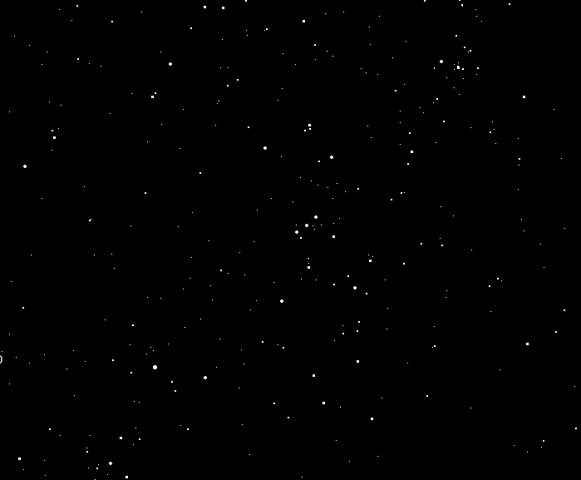
Guess what is this image?
You are right, it’s a typical picture of an open sky. I took this picture last to last night in Bangalore from my terrace. At that point of time, I had no clue that this can be such an exciting and rewarding exercise. As a kid, I used to spend hours counting these stars but almost always failed to go beyond 50-60. I wanted to complete this exercise using some help from my machine. I had no clue that this was even possible till last Sunday, and today I have completed this long pending task using Python.
Step 1: Import the required library
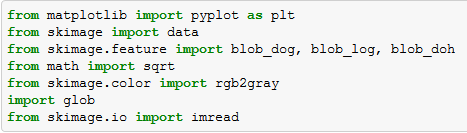
Skimage package enables us to do image processing using Python. The language is extremely simple to understand but does some of the most complicated tasks. Here are a few library you need to import to get started,
Step 2 : Import the image
Once we have all the libraries in place, we need to import our image file to python. Following is the code you can use to import the image file. Note that the image is imported in grey scale, which basically means that each pixel is a shade of grey. And each pixel essentially becomes one cell in a matrix. In this case the image is matrix of 480*581 cells (or image of 480*581 pixels).
Python Code:
from skimage.io import imread
import matplotlib.pyplot as plt
image = imread('./image.png')
plt.imshow(image)
plt.show()
Step 3 : Find the number of Stars
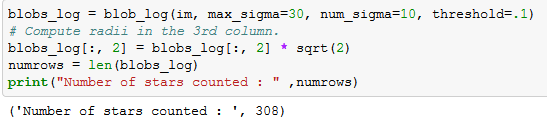
Now comes the critical part where our major labor is done by a few commands. These few command go out for searching continuous objects in the picture. Blobs_log gives three outputs for each object found. First two are the coordinates and the third one is the area of the object. The radius of each blob/object can be estimated using this column (area of the object).
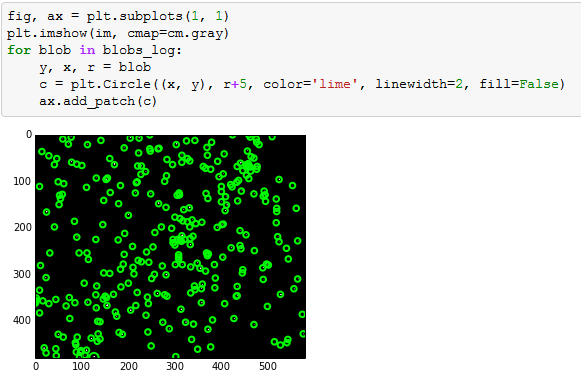
As we can see that the algorithm has estimated 308 visible stars. Let’s now look at how accurate are these readings.
Step 4 : Validated whether we captured all the stars
The number 308 is still coming out of a black box. Let’s look at whether we have spotted all the stars correctly. For this I am circling each estimated star position. And the look at the image if we are missing any star.
Here is the complete code :
[stextbox id=”grey”]from matplotlib import pyplot as plt from skimage import data from skimage.feature import blob_dog, blob_log, blob_doh from math import sqrt from skimage.color import rgb2gray import glob from skimage.io import imread
example_file = glob.glob(r"C:UsersTavishDesktopwint_sky.gif")[0]
im = imread(example_file, as_grey=True)
plt.imshow(im, cmap=cm.gray)
plt.show()
blobs_log = blob_log(im, max_sigma=30, num_sigma=10, threshold=.1)
# Compute radii in the 3rd column.
blobs_log[:, 2] = blobs_log[:, 2] * sqrt(2)
numrows = len(blobs_log)
print("Number of stars counted : " ,numrows)
fig, ax = plt.subplots(1, 1)
plt.imshow(im, cmap=cm.gray)
for blob in blobs_log:
y, x, r = blob
c = plt.Circle((x, y), r+5, color='lime', linewidth=2, fill=False)
ax.add_patch(c) [/stextbox]End Notes
Image Processing is fascinating! I started my journey with Python Image Processing not more than 5 days. For the benefit of the community, I will encourage any suggestions or best practices to be shared on this forum. This exercise might not have any practical application but similar analysis can be done for purity estimations. For instance, in glass industry we need the number of silica particles in the glass at a microscopic level. By capturing the frames in a video, you can use this simple code to do a lot of things. For example, estimation of traffic through CCTV footage. This code can easily be tailored to achieve the same.
Did you find the article useful? If you have done similar pieces of work on Python Image processing, please share them with us. Do let us know your thoughts about this article in the box below.
If you like what you just read & want to continue your analytics learning, subscribe to our emails, follow us on twitter or like our facebook page.
Tavish Srivastava, co-founder and Chief Strategy Officer of Analytics Vidhya, is an IIT Madras graduate and a passionate data-science professional with 8+ years of diverse experience in markets including the US, India and Singapore, domains including Digital Acquisitions, Customer Servicing and Customer Management, and industry including Retail Banking, Credit Cards and Insurance. He is fascinated by the idea of artificial intelligence inspired by human intelligence and enjoys every discussion, theory or even movie related to this idea.
GPT-4 vs. Llama 3.1 – Which Model is Better?
Llama-3.1-Storm-8B: The 8B LLM Powerhouse Surpa...
A Comprehensive Guide to Building Agentic RAG S...
Top 10 Machine Learning Algorithms in 2026
45 Questions to Test a Data Scientist on Basics...
90+ Python Interview Questions and Answers (202...
8 Easy Ways to Access ChatGPT for Free
Prompt Engineering: Definition, Examples, Tips ...
What is LangChain?
What is Retrieval-Augmented Generation (RAG)?
Thanks a lot for sharing. I am also a beginner in the image processing world, good article to start the journey !!
Nice article, Tavish. When you say that "this exercise might not have any practical application", it would depend upon your definition of practical. ;-) Even while reading the article, I thought up of a possible use: the estimation of night sky darkness from a specific place. With artificial lights encroaching into a lot of places, I strongly feel that it is important that we make sure that the treasures of the night sky are 'directly' available to us. While this method may not be perfect owing to the differences in the mechanics of human and camera vision, I think it at least could be a good complement to standard methods. And in more general terms, these days machine learning and large-scale computational statistical analyses are widely prevalent in astronomy (a good example of "Big Science"). For more information see, e.g. here and here.
Anon, Glad you liked the article. And thanks a lot for sharing these applications. Tavish
Edit
Resend OTP
Resend OTP in 45s