VOOZH about

URL: https://www.analyticsvidhya.com/blog/2021/04/top-python-libraries-for-image-processing-in-2021/

⇱ Top Python Libraries For Image Processing In 2021


India's Most Futuristic AI Conference Is Back – Bigger, Sharper, Bolder

  • d
  • :
  • h
  • :
  • m
  • :
  • s

Reading list

Top Python Libraries For Image Processing In 2021

Akshay Last Updated : 22 Oct, 2024
6 min read
This article was published as a part of the Data Science Blogathon.

As indicated by IDC, digital information will soar up to 175 zettabytes, and the immense piece of this information pictures. Data scientists need to (pre) measure these images before taking care of them into any Artificial Intelligence and deep learning models. They need to do the significant (and at times filthy) work before the pleasant part starts.

To handle a lot of information with effectiveness and speed without bargaining the outcomes Data scientists need to utilize picture preparing instruments for Artificial Intelligence and deep learning tasks.

In this article, I will drill down the most helpful image processing libraries in Python which are being utilized vigorously in Artificial intelligence and deep learning tasks. So let’s get started!

πŸ‘ python libraries image processing image

  1. OpenCV
  2. Scikit-Image
  3. Scipy
  4. Python Image Library (Pillow/PIL)
  5. Matplotlib
  6. SimpleITK
  7. Numpy
  8. Mahotas

OpenCV is one of the most famous and widely used open-source libraries for computer vision tasks such as image processing, object detection, face detection, image segmentation, face recognition, and many more. Other than this, it can also be used for machine learning tasks. This is developed by Intel in 2002. It is written in C++ but developers have provided Python and Java bindings. It is easy to read and use.

To build computer vision and machine learning models, OpenCV has more than 2500+ algorithms. These algorithms are very much useful to perform various tasks such as face recognition, object detection, and many more. Let’s see some examples where we can perform using OpenCV:

πŸ‘ OpenCV

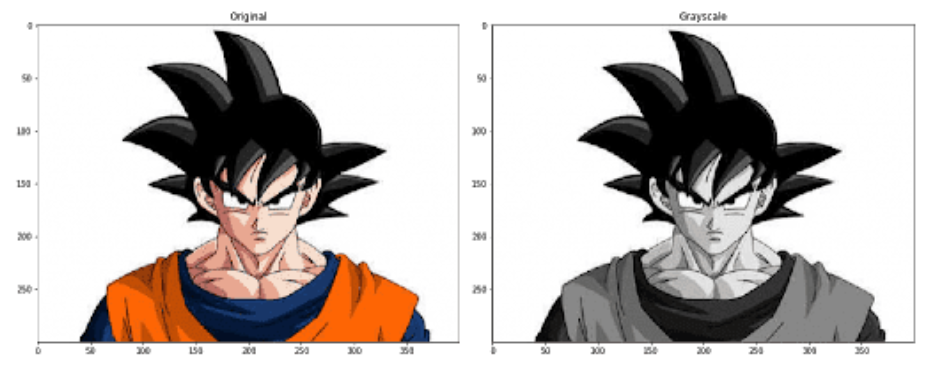
Gray Scaling

Below code, snippet shows the gray-scaling in OpenCV

πŸ‘ image processing python libraries opencv

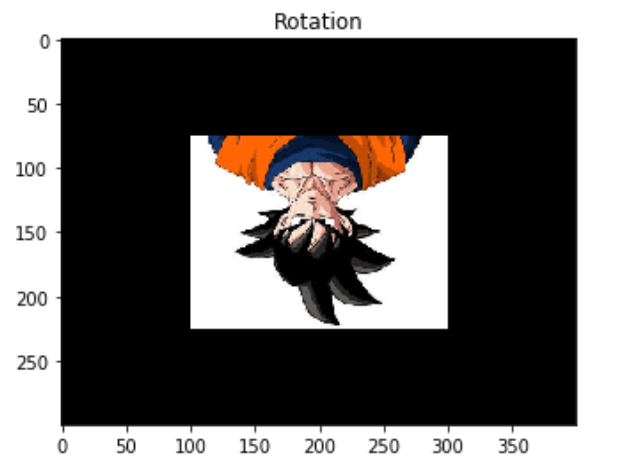
Rotate Image

OpenCV helps use to rotate the image by any degree ranges from 0 to 360 degrees.

Check the below code to rotate the image by 180 degrees.

import cv2 as cv
import matplotlib.pyplot as plt
img = cv.imread('example.jpg')
h, w = image.shape[:2]
rot_matrix = cv.getRotationMatrix2D((w/2,h/2), -180, 0.5)
rot_image = cv.warpAffine(img, rot_matrix, (w, h))
plt.imshow(cv.cvtColor(rot_image, cv.COLOR_BGR2RGB))
πŸ‘ image processing python libraries rotation
OpenCV provides other functionalities as well other than what we have discussed so far. Apart from this, it also helps in Face Detection, Image Segmentation, Feature Extraction, Object Detection, 3-D Reconstruction, and many more.

For more information, check official documentation: Link

Scikit-Image is another great open-source image processing library. It is useful in almost any computer vision task. It is among one of the most simple and straightforward libraries. Some parts of this library are written in Cython ( It is a superset of python programming language designed to make python faster as C language). It provides a large number of algorithms which include segmentation, color space manipulation, geometric transformation, filtering, morphology, feature detection, and many more.
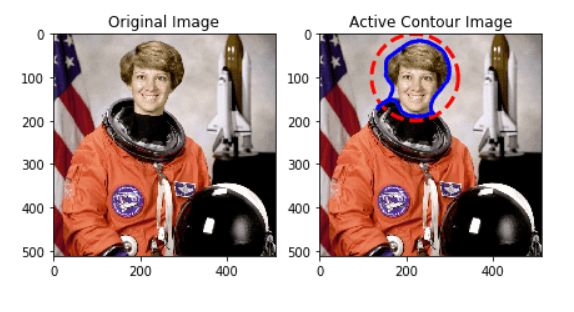
Scikit Image uses Numpy arrays as image objects. Let’s see how can we perform active contour operation in the scikit image. Active contour describes the boundaries of shapes in an image. 
πŸ‘ image processing python libraries scikit image

Check the below code for active contour operation:

import numpy as np
import matplotlib.pyplot as plt
from skimage.color import rgb2gray
from skimage import data
from skimage.filters import gaussian
from skimage.segmentation import active_contour
image = data.astronaut()
# Data for circular boundary
s = np.linspace(0, 2*np.pi, 400)
x = 220 + 100*np.cos(s)
y = 100 + 100*np.sin(s)
init = np.array([x, y]).T
# formation of the active contour
centre = active_contour(gaussian(image, 3),init, alpha=0.015, beta=10, gamma=0.001)
figure, axis = plt.subplots(1, 2, figsize=(7, 7))
ax[0].imshow(image, cmap=plt.cm.gray)
ax[0].set_title("Original Image")
ax[1].imshow(image, cmap=plt.cm.gray)
πŸ‘ image processing python libraries skimage example

For more information, check official documentation: Link

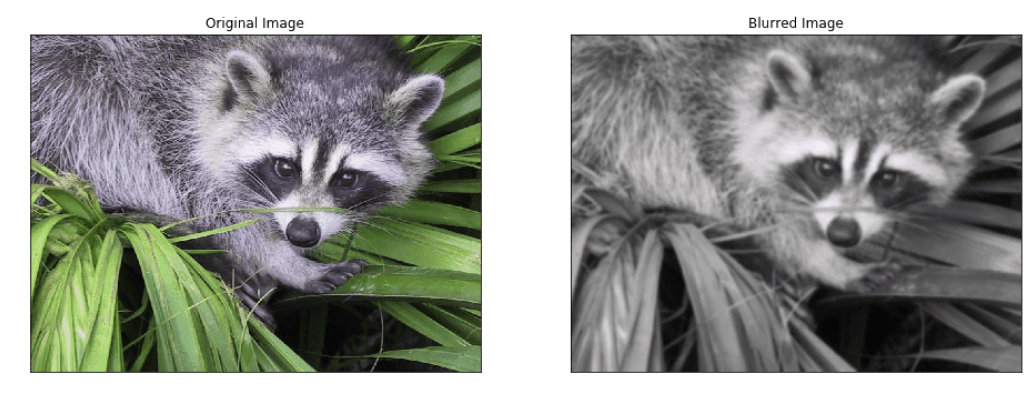
SciPy is primarily used for mathematical and scientific computations, but sometimes it can also be used for basic image manipulation and processing tasks using the submodule scipy.ndimage.At the end of the day, images are just multidimensional arrays, SciPy provides a set of functions that are used to operate n-dimensional Numpy operations. SciPy provides some basic image processing operations such as Face Detection, Convolution, Image Segmentation, Reading Images, Feature Extraction, and many more. Along with this, you also perform filtering, draw contour lines on images.

πŸ‘ image processing python libraries scipy


Check the below code for Blurring an image with SciPy:

from scipy import ndimage, misc
from matplotlib import pyplot as plt
f = misc.face()
b_face = ndimage.gaussian_filter(f, sigma=3)
figure, axis = plt.subplots(1, 2, figsize=(16, 8))
πŸ‘ image processing python libraries scipy example

For more information, check official documentation: Link

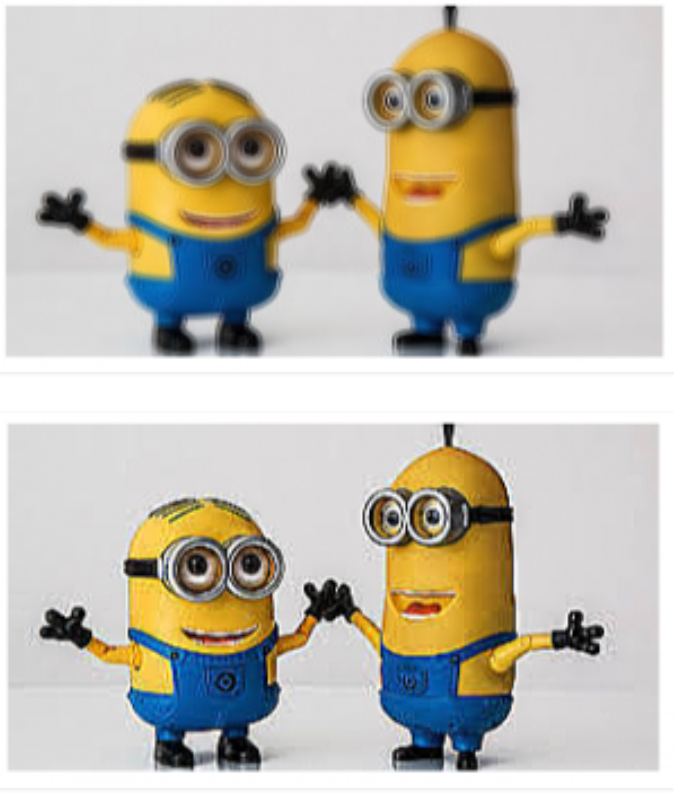
It is an open-source python library that is used for image processing tasks. It provides special functionalities which are generally not provided by other libraries such as filtering, opening, manipulating, and saving images. This library supports a wide range of file formats, which makes it more efficient. PIL also supports functions such as Image processing, Image Display, and Image Archives. Let’s see Image Enhancement using PIL/Pillow.
πŸ‘ Python Image library

Change the sharpness of an image:

πŸ‘ sharpness of an image:

For more information, check official documentation: Link

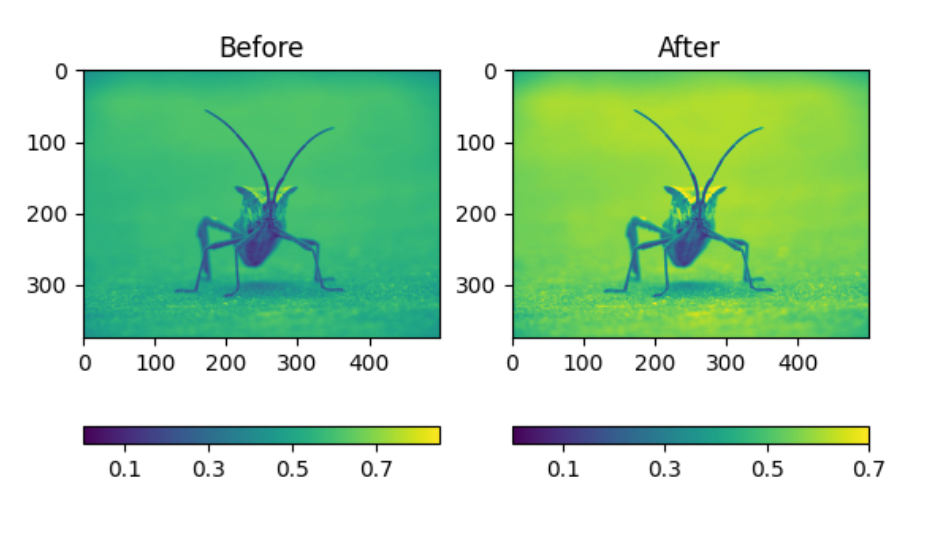
Matplotlib is primarily used for 2D visualizations such as scatter plots, bar graphs, histograms, and many more, but we can also use it for image processing. It is effective to get information out of an image. It doesn’t support all file formats.

πŸ‘ matplotlib

Check the below image after background color change operation:

πŸ‘ matplotlib b and a

For more information, check official documentation: Link

It is also called Insight Segmentation and Registration Toolkit. It is an open-source library that is used for Image Registration and Image Segmentation. Libraries like OpenCV consider the image as an array but this library considers images as a set of points on a region in space. Check the below example:

πŸ‘ SimpleITK

Image Segmentation

For more information, check official documentation: Link

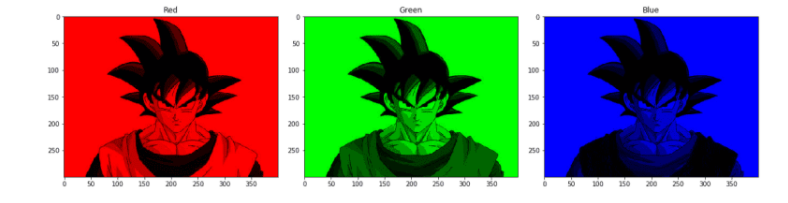
It is an open-source python library that is used for numerical analysis. It contains a matrix and multi-dimensional arrays as data structures. But NumPy can also use for image processing tasks such as image cropping, manipulating pixels, and masking of pixel values.
πŸ‘ SimpleITK

Check the below image to extract green/red/blue channels from the image:

πŸ‘ Check the below image to extract green/red/blue channels from the image:

For more information, check official documentation: Link

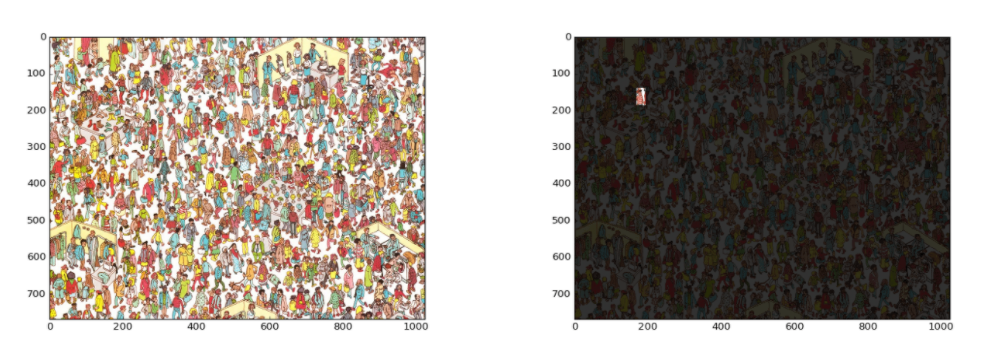
It is another open-source python library for computer vision and image processing. It was designed for biometric informatics. It provides many algorithms which are written in C++ for speed with a good python interface. It read and writes images in NumPy arrays.

Check the below image for Template Matching using Mahotas:

πŸ‘ Mahotas

For more information, check official documentation: Link

So in this article, we have covered the top 8 image processing libraries in python for machine learning in 2021. I hope you learn something from this blog and it will turn out best for your project. Thanks for reading and your patience. Good luck!

You can check my articles here: Articles

Thanks for reading this article on python libraries for image processing and for your patience. Do let me in the comment section. Share this article, it will give me the motivation to write more blogs for the data science community.

Email id: @gmail.com

Follow me on LinkedIn: LinkedIn

The media shown in this article are not owned by Analytics Vidhya and is used at the Author’s discretion. 

Login to continue reading and enjoy expert-curated content.

Free Courses

Nano Course: Dreambooth-Stable Diffusion for Custom Images

Learn to create custom images with Dreambooth Stable Diffusion technology

Responses From Readers

Flagship Programs

GenAI Pinnacle Program| GenAI Pinnacle Plus Program| AI/ML BlackBelt Program| Agentic AI Pioneer Program

Free Courses

Generative AI| DeepSeek| OpenAI Agent SDK| LLM Applications using Prompt Engineering| DeepSeek from Scratch| Stability.AI| SSM & MAMBA| RAG Systems using LlamaIndex| Building LLMs for Code| Python| Microsoft Excel| Machine Learning| Deep Learning| Mastering Multimodal RAG| Introduction to Transformer Model| Bagging & Boosting| Loan Prediction| Time Series Forecasting| Tableau| Business Analytics| Vibe Coding in Windsurf| Model Deployment using FastAPI| Building Data Analyst AI Agent| Getting started with OpenAI o3-mini| Introduction to Transformers and Attention Mechanisms

Popular Categories

AI Agents| Generative AI| Prompt Engineering| Generative AI Application| News| Technical Guides| AI Tools| Interview Preparation| Research Papers| Success Stories| Quiz| Use Cases| Listicles

Generative AI Tools and Techniques

GANs| VAEs| Transformers| StyleGAN| Pix2Pix| Autoencoders| GPT| BERT| Word2Vec| LSTM| Attention Mechanisms| Diffusion Models| LLMs| SLMs| Encoder Decoder Models| Prompt Engineering| LangChain| LlamaIndex| RAG| Fine-tuning| LangChain AI Agent| Multimodal Models| RNNs| DCGAN| ProGAN| Text-to-Image Models| DDPM| Document Question Answering| Imagen| T5 (Text-to-Text Transfer Transformer)| Seq2seq Models| WaveNet| Attention Is All You Need (Transformer Architecture) | WindSurf| Cursor

Popular GenAI Models

Llama 4| Llama 3.1| GPT 4.5| GPT 4.1| GPT 4o| o3-mini| Sora| DeepSeek R1| DeepSeek V3| Janus Pro| Veo 2| Gemini 2.5 Pro| Gemini 2.0| Gemma 3| Claude Sonnet 3.7| Claude 3.5 Sonnet| Phi 4| Phi 3.5| Mistral Small 3.1| Mistral NeMo| Mistral-7b| Bedrock| Vertex AI| Qwen QwQ 32B| Qwen 2| Qwen 2.5 VL| Qwen Chat| Grok 3

AI Development Frameworks

n8n| LangChain| Agent SDK| A2A by Google| SmolAgents| LangGraph| CrewAI| Agno| LangFlow| AutoGen| LlamaIndex| Swarm| AutoGPT

Data Science Tools and Techniques

Python| R| SQL| Jupyter Notebooks| TensorFlow| Scikit-learn| PyTorch| Tableau| Apache Spark| Matplotlib| Seaborn| Pandas| Hadoop| Docker| Git| Keras| Apache Kafka| AWS| NLP| Random Forest| Computer Vision| Data Visualization| Data Exploration| Big Data| Common Machine Learning Algorithms| Machine Learning| Google Data Science Agent
πŸ‘ Av Logo White

Continue your learning for FREE

Forgot your password?
πŸ‘ Av Logo White

Enter OTP sent to

Edit

Wrong OTP.

Enter the OTP

Resend OTP

Resend OTP in 45s
πŸ‘ Popup Banner
πŸ‘ AI Popup Banner