The Zendesk AI chatbot: a complete 2026 guide to setup, pricing, and limits


Last edited June 13, 2026
Table of Contents
- What "Zendesk AI chatbot" actually means in 2026
- How the Zendesk AI chatbot actually works
- How to set up a Zendesk AI chatbot, step by step
- Scripted dialogues vs generative procedures
- How much does the Zendesk AI chatbot actually cost?
- What real users say about the Zendesk AI chatbot
- Where the Zendesk AI chatbot falls short
- Try eesel AI
What "Zendesk AI chatbot" actually means in 2026
This is the first thing that trips people up, so let's clear it up. There isn't one product called "Zendesk AI chatbot" - the name people search for maps onto a few different things Zendesk sells, and the lineup got reshuffled in 2026.
Here's the lay of the land:
- AI Agents is the customer-facing bot - the one that chats with your customers and tries to resolve their issue without a human. This is what most people mean by "the Zendesk chatbot." It descends from the old Answer Bot and the Ultimate.ai technology Zendesk acquired.
- Copilot is the agent-facing assistant. It doesn't talk to your customers; it sits beside your human agents, drafts replies, suggests next steps, and can auto-run approved actions. We'll come back to it, because the two get conflated constantly.
- Intelligent Triage and AutoQA are the behind-the-scenes AI - handling AI-powered ticketing by intent and sentiment, and grading conversation quality.
Within AI Agents, there are two configurations you'll bump into. The bundled Essential tier (Answer Bot lineage) does knowledge-base Q&A and not much else - no scripted dialogues, no actions, no API calls. The richer flow, originally sold as the Advanced add-on and derived from Ultimate.ai, adds branching dialogues, generative procedures, and the ability to take actions across your systems. As of May 2026, Essential is officially legacy and sunsets on December 31, 2026, and the advanced capabilities are rolling into every Suite and Support plan. So if you're setting one up today, you're using the unified, agentic flow - not the old Answer Bot.
If you want the deeper teardown of the whole stack, our Zendesk review and Zendesk pros and cons go further than we will here.
AI Agents vs Copilot: which one do you want?
Quick gut-check, because picking the wrong one is the most common setup mistake. If you want something that replaces front-line replies for your customers, that's AI Agents (the chatbot). If you want something that makes your human agents faster without removing them from the loop, that's Copilot, which sits closer to a customer service AI assistant than a self-service bot.
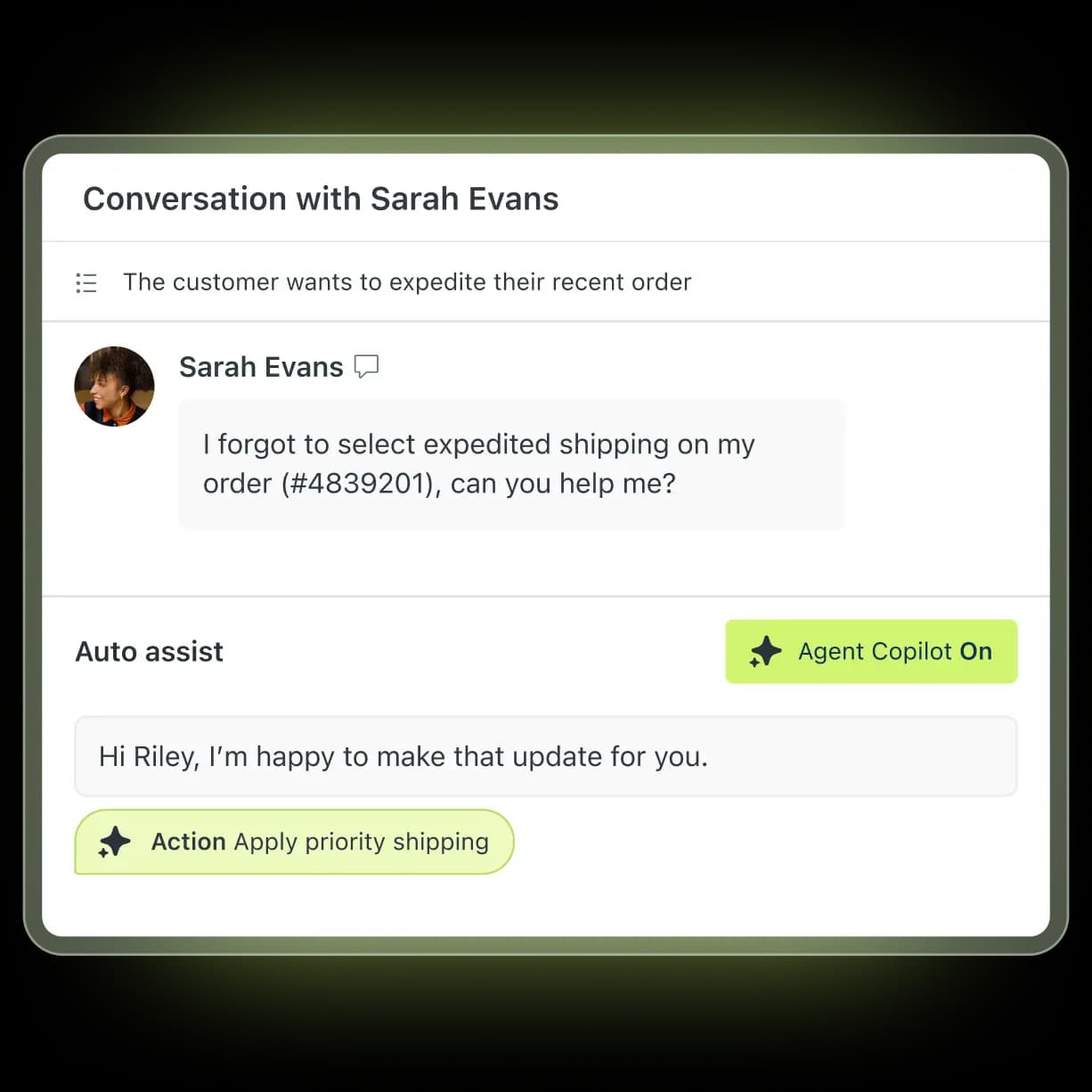
The pricing is different too, which matters. Here's the short version:
| AI Agents (the chatbot) | Copilot | |
|---|---|---|
| Who it talks to | Your customers, directly | Your human agents |
| Job | Resolve tickets autonomously | Draft replies, suggest actions |
| Channels | Messaging, email, web form, voice (EAP) | Inside the agent workspace |
| Billing | Per automated resolution | $50/agent/month add-on (bundled at Enterprise) |
| Best for | Deflecting repetitive tickets | Speeding up complex, human-handled tickets |
A lot of teams end up running both - the bot deflects the easy stuff, Copilot helps agents on what's left. It's a sensible shape for customer service automation, just know you're now paying for two AI products on top of your seats. More on that in the pricing section.
How the Zendesk AI chatbot actually works
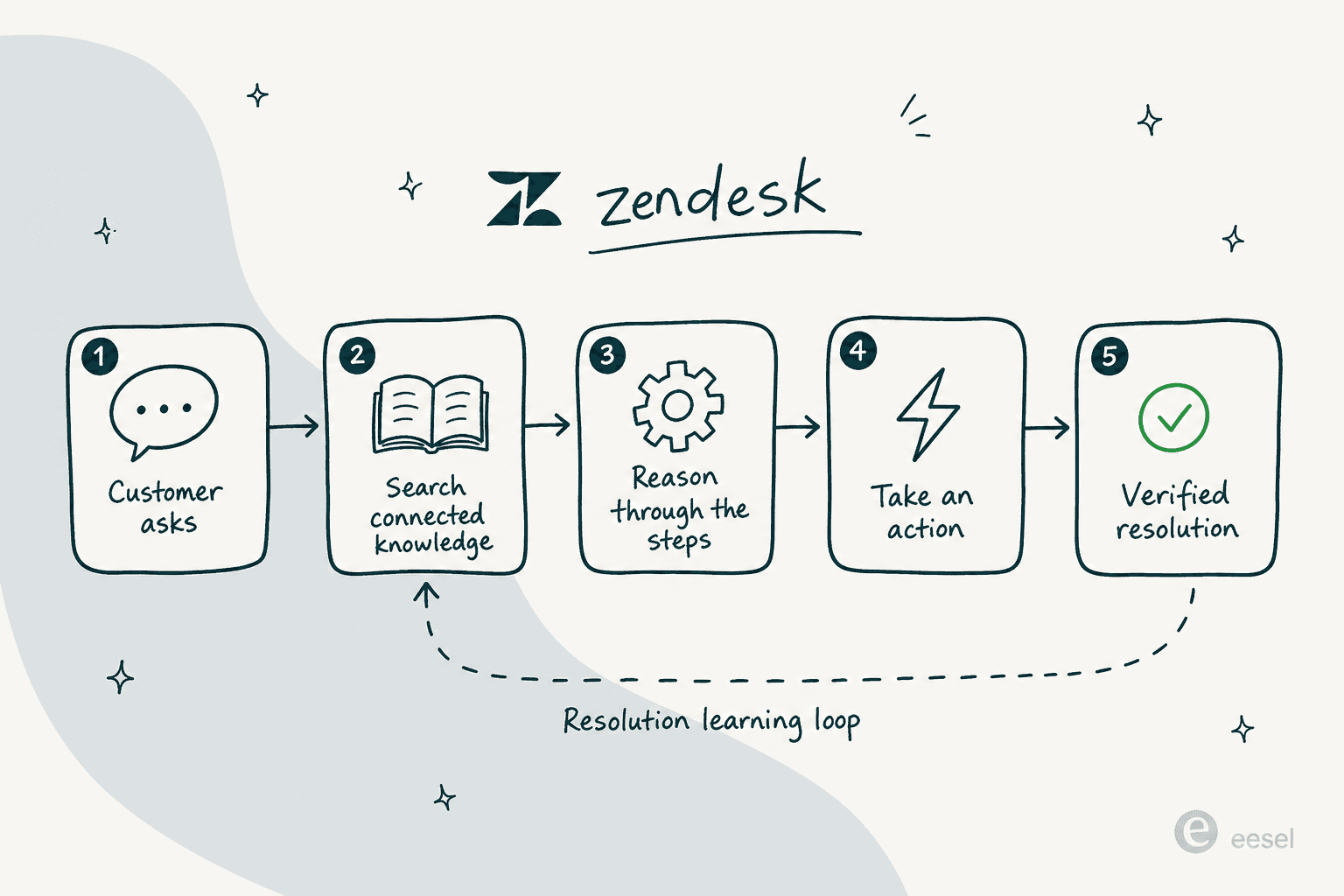
Under the hood, Zendesk's bot runs on what they call agentic AI - a combination of generative AI and Zendesk's own intent models. Instead of following a single rigid script, it reasons through a request: it searches your connected knowledge, retrieves relevant data, decides what to do, and can take an action before answering. That's the "chain of thought" you can see in the product screenshots - search knowledge, retrieve order details, verify eligibility, then respond.
Two design choices are worth understanding, because they shape everything about whether the bot works for you:
- It only knows what you connect. Like any knowledge base chatbot, the bot grounds answers in your Zendesk help center plus optional sources like Google Drive or PDFs. It cannot browse the open web or follow a link in an article. If the answer isn't in a connected, well-structured source, the bot has nothing to surface - and that's the single biggest reason teams see low automation early on.
- Every "resolution" gets verified. After the bot responds, an LLM verification step checks whether the issue was actually resolved. This matters for your bill (we'll get there) and for trust - it's how Zendesk separates a genuine fix from a customer who just wandered off.
The whole thing is wrapped in what Zendesk markets as the Resolution Learning Loop: every interaction feeds back to refine the bot's decisions over time. In practice, that improvement is only as good as the knowledge and feedback you give it - which is why the teams who win with it treat KB hygiene as the actual project, not the bot setup.
How to set up a Zendesk AI chatbot, step by step
The current setup flow is a no-code, three-page wizard: Knowledge → Personalize → Activate. You need a client admin role in AI agents to create one. Here's the path for a messaging bot (email is nearly identical, minus dialogues).
Step 1: Optimize and connect your knowledge
Before you touch the wizard, do the unglamorous work: make sure your help center actually answers the questions customers ask. Zendesk's own readiness guide is a good starting point. This is the step that decides how many tickets you'll deflect with AI, full stop.
Then, in the AI agents workspace, click Create AI agent → for Messaging. The first page is where you pick the brand and knowledge base the bot answers from.
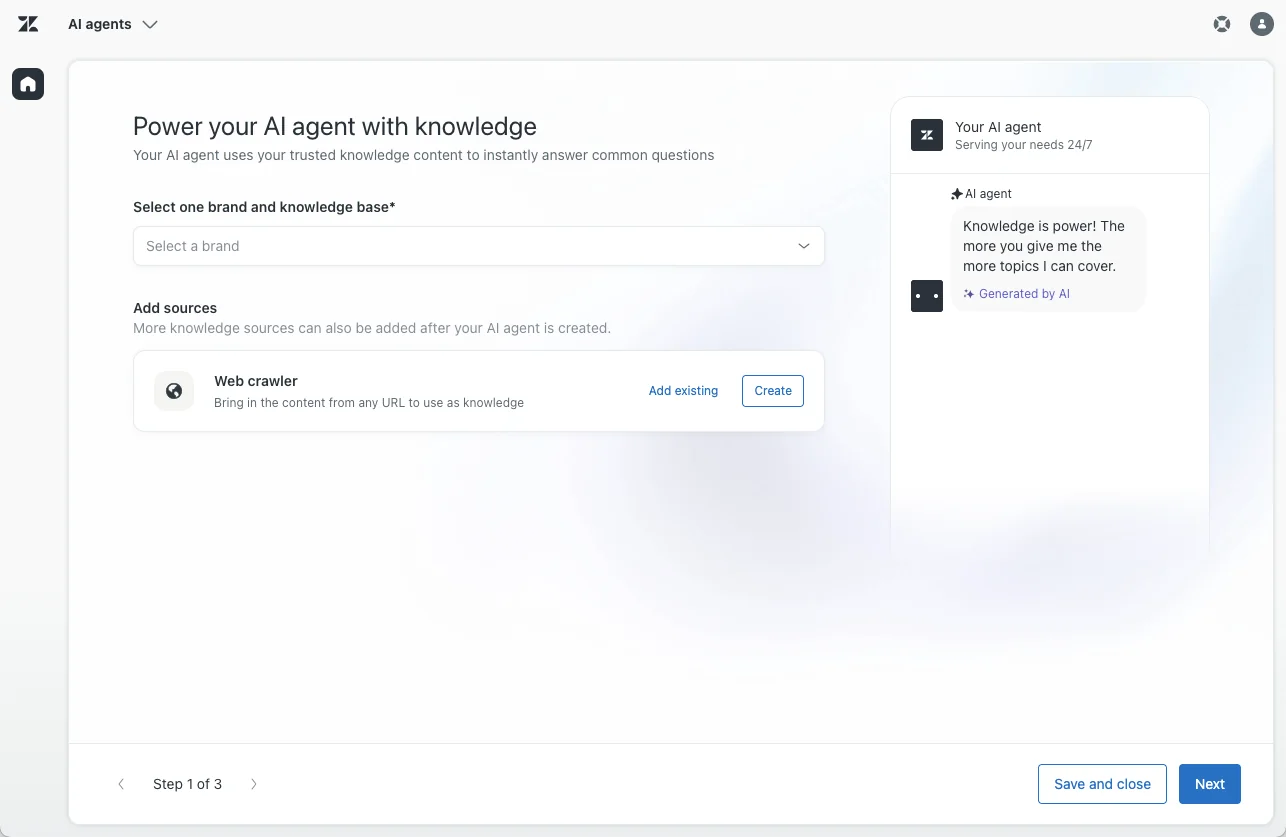
If the brand's knowledge base isn't created or activated yet, the wizard prompts you to fix that here. You can also add a web crawler to pull in external website content. You need at least one knowledge source connected to continue.
Step 2: Personalize the bot
Next page is personality and language. You set the bot's name (shown at the top of the Web Widget), a short factual business profile (Zendesk explicitly warns against putting instructions or marketing copy here - it destabilizes behavior), a tone of voice (Professional, Enthusiastic, Informal, or Custom), an avatar, and your default plus translation languages. Zendesk's bot supports 80 languages at native fluency.
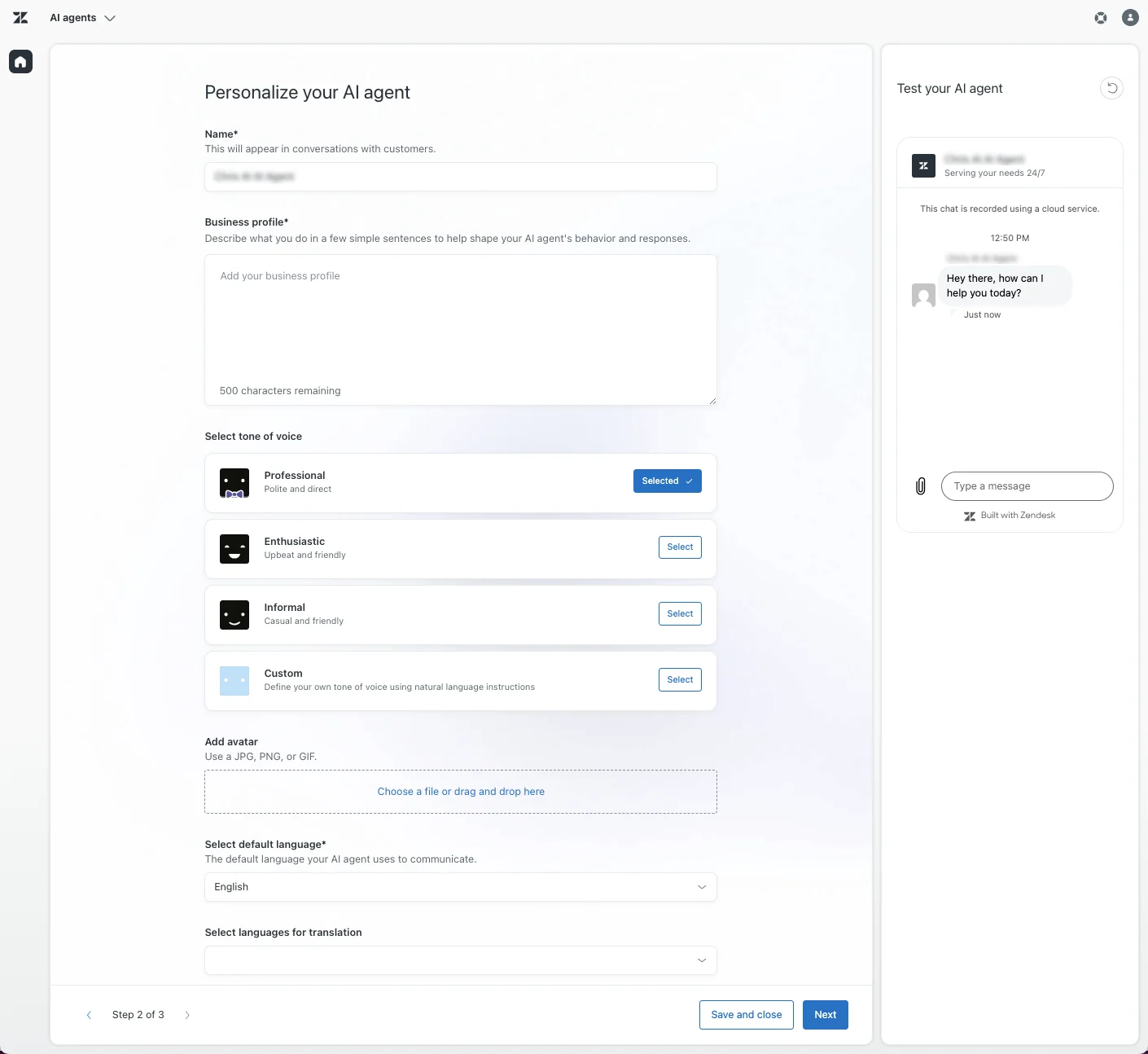
There's an inline tester on this page - use it to chat with the draft bot against your knowledge before going further.
Step 3: Set up system replies and activate
The final wizard page is where you write the bot's system replies: its greeting, wrap-up (with the helpful/unhelpful feedback prompt), escalation message, and fallback for when nothing matches. The escalation and fallback replies are where you wire in the "talk to a human" option.
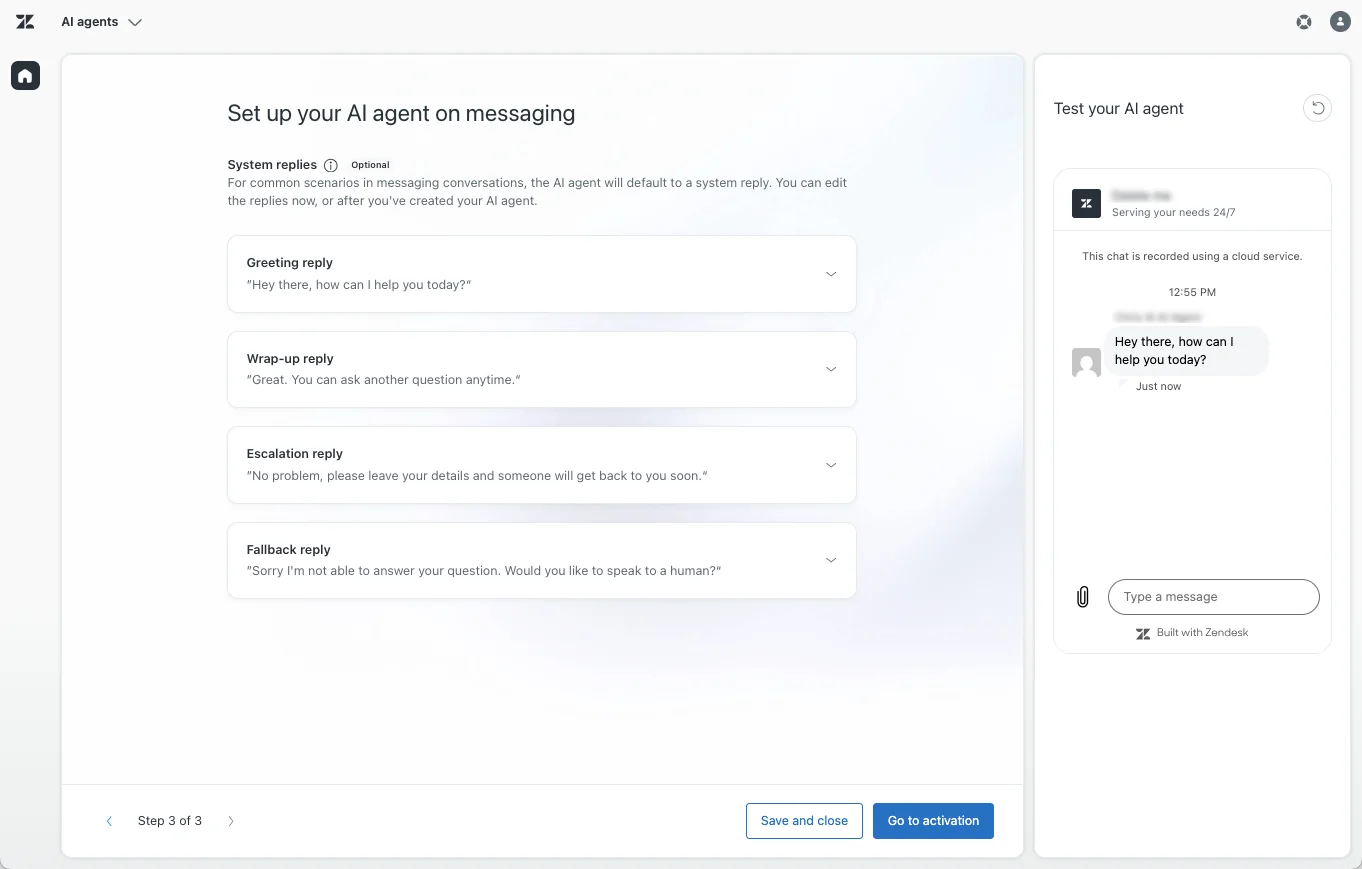
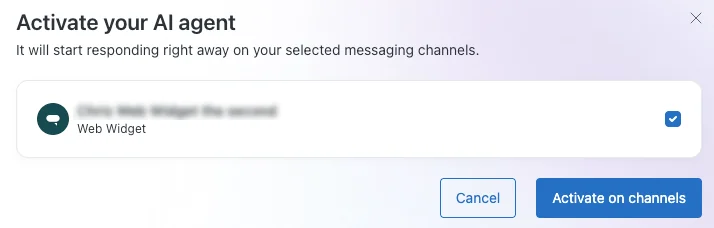
Then hit Go to activation, pick your channels, and Activate on channels. Only one AI agent can be active per messaging channel at a time.
Step 4: Add use cases, dialogues, and actions (the real work)
The wizard alone gives you a bot that answers freeform questions from your knowledge. To shape conversations and let the bot do things, you layer on:
- Use cases - topic buckets (
order returns,refund requests) that link a request to the right flow. - Generative procedures - flexible, goal-oriented flows where the bot adapts within guardrails.
- Dialogues - scripted, branching conversation trees for deterministic flows. (Email bots can't use dialogues - procedures only.)
- Actions and API integrations - let the bot update records, look up orders, and call third-party systems.
This is also where the learning curve bites. We'll look at the flow builder next, because it's the part reviewers complain about most. For a deeper how-to on getting replies flowing, our guide to automating Zendesk tickets and Zendesk AI reply configuration pick up where this leaves off.
Scripted dialogues vs generative procedures
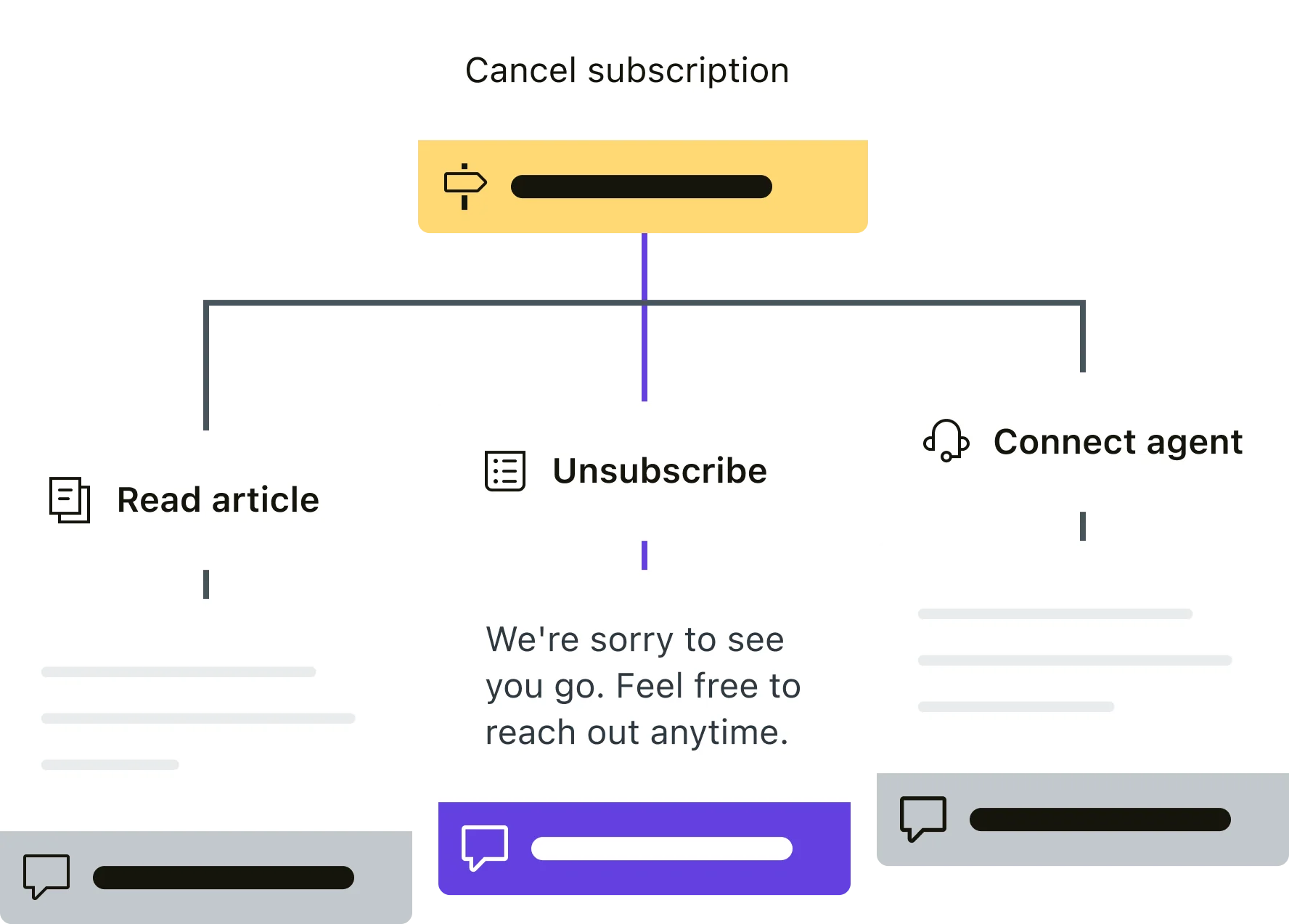
For each use case, you choose how tightly to script the conversation. Generative procedures are lighter to set up and adapt on the fly; dialogues are the drag-and-drop builder where you map every branch by hand - a customer who picks "cancel subscription" might be routed to read an article, unsubscribe, or connect to an agent.
The builder itself is powerful, but it's where the setup time goes. The canvas is a node-by-node flow editor, and complex bots mean a lot of nodes.
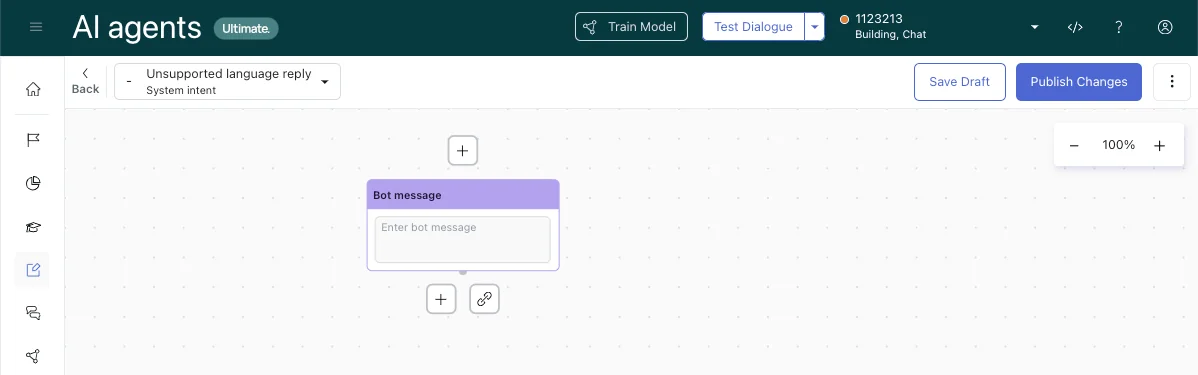
One r/Zendesk commenter called the flow builder "the most annoying interface in the world," in a thread where another user described an Ultimate.ai rollout dragging past timeline even with a consultant. That's the trade: deterministic control, but you build and maintain every branch yourself.
How much does the Zendesk AI chatbot actually cost?
This is where most of the surprises live. The base Suite plans are straightforward enough:
| Plan | Price (per agent/month, annual) | What you get for AI |
|---|---|---|
| Support Team | $19 | Email/ticketing only - no AI Agents |
| Suite Team | $55 | First tier with AI Agents + AI knowledge base |
| Suite Professional | $115 | Adds AI writing tools, quick reports, basic Admin Copilot |
| Suite Enterprise + Copilot | Contact Sales | Intelligent Triage, full Copilot, generative voice |
The sticker price isn't the story, though - the AI bills by "automated resolution," not by seat. An automated resolution is a conversation the bot resolved without escalating to a human, and since May 2026 it's split into three tiers:
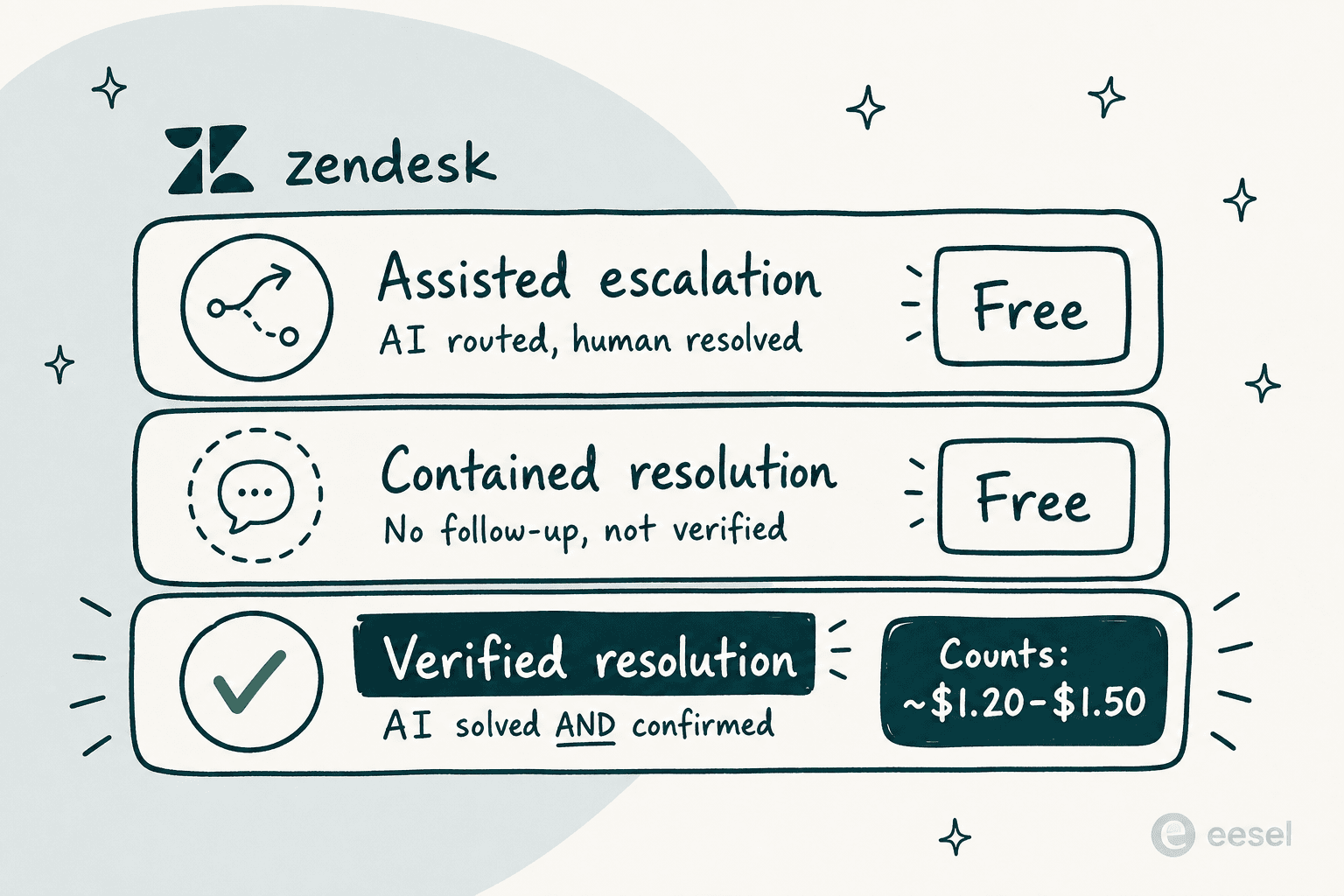
Only Verified Resolutions - where the bot resolved the issue and the LLM verification confirmed it - draw from your allowance. Assisted Escalation and Contained Resolution are free. That's a genuine improvement on the old model, where 72 hours of customer silence counted as a billable resolution whether or not anything was actually fixed.
Each plan ships with a baseline allowance (roughly 5-15 resolutions per agent/month depending on tier), and overages bill monthly. There's no public rate card, but independent teardowns and Reddit threads consistently land on $1.20-$1.50 per resolution above your commit.
Here's where it adds up. Picture a 10-agent team on Suite Professional doing real volume:
- Base plans: 10 × $115 = $1,150/month
- Copilot add-on (if you want agent-side AI too): 10 × $50 = $500/month
- AI overages: 6,000 resolutions/month at ~$1.50 = $9,000/month
That's the pattern flagged across reviews: AI cost easily reaching 2-3x the base subscription, with no graceful cap - Zendesk's only overage control is to pause AI entirely. One Capterra reviewer put the add-on creep plainly:
"Pricing is a bit of a con and setting up add ons can add more to it and could feel like a full time job in the backend."
Vibhore S., Logistics Lead, Capterra review (April 2026)

If predictable cost matters more than anything, this is the part to model carefully before you commit. Our full Zendesk AI pricing guide works through more scenarios.
What real users say about the Zendesk AI chatbot
The aggregate scores are solid - Zendesk Suite sits at 4.3/5 across 6,837 G2 reviews and 4.4/5 on Capterra. But dig into the AI-specific feedback and a few themes repeat.
The knowledge base is the real ceiling. This comes up more than anything else:
"The Co-Pilot stuff is decent, but we found its effectiveness really depends on having a perfectly curated Zendesk knowledge base, which... ours isn't, lol."
u/ToastBix, r/Zendesk

Because the bot can't follow links or browse the web, teams with sparse docs report roughly 20% automation in month one, climbing toward 70% only after sustained KB cleanup. If your bot is giving bad answers, the docs are almost always the cause - we dig into the fixes in why your AI chatbot isn't answering correctly.
The bundled Essential tier feels thin. Teams evaluating the free included tier on r/Zendesk described it as "doesn't feel like AI at all" - more of a routing layer than an autonomous agent, which pushes teams toward the paid path or one of the best AI helpdesk tools on the marketplace.
Onboarding the AI is heavy. Reviewers consistently praise the agent-facing experience while flagging that admin-side configuration is "burdensome." And there's an uncomfortable abandonment signal: at Zendesk's own ProductLab 2025 conference, a live poll found only ~10% of AI agents built in the prior six months were still in use.
The fairest read is the one cross-platform comment that framed Zendesk AI as "very much a copilot approach, making agents faster rather than replacing them. Not flashy, but sometimes boring and reliable wins." That's a reasonable verdict - just make sure the version you're buying matches the job you need done.
Where the Zendesk AI chatbot falls short
Pulling the threads together, here's the honest shortlist of where the native bot frustrates teams:
- It's only as good as your KB. No web browsing, no link-following. Bad docs, bad bot.
- Billing is hard to predict. Per-resolution overage with no soft cap means a seasonal volume spike becomes a surprise invoice.
- Setup has a real learning curve. The dialogue builder and add-on configuration are repeatedly described as a part-time job.
- No built-in way to test before launch. You configure, activate, and find out how it performs on live customers - there's no simulation against your historical tickets baked in.
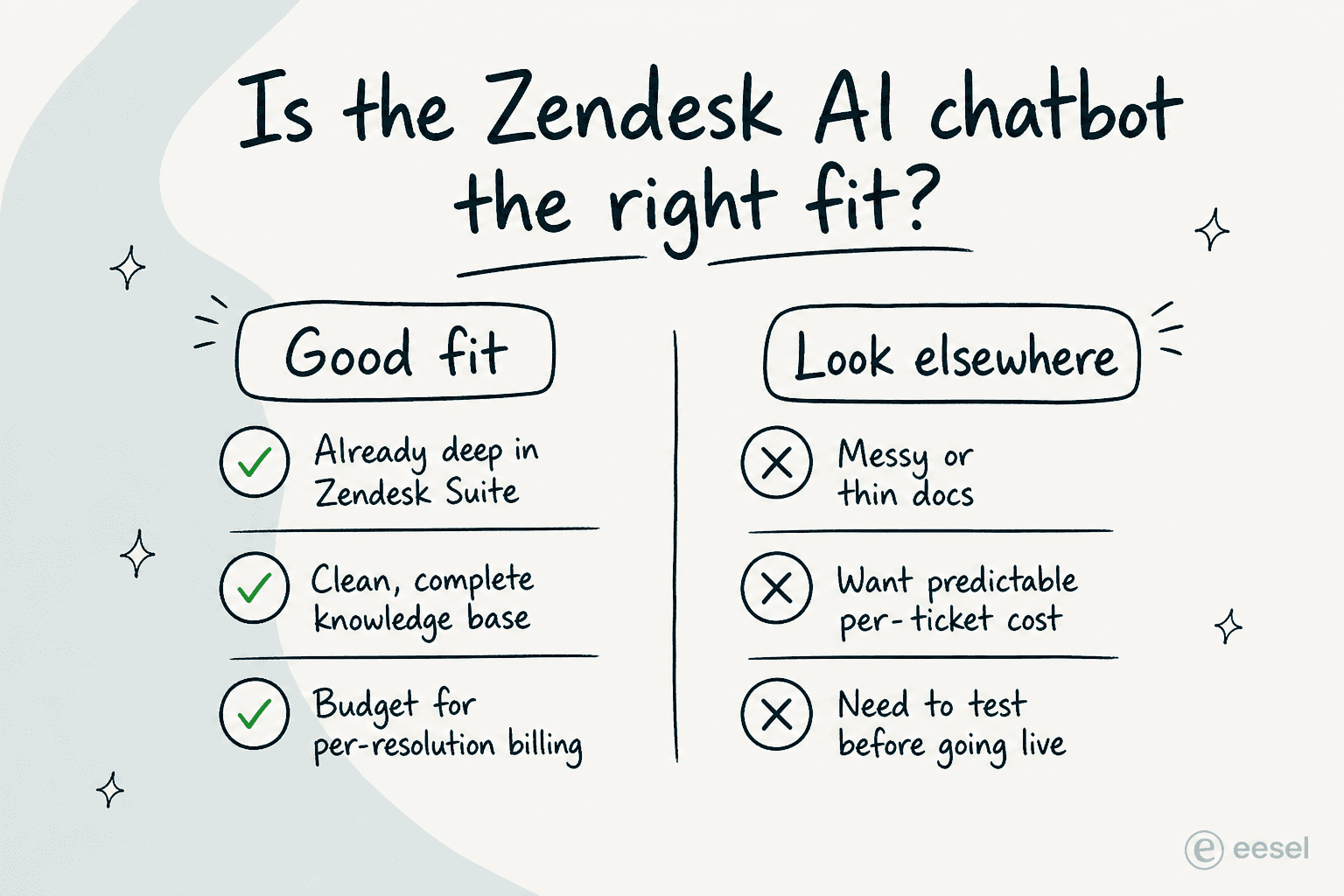
None of this means the native bot is a bad choice. If you're already standardized on Zendesk, your help center is in good shape, and the usage math works for your volume, it's a sensible default that lives right where your team already works - and it's worth weighing against the wider field of AI for customer service before you sign. The teams that struggle are usually the ones who expected it to work on a thin KB, or got blindsided by the resolution bill.
Try eesel AI
If the per-resolution billing or the "configure-and-pray" launch worries you, eesel AI is a native AI Agent that installs straight from the Zendesk Marketplace and behaves like a human agent inside your account - reading tickets, drafting on-brand replies, updating fields, and escalating, across every channel in your Zendesk omnichannel setup.
Two differences tend to matter most for Zendesk teams. First, eesel charges $0.40 per ticket handled - no per-seat fees, no platform fee, and no "verified resolution" accounting to forecast. Second, you can simulate the agent on your past Zendesk tickets before it touches a live one, so you see your real automation rate and fix the gaps up front instead of discovering them on customers. Ecosa runs 10,000+ tickets/month this way, and Smava fully automates 100,000+ German-language tickets a month on Zendesk.
"We have been using eesel for a few months now. Connecting eesel to zendesk helpcenter and messaging is ridiculously simple and we managed to get a chatbot and AI assistant that does some pretty complex actions with relative ease."
Richard Westerhof, Cloud86 (eesel AI for Zendesk)
It's a no-code setup that takes under 30 minutes and learns from your existing help center, past tickets, and macros. You can try eesel free, no card required, and run a simulation before you decide anything.
Frequently Asked Questions

Share this article

Article by
Alicia Kirana Utomo
Kira is a writer at eesel AI with a Computer Science background and over a year of hands-on experience evaluating AI-powered customer service tools. She focuses on breaking down how helpdesk platforms and AI agents actually work so that support teams can make better buying decisions.