VOOZH about

URL: https://www.geeksforgeeks.org/angular-js/mdbootstrap-introduction-and-installation-for-angular/

⇱ MDBootstrap Introduction and Installation for Angular - GeeksforGeeks


  • Courses
  • Tutorials
  • Interview Prep

MDBootstrap Introduction and Installation for Angular

Last Updated : 15 Jul, 2025

Introduction: MDBootstrap (Material Design for Bootstrap) is a complete UI package that can be integrated with other frameworks such as Angular, React, Vue, etc. It is used to design a fully responsive and mobile-friendly layout using various components, plugins, animations to make it more attractive and user friendly which are compatible with other browsers.

Features of MDBootstrap:

  • An open-source tool which can be downloaded easily.
  • Fully responsive to different devices.
  • Various UI Components are present which makes developers tasks easier.
  • Provide lots of animations and icons.
  • Amazing look and feel of the applications.

Prerequisite:

  • A code editor like VS Code, Sublime, Brackets, etc.
  • NodeJS should be installed in the system.

For Windows:

https://www.geeksforgeeks.org/installation-guide/install-node-js-on-windows/

For Linux:

https://www.geeksforgeeks.org/node-js/installation-of-node-js-on-linux/ Knowledge of setting up of an Angular Project https://www.geeksforgeeks.org/angular-js/angular-cli-angular-project-setup/

Installation of MDBootstrap in Angular:

  • Install "@angular/cdk" package (required if MDBootstrap Angular version is greater than or equal to 9.0.0)
    npm install @angular/cdk --save
    👁 Image
    Installation of @angular/cdk
  • Install "angular-bootstrap-md" package
    npm install angular-bootstrap-md --save
    👁 Image
    Installation of MDB Angular (Free Version)
  • In "app.module.ts", import "MDBBootstrapModule" as given below:
  • Install other third party libraries like for animation

    npm install -–save chart.js@2.5.0 @types/chart.js @fortawesome/fontawesome-free hammerjs animate.css

    👁 Image
    Installation of Third-party libraries
  • Update "angular.json" file by importing the .css and .js files in styles and scripts arrays from node_modules as given below:
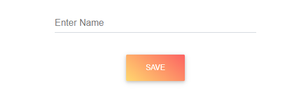
  • In "app.component.html" add the following code to use MDBootstrap components with Angular as given below:
  • Then run the application after saving it using following command:
    ng serve -o

Output:

👁 Image
Final Output After running application on the browser
Comment
Article Tags:
Article Tags:

Explore