VOOZH about

URL: https://www.geeksforgeeks.org/artificial-intelligence/crewai-knowledge/

⇱ CrewAI Knowledge - GeeksforGeeks


  • Courses
  • Tutorials
  • Interview Prep

CrewAI Knowledge

Last Updated : 14 Apr, 2026

Knowledge in CrewAI enables agents to reference explicit facts when performing tasks. Knowledge sources provide structured or unstructured information, allowing agents to answer questions accurately, provide support, and generate content based on real-world data. This helps tailor agents to specific domains, ensuring reliability and context-aware interactions.

Exploring Available Knowledge Sources

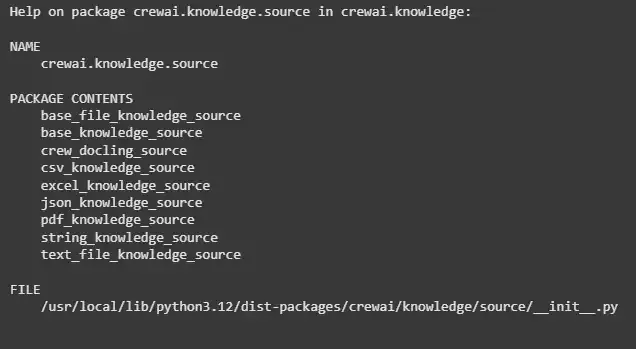
CrewAI supports multiple knowledge sources to supply agents with factual information from different formats. To explore all available sources and their documentation, the help() function can be used.

Output:

👁 crewai_knowledge
Available Knowledge Sources

Understanding Knowledge Sources

CrewAI offers multiple knowledge sources to feed information to agents. Each is suited for different types of data and use cases.

1. base_file_knowledge_source

Base class for knowledge sources that read from files. It provides a foundation for other file-based sources.

  • file_path: Path to the file containing knowledge.
  • chunk_size: Maximum size of text chunks for processing.
  • split_method: Method to split content into chunks (e.g., sentence, paragraph).

Note: We will demonstrate a full example implementation towards the end of the article.

2. base_knowledge_source

Generic base class for creating custom knowledge sources. Useful when building specialized sources.

  • name: Name of the knowledge source.
  • verbose: Enable debug output.

3. crew_docling_source

Integrates knowledge from Crew’s internal Docling system. Ideal for agents that reuse Crew documentation.

  • doc_id: ID of the Docling document to load.
  • verbose: Enable debug output.

4. csv_knowledge_source

Loads knowledge from CSV files making it suitable for tabular data.

  • file_path: Path to the CSV file.
  • delimiter: Column separator (default is ,).
  • encoding: File encoding.
  • verbose: Enable debug output.

5. excel_knowledge_source

Loads knowledge from Excel spreadsheets, supporting structured business or research data.

  • file_path: Path to the Excel file.
  • sheet_name: Sheet to read.
  • encoding: File encoding.
  • verbose: Enable debug output.

6. json_knowledge_source

Loads knowledge from JSON files, ideal for hierarchical or structured data.

  • file_path: Path to the JSON file.
  • encoding: File encoding.
  • verbose: Enable debug output.

7. pdf_knowledge_source

Loads knowledge from PDF documents. Suitable for reports, manuals and research papers.

  • file_paths: List of PDF files.
  • chunk_size: Maximum characters per chunk.
  • chunk_overlap: Overlap between chunks to preserve context.

8. string_knowledge_source

Loads knowledge from a string of text. Useful for small snippets or predefined facts.

  • content: The text containing knowledge.
  • verbose: Enable debug output.

9. text_file_knowledge_source

Loads knowledge from plain text files. Ideal for notes, documentation or FAQs in text format.

  • file_path: Path to the text file.
  • encoding: File encoding.
  • verbose: Enable debug output.

These knowledge sources allow you to feed structured or unstructured information from multiple formats, making your agents capable of handling multiple domains effectively.

Creating an Agent with StringKnowledgeSource

We will be implementing a CrewAI agent that can answer questions about a product using a string knowledge source.

  • First we create a StringKnowledgeSource to provide factual information about the XPS 13.
  • Then we define an Agent with a specific role, goal and backstory, linking it to the knowledge source.
  • Then we set up a Task that instructs the agent to answer product-related questions.
  • Then we create a Crew to manage the agent and its tasks.
  • Then we run the Crew with a sample question and print the agent’s response.

Output:

"Our product, the XPS 13, has a storage capacity of 512GB SSD."

Comment

Explore