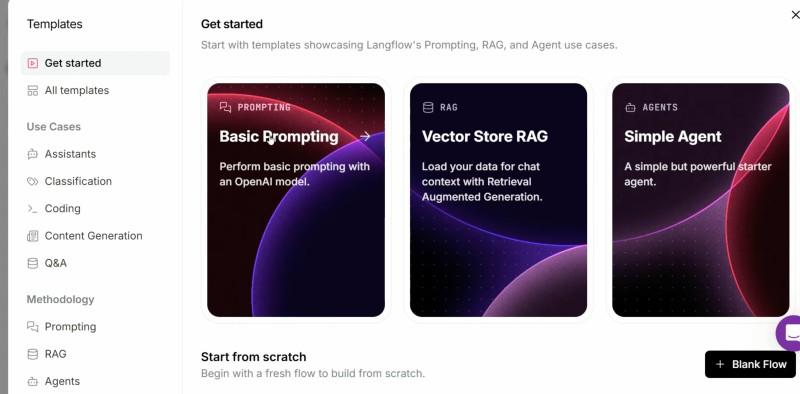
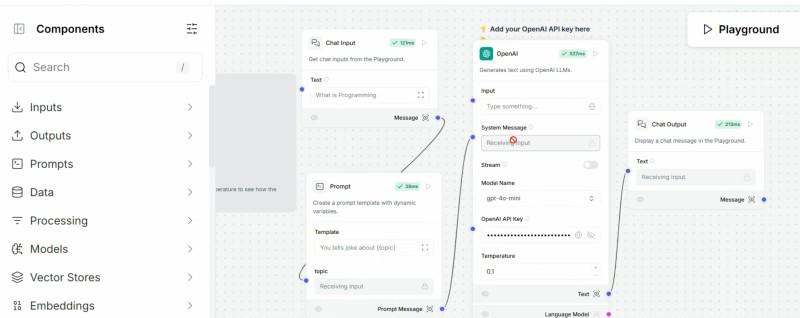
Langflow is an open-source, Python-based low-code platform that enables users to visually build, prototype, and deploy AI workflows, agents, and applications. Its drag-and-drop interface simplifies the process of connecting large language models, data sources, vector databases, APIs and custom logic.
Provides a visual interface for building AI workflows
Simplifies integration of LLMs, APIs and data sources
Whether you want to create Retrieval-Augmented Generation (RAG) pipelines, build chatbots, design multi-agent systems or orchestrate API-driven automations, Langflow offers a unified environment that dramatically accelerates iteration and deployment.
Visual Builder: Design AI workflows, chains and agents using a drag and drop GUI, reducing manual coding.
Flow-Based Programming: Connect modular components (nodes) to process data, call models, manage memory or handle inputs/outputs. Each “flow” forms a Directed Acyclic Graph (DAG) representing the sequence of tasks.
Multi-Agent Support: Easily create, manage and coordinate multiple AI agents with specific skills or data access.
RAG and Data Integration: Seamlessly link LLMs, embedding models, vector databases (e.g., Pinecone, AstraDB, ChromaDB) and your own document stores for RAG workflows.
Collaborative Tools: Share, export and iterate on flows with teammates through cloud or desktop environments.
Extensive Integrations: Supports all major AI frameworks, LLMs and tool APIs. LangChain, LlamaIndex, OpenAI, HuggingFace, Google and more are natively compatible.
Working of LangFlow
1. Flow in Langflow
A flow in Langflow is a workflow made up of connected components (nodes), where each node performs a specific function such as running an LLM, retrieving data, or handling inputs and outputs. These flows are visually designed and executed based on how the components are connected.
Combines multiple components into a structured workflow
Each node performs a specific task such as processing, retrieval or generation
Execution follows the connections between nodes
Example Components
LLM (e.g., GPT, Gemini, Claude)
Vector store search
Data loader (PDF, SQL, Web)
Prompt handler
Memory manager
API connectors
Input/output UIs
2. Drag and Drop Workflow Design
Users build flows by dragging components from a sidebar into a workspace and connecting them with arrows. Each node’s properties can be configured from the UI and advanced users can inspect or edit the underlying Python code directly.
Workflows can range from simple (single prompt to LLM) to highly complex (multi step processes, agent orchestration, conditional branching).
Each node’s output can be fed as input to downstream nodes, defining the data and process dependencies.
3. Example Use Cases
Chatbots: Link chat input, LLM and chat output components for customer support or tutoring.
Multi-Agent Systems: Route tasks between specialized agents, with global memory, shared prompt libraries and tool access.
Retrieval-Augmented Generation (RAG): Combine document loaders, embedding components and vector search with LLMs for data grounded Q/A or summarization.
Automated Workflows: Chain together APIs (email, calendar, database) with AI logic to automate business or research tasks.
Projects and MCP Integration
Projects: Langflow organizes flows into Projects a space for modular workflows that encapsulate reusable logic, configurations and assets for a specific application or domain.
MCP Support: Projects can be exposed as MCP (Model Context Protocol) servers, enabling seamless interoperability with other LLM apps, tools and external APIs. Each flow inside a project can be registered as a callable “tool” or “action” for outside agents and platforms.
Advanced Features
Feature
Description
Global Variables
Set and share variables across multiple components in a flow
Observability
Deep integration with LangSmith/LangFuse for tracing, logs, versioning and debugging
GUI
Full-featured, drag-and-drop web interface
Custom Components
Write Python functions or classes as nodes that plug into visual flows
Flow as API
Deploy and call flows as HTTP endpoints, integrating with any software stack or serving as microservices
Secure Deployment
Role-based access, secrets management and environment variable configs for safe multi-user use
Asynchronous Exec
Langflow can process long-running or resource-intensive tasks asynchronously for efficient scaling
Getting Started: Installation and Usage
1. Installation
You can install Langflow via pip
or via Anaconda with a new environment
2. Running Langflow
Start the app locally
The platform runs at http://localhost:7860 by default, providing the full visual interface in your browser.
3. Building Your First Flow
Drag nodes (e.g., Input, LLM, Output) onto the canvas.
Connect them in your desired sequence.
Configure each node (e.g., add API keys, prompt templates).
Click “Run” to test and iterate.
4. Deployment
Export and share flows as JSON or reusable templates.
Deploy locally, on your own servers or use Langflow Cloud for instant production, scaling and collaboration.
Applications
Enterprise AI Assistants: Customer support bots, process automation, internal Q&A
Data-Centric Apps: Information extraction, document analysis and summarization
Conversational Interfaces: Language tutors, creative writing tools, translation
RAG Pipelines: Real-time chat with private data, knowledge management, legal or financial research